Kirin 808
Participant
November 11, 2020
Question

Replace document colors white striped bug

  • November 11, 2020
  • 1 reply
  • 480 views

Hey guys!

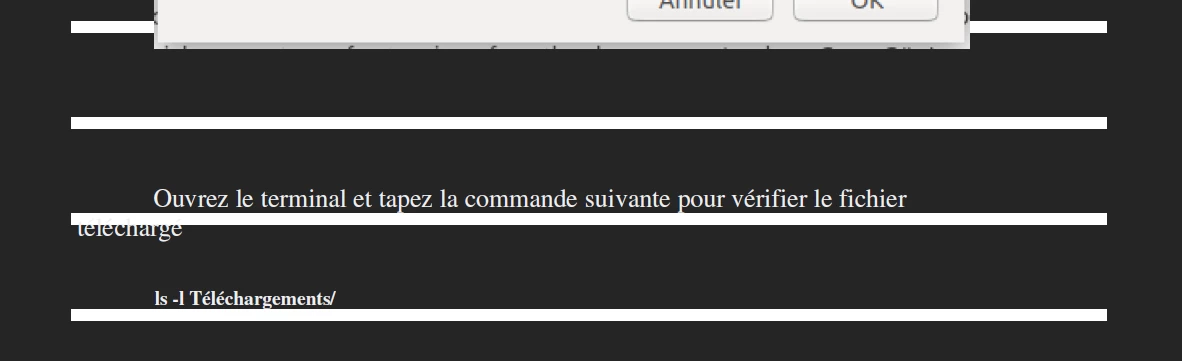
When replacing documents colors, I've been having this problem where documents opened after the first one render large white stripes throughout the document. Strangely enough, Acrobat Reader renders them without any issue.


Thanks for any cues!

 

This topic has been closed for replies.

1 reply

Amal.
Legend
November 12, 2020

Hi Kirin


Hope you are doing well and sorry for the trouble. As described, When replacing documents colors, documents opened after the first one render large white stripes throughout the document.


Would you mind sharing the version of Adobe Acrobat Pro DC you are using? To check the version go to Help > About Acrobat  and make sure you have the latest version 20.13.20064 installed. Go to Help > Check for Updates.


What is the workflow/steps you are doing to replace the document color?

Is this a behavior with a particular PDF file or with all the PDFs? Please try with a different PDF and check.


If the PDF is stored on a shared network/drive, please try to download it to your computer locally and then try again and check.


Please try to reboot the computer once and see if that works. You may also try to repair the installation (Windows only) and check. Go to Help > Repair installation.


If it still doesn't work, please try to reset the preferences to default as described in the help page https://community.adobe.com/t5/acrobat/how-to-reset-acrobat-preference-settings-to-default/td-p/4792082?page=1


Let us know how it goes


Regards

Amal


Kirin 808
Kirin 808Author
Participant
November 12, 2020

"and make sure you have the latest version 20.13.20064 installed. Go to Help > Check for Updates."


I always have the latest version.


"What is the workflow/steps you are doing to replace the document color?

Is this a behavior with a particular PDF file or with all the PDFs? Please try with a different PDF and check."


Go to the accessibility pane > check replace document colors. They all behave the same, no difference whatsoever.


"If the PDF is stored on a shared network/drive, please try to download it to your computer locally and then try again and check."


Not on a network drive.


"Please try to reboot the computer once and see if that works. You may also try to repair the installation (Windows only) and check. Go to Help > Repair installation."


Done and done, no change.


"If it still doesn't work, please try to reset the preferences to default as described in the help page https://community.adobe.com/t5/acrobat/how-to-reset-acrobat-preference-settings-to-default/td-p/4792..."


No go....

Amal.
Legend
November 18, 2020

Hi there,


Thank you for sharing the information, we have tried to reproduce the issue on our end and its working fine.


Please try to create a new test user profile on Windows and try using the application there and check.


Let us know how it goes

Regards

Amal