

Participant
July 18, 2023
Answered

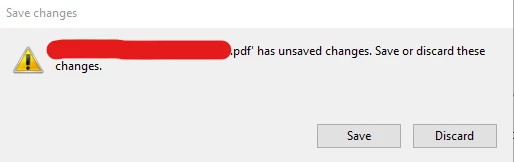
Save as: missing cancel button on pop up window

  • July 18, 2023
  • 2 replies
  • 1205 views

Hi, there is no cancel button when I'm saving a file, there is a way to make it appear again?, thanks.



This topic has been closed for replies.
Correct answer Jared34215652norx

Thanks for the response Amal.

Installation repair and manual reset did not work. I'll have to get with I.T. and see if they want to mess with the registry. If it'd be my home computer, I'd do it, but I don't have access to it here. It was missing from the 1st day they installed it, so I assumed it was removed altogether.


Changing the registry worked. Thanks Amal.

2 replies

Participating Frequently
May 6, 2024

Hi – is there any progress on resolving this? Resetting all preferences to default, let alone registry edits, are not attractive workarounds.


I just went to close a PDF in which Acrobat obviously believed I had unsaved changes, but was only offered options to Save or Discard changes, no Cancel that would allow me to determine what edit I might actually have made, and whether or not it was intended and required. Windows’ enduring focus-stealing will make this a recurring problem.


Acrobat 24.2.20736.0 on Windows 22H2.

Amal.
Legend
July 18, 2023

Hi @Jose310215741fqo 


Hope you are doing well and thanks for reaching out.


What is the workflow/steps you are doing to save the PDF? A small video recording of the same would be very helpful.


Is this an issue with a particular PDF file or with all the PDFs? Please try with a different PDF file and check.

What is the version of the Acrobat DC you are using? To check the version go to Help > About Acrobat and make sure you have the recent version 23.03.20244 installed. Go to Help > Check for updates and reboot the computer once.

Also try to repair the installation from the help menu (Win Only) and see if that works.


Let us know how it goes


Regards

Amal

Participant
February 26, 2024

My version is 2023.008.20555 and the Cancel button is still missing. I tried to open the properties bar with Ctrl+E and hit Ctrl+W by accident (which wants to close the document). I had been working on the file for a while and didn't want to overwrite what others had done but i also didn't want to start over. But alas, I had to start over because the Cancel button is missing...

Amal.
Legend
February 26, 2024

Hi there 


I have tried to reproduce the issue at my end and it's working fine.


As you have the most recent version installed, try to repair the installation from the help menu (Win Only) and see if that works.

Also try to reset the Acrobat preferences as described here https://community.adobe.com/t5/acrobat-discussions/how-to-reset-acrobat-preference-settings-to-default/td-p/4792082 and see if that helps.


Let us know how it goes.


~Amal