
Participant
August 14, 2023
Question

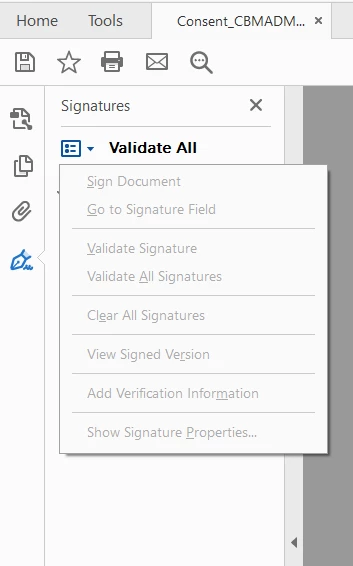
Sign document prompt doesn't show up when I click on unsigned signature field.
  • August 14, 2023
  • 1 reply
  • 682 views

I've looked through all my settings and certificates, but I still can't sign a document that I was able to sign a few days ago, and when I click the blue square in the picture all the options are grayed out. What used to happen was I clicked on a square that said unsigned signature field(click to sign) and a smaller window would show up where I'd use a signature pad to sign would appear. Now clicking does nothing.


This topic has been closed for replies.

1 reply

Amal.
Legend
August 14, 2023

Hi @Fredof 

Hope you are doing well and sorry to hear that

Is this an issue with a particular PDF file or with all the PDFs? Please try with a different PDF file and check. If the file is stored on a shared network/drive please download it to your computer locally and then try again.


You may also try to sign the PDF online via the link https://acrobat.adobe.com/link/tools/?group=group-sign and see if that works.

What is the version of the Acrobat DC you are using? To check the version go to Help > About Acrobat and make sure you have the recent version 23.03.20269 installed. Go to Help > Check for updates and reboot the computer once.

Also try to repair the installation from the help menu (Win Only) and see if that works.

Please try to reset the Acrobat preferences as described here https://community.adobe.com/t5/acrobat-discussions/how-to-reset-acrobat-preference-settings-to-default/td-p/4792082 and see if that works.


Regards

Amal