Participating Frequently
February 2, 2023
Answered

Text insertion with comment not working correctly

  • February 2, 2023
  • 1 reply
  • 4201 views

In Acrobat Pro, when I add text with the COMMENT tool, the text is inserted below the cursor. I am using macOS 13.1. Has anyone else encountered this? Is there a solution?

Please help

This topic has been closed for replies.
Correct answer Amal.

Hi Amal

I sent you the link to the pdf and movie of my issue a week ago.

Did you receive it?

Are there any questions?

Any suggestions?

Please advise

Thank you


Hi @bferri 


Hope you are doing well, we have the update from the engineering team, as they were able to reproduce the scenario by clicking increase line spacing option multiple times  (option next to Font color).

It got back to normal by clicking decrease line spacing option multiple times as shown in the screenshot below.
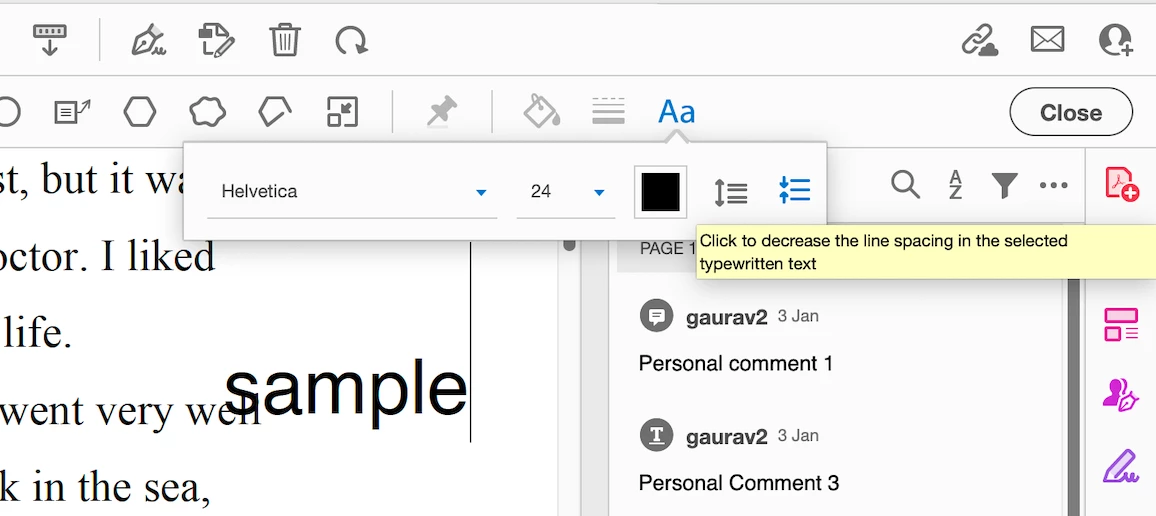


Let us know how it works for you.


Regards

Amal


Hey! Spread the word and help others by marking the correct answer so future users can benefit from your experience.


1 reply

Amal.
Legend
February 2, 2023

Hi @bferri 

Hope you are doing well and sorry to hear that

Is this an issue with a particular PDF file or with all the PDFs? Please try with a different PDF file and check. If the file is stored on a shared network/drive please download it to your computer locally and then try again.

What is the version of the Acrobat DC you are using? To check the version go to Help > About Acrobat and make sure you have the recent version 22.3.20314 installed. Go to Help > Check for updates and reboot the computer once.

Please try to reset the Acrobat preferences as described here https://community.adobe.com/t5/acrobat-discussions/how-to-reset-acrobat-preference-settings-to-default/td-p/4792082

You may also try to create a new test user profile with full admin rights or enable the root account in MAC and try using the application there and check.


Regards

Amal

bferriAuthor
Participating Frequently
February 10, 2023

Hello Amal,

Thank you for replying. Let me answer your questions:

This is an issue with all pdf's on different computers. I am using a Mac Mini. One of them is running Moneray and the other is running Ventura. I also just tried it on my MacBook Air running Monteray and got the same result

I tried working with the file locally, but, that did not make a difference

I am using Acrobat version 22.3.20314

I tried to follow the instructions to reset Acrobat, but, I could not find any of the files described in the acticle

Unfortunately, I have no idea how to create a new user profile.

I will say that this issue first appeared when I upgraded to Monteray (Mac OS 12). I was hoping that it would have been solved in OS 13)

Do you have any other suggestions, or, is there another way to reset the Acrobat preferences?

Thank you

Amal.
Legend
February 13, 2023

Hi @bferri 


We are sorry to hear that. Please test the application in the root account as described here https://support.apple.com/en-in/HT204012 and see if its working fine there.


Regards

Amal