


Inspiring
May 5, 2021
Question

Tools Panel keep resetting to default!

  • May 5, 2021
  • 33 replies
  • 29790 views

Good day community,
Please can someone assist.

We have two work station with seperate licenses and we get this problem on both computers.

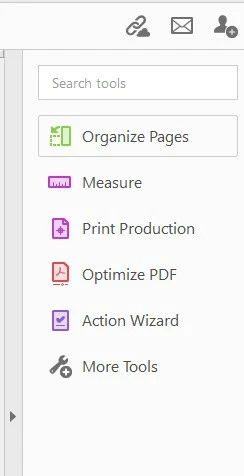
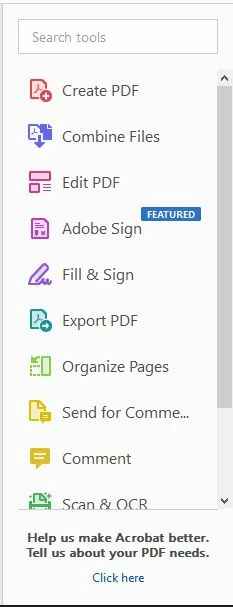
When you customize Adobe Acrobat Pro DC 32bit tool panel, the tool panel stays customised only for short while then goes back to default. I cannot wrap my head around this and it is driving me crazy having to set it up every day; some times more than once.

Cusomized:
Default:
33 replies

daniels24042250
Participating Frequently
March 3, 2022

I have the same issue.

I will customize my Tool Bar and remove or add the tools I use most and usually the next day when I open the application it's all back to the same default options as before I changed it and I have to go through the process all over again.


There needs to be a way to change the Tool Bar to your liking, your specific tools, and it stays like that!! It's beyond annoying to go through this daily.

Participating Frequently
February 3, 2022

I have the same problem. I don't see how you can 'try to replicate the behavior', because it is something that just happens. So trying to replicate the behavior would mean to just live your life and see if it happens to you too. I guess in a sense every Acrobat user is trying to replicate the behavior.

When I customize the panel, it stays that way for a day, maybe a few days or even longer, but sooner or later it *will* revert to default and it drives me crazy. I honestly never request e-signatures, but I do compare documents frequently (to give an example). It really is beyond annoying to have to customize the tools panel over and over again.

Meenakshi Negi
Community Manager
Community Manager
May 5, 2021

Hello,


Thank you for reaching out and sorry for the trouble.


We have tried to replicate the behavior, however, it works fine. 

Could you please share the Acrobat and OS version on the machine? Also, confirm if the tool panel goes to default after relaunch?


Thanks,

Meenakshi

Q0093C-PCAuthor
Inspiring
May 7, 2021

Good day @Meenakshi Negi 
Thanks for the reply.

If i customise my toolbar now, it will stay customised even if i close the application; but randomly through out the day it reverts to default. I cannot see a pattern in my workflow causing the occurance.

Below is screenshots of my PC specs, Operating system as well as adobe version.

Meenakshi Negi
Community Manager
Community Manager
June 2, 2021

Hi,


Sorry for the delay in response.


We did try to replicate the behavior at our end, however, it works fine. Please ensure that you have updated the application to the latest version. You may check the latest version available for the application from this link: https://helpx.adobe.com/acrobat/release-note/release-notes-acrobat-reader.html.


If the issue still occurs, please try resetting the application preferences using the steps suggested here: https://community.adobe.com/t5/acrobat/how-to-reset-acrobat-preference-settings-to-default/td-p/4792082


Let us know if you still experience the issue.


Thanks,

Meenakshi