

Participant
January 7, 2020
Answered

Unable to change signature in the Fill & Sign Tool drop down list using Acrobat Pro DC

  • January 7, 2020
  • 18 replies
  • 130493 views

Unable to delete a signature in the drop down so that I can add a new one. The delete box is grayed out and won't respond.
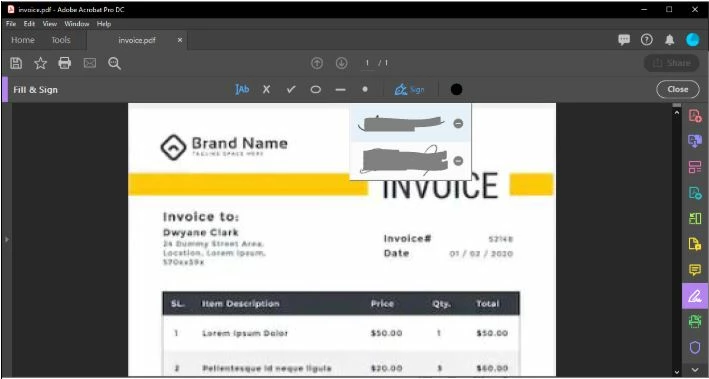


[Title Edited By Moderator]

Correct answer jjkadavil

I think the easiest way of fixing it is - First press on the close (x) button next to the signature a few times (it would be still not gone that is the problem we have), then open task manager (ctrl+alt+delete), 'End Task' Adobe Acrobat. Now start Adobe Acrobat, the signature will be gone and 'Add signature' will be shown.

18 replies

Participating Frequently
April 30, 2024

ADOBE...

As paying customers waiting years for this glitch to be fixed, how is it still a thing?

We should not have to try multiple work rounds to change out signatures.

Sometimes it works, sometimes it doesn't. Frustrating to the point where I am testing out another product.

I don't need all the bells and whistles, but I do need this feature to work reliably.


Amal.
Community Manager
Community Manager
April 30, 2024

Hi there,


Please remove the application using the Acrobat cleaner tool https://www.adobe.com/devnet-docs/acrobatetk/tools/Labs/cleaner.html, reboot the computer and reinstall the application using the direct link https://helpx.adobe.com/acrobat/kb/acrobat-dc-downloads.htmland see if that works.


~Amal

Participating Frequently
May 1, 2024

Thank you Amal.

Did as directed - cleaned, reinstalled - same issue.

Was worth a try.

Les

jjkadavilCorrect answer
Participant
February 15, 2024

I think the easiest way of fixing it is - First press on the close (x) button next to the signature a few times (it would be still not gone that is the problem we have), then open task manager (ctrl+alt+delete), 'End Task' Adobe Acrobat. Now start Adobe Acrobat, the signature will be gone and 'Add signature' will be shown.

Participant
February 24, 2025

This worked for me, thank you!!

Participant
October 31, 2023

[P.I removed by moderator]

Participating Frequently
September 26, 2023

Snce the new version was released, this is happening to me. YThis feature is only reason I use this software. Frustrating.

Amal.
Community Manager
Community Manager
September 26, 2023
 
I understand that you're having trouble with your Adobe Acrobat application, and I'm here to help you get it resolved. Thank you for reaching out with your concerns.


To address the problem, please follow these steps:

  1. Remove the Application: Start by using the Acrobat Cleaner Tool, which can help ensure a clean uninstallation. You can download the tool from this link: Acrobat Cleaner Tool. Make sure to carefully follow the instructions provided on the Adobe website to uninstall Acrobat completely.

  2. Reboot Your Computer: After using the Cleaner Tool, please restart your computer. This step is essential to ensure that any remaining traces of the previous installation are completely cleared.

  3. Reinstall Acrobat: Once your computer has rebooted, you can proceed to reinstall Adobe Acrobat. You can download the latest version directly from Adobe's official website at this link: Adobe Acrobat DC Downloads. Be sure to select the appropriate version and follow the installation instructions provided.


I hope these steps help resolve the issues you're experiencing with Adobe Acrobat. If you encounter any difficulties or have further questions, please don't hesitate to reach out for assistance. We're here to support you through this process.


~Amal
 
 
Participating Frequently
September 26, 2023

Thanks Amal,


That worked 😃

Participant
May 25, 2023

I am on a Mac using Adobe Acrobat and also having trouble changing the signature.  I have the most updated version using Creative Cloud which I pay a lot of money for.  This problem started several months ago suddenly, where when I click the minus button next signature... nothing happens.  It used to delete when I clicked it many times but now that does not work either.  I have removed the application and reinstalled and it works for like a day or two and then stops.  This happens not just on one computer but now two separate devices I use (home and work).  It definitely seems to be a problem in the application.  I am tired of reinstalling the app every other day.  Is there a workaround for Macs and why did this start happening suddenly?  Can you just go back to old application?  This is the most important feature and why I use Acrobat.  Please help or I will have to discontinue and pay for another program.  Thanks.

Amal.
Community Manager
Community Manager
May 26, 2023

Hi @RYAN22234248bkdb 


What is the version of the Acrobat DC you are using? To check the version go to Help > About Acrobat and make sure you have the recent version 23.01.2017X installed. Go to Help > Check for updates and reboot the computer once.

Also, try to repair the installation from the help menu (Win Only) and see if that works.

Please try to reset the Acrobat preferences as described here https://community.adobe.com/t5/acrobat-discussions/how-to-reset-acrobat-preference-settings-to-default/td-p/4792082

You may also try to create a new test user profile with full admin rights in Win or enable the root account in MAC and try using the application there and check.


Regards

Amal

Participant
April 27, 2023

Isn't it amazing that we are all paying Adobe an ongoing monthly fee these days and they can't even do a simple signature fix in 2023? There are free PDF options out there that can do signatures with no issues. I'd like to think Adobe is completely abysmal but, they are making millions. Can't help but just sit back and laugh at this situation.

Participant
February 10, 2023

Have Adobe support completely remove their profile -Don't let them tell you to create a new one yourself - This happened to me on both my office PC and my home laptop - I could login with creds from my manager and it worked fine on both systems - They didn't say what they did, but after 10 minutes of saying it is a known issue, everthing worked. Can now go to sign yourself and add and remove signatures when I couldn't before.

Participant
October 17, 2022

This is the dumbest work around ever needed. Adobe. Fix this. Peope have been begging for year.


Everyone - Go into the online version of Adobe, go to settings, e-sign settings, edit settings, my preferences, my signature


What a waste of money for such a critical service. You have so many redic promotions on signing, but make it so difficult...

Participant
October 17, 2022

I tried to long-click the 'minus' button and it worked.

Participant
October 18, 2022
I believe something to this effect may have been what was done to get it to work correctly at the time.

However, I was lucky enough to obtain a new office computer and all works perfectly now - admittedly I know this is not helpful information for anyone suffering through the same issue.

Thank you for the help and reply,

Robert
Fire Chief, Kemah Fire Department
[https://d36urhup7zbd7q.cloudfront.net/u/J8XgpOMnZkq/1657326831357.png#logo]
This communication may contain restricted or confidential information and may not be disclosed to anyone other than the intended addressee; any review, use, dissemination, forwarding, printing, copying, disclosure, or distribution of this communication is prohibited and may be unlawful. If you are not the intended addressee, you have received this communication in error. Please notify the sender immediately and destroy the communication, including all content and attachments. Any communications are subject to the freedom of information act (Texas Government Code 552) and may become public records.

Sent from my iPhone.
Participant
January 19, 2022

Easier fix: Open a .jpg file in the program. Go to Fill & Sign. Click (if doesn't work double click) on the - (minus) icon. You should be able to re-make and save a new signature.  Makes sure you check the "Save signature" box. You don't have to save the file, just close it. If you go back to a .pdf, it should work correctly again!

Participant
February 17, 2022

That would work if the minus icon was not disable, which is the real problem in this thread...

Amal.
Community Manager
Community Manager
February 18, 2022

Hi Linda


We are sorry to hear that. Please try to repair the installation from the help menu (Win Only) and reboot the computer once.

You may also try to reset the Acrobat preference as described here https://community.adobe.com/t5/acrobat-discussions/how-to-reset-acrobat-preference-settings-to-default/td-p/4792082


Also try to create a new test user profile with full admin rights or enable the root account in MAC and try using the application there and check.


Regards

Amal

Participant
January 17, 2022

This problem was solved by some earlier advice – uninstall and re-install the application – which worked.