tm5813973
Participating Frequently
July 16, 2023
Question

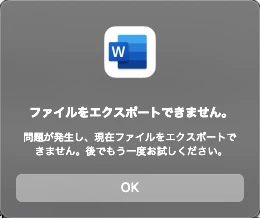
Unable to export word to pdf

  • July 16, 2023
  • 1 reply
  • 647 views

(I am posting the same question that has asked in Japaneses community as no answer has been given for 1+ week). 


When I try to convert Word to PDF (PDF with bookmarks) in Acrobat Pro for Mac, I get the error "Unable to export file". It seems that the error tends to end as the file size increases. Conversion to PDF that is "best for printing" can be processed without any problems.


Any advice on how to solve it would be appreciated.
 

Acrobat Version 2022.003.20281

PC: M1Pro Mac


Thanks

This topic has been closed for replies.

1 reply

Amal.
Legend
July 21, 2023

Hi @tm5813973 

Hope you are doing well and sorry to hear that

Is this an issue with a particular PDF file or with all the PDFs? Please try with a different PDF file and check. If the file is stored on a shared network/drive please download it to your computer locally and then try again.

What is the version of the Acrobat DC you are using? To check the version go to Help > About Acrobat and make sure you have the recent version 23.03.20244 installed. Go to Help > Check for updates and reboot the computer once.

Please try to reset the Acrobat preferences as described here https://community.adobe.com/t5/acrobat-discussions/how-to-reset-acrobat-preference-settings-to-default/td-p/4792082 and see if that works for you.


Let us know how it goes


Regards

Amal

tm5813973
tm5813973Author
Participating Frequently
August 8, 2023

Hi Amal, 

Thank you for the suggestion. I tried to reset preferences but I still see this problem.

1. This issue happens if file is big in size (Conversion was failed with 39.8MB file but completed with 2.4MB file). 

2. My acrobat is latest version

3. I found following plist file under ~/Library/Preferences. So, I tried to remove them, then tried file conversion.

  • com.adobe.acrobat.DC.WebResource.plist
  • com.adobe.acrobat.pdfviewer.plist
  • com.adobe.PDFAdminSettings.plist


Any suggestion would be appreciated.

Thanks,

Amal.
Legend
August 11, 2023

Hi @tm5813973 


The new version of  Acrobat Pro/Reader is now available. Please update the application to version 23.03.20269 from the help menu > Check for updates and reboot the computer once and see if that works.


If it still doesn't work, please share the PDF file in question and a small video recording of the workflow also please collect the Adobe CC logs https://helpx.adobe.com/creative-cloud/kb/cc-log-collector.html , Procmon logs (Win Only) https://www.adobe.com/devnet-docs/acrobatetk/tools/Labs/acromonitor.html  and share them via any cloud storage. Just upload the log file to the cloud, generate the link, and share that link with us for further investigation.

Regards
Amal