


When Splitting by Top Level Bookmarks, I am unable to select the same folder selected at start as a target folder option when choosing bookmarks for file names. What gives?? It worked on an older version of Adobe pro and now it's not allowed??
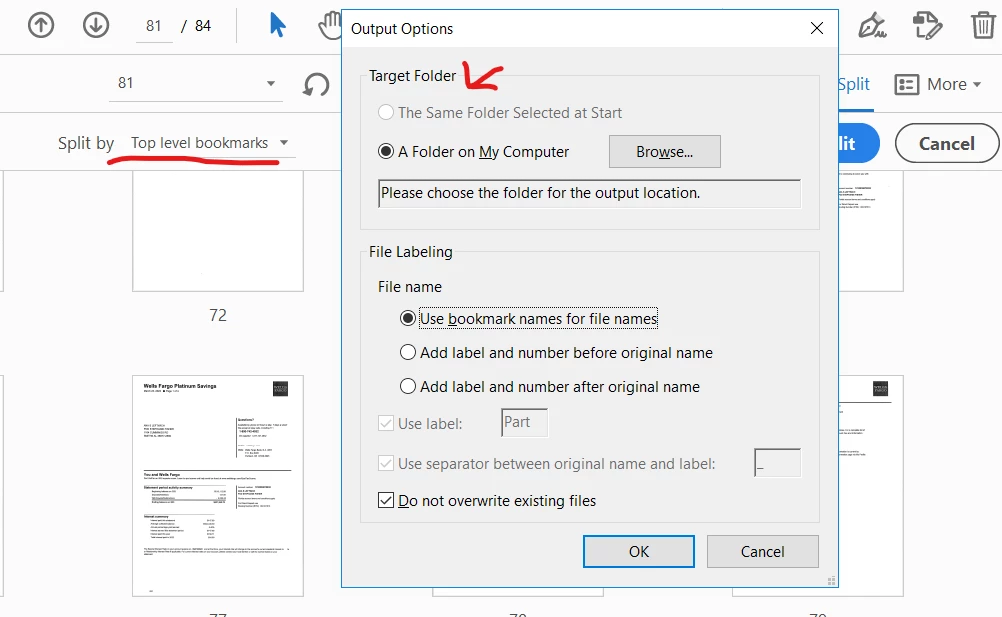
- Does this happen with all files in all folders? Make sure the file is not located in a "sensitive" folder, like the root folder or something like C:\Windows, for example.
- Go to Edit - Preferences - Security (Enhanced), and uncheck the "Enable Enhanced Security" box, as well as "View in Protected Mode", "Run in AppContainer" or anything else with a similar name, and then restart Acrobat and try it again.
I tried to reproduce the issue at my end using Win 11 and Acrobat Pro 23.03.20244 and its working fine.
Is this an issue with a particular PDF file or with all the PDFs? Please try with a different PDF file and check. If the file is stored on a shared network/drive please download it to your computer locally and then try again.
What is the version of the Acrobat DC you are using? To check the version go to Help > About Acrobat and make sure you have the recent version 23.03.20244 installed. Go to Help > Check for updates and reboot the computer once.
Also try to repair the installation from the help menu (Win Only) and see if that works.
Hi Amal. I am not on Windows 11. My employer is still running Windows 10. We have Adobe Pro version 2023.003.20244. The previous version I was using was Abobe Pro 2017 Version but my company switched to the Abode Create Cloud and now I am not able to split like I used it.
- Does this happen with all files in all folders? Make sure the file is not located in a "sensitive" folder, like the root folder or something like C:\Windows, for example.
- Go to Edit - Preferences - Security (Enhanced), and uncheck the "Enable Enhanced Security" box, as well as "View in Protected Mode", "Run in AppContainer" or anything else with a similar name, and then restart Acrobat and try it again.
