Tessellate
Participating Frequently
April 3, 2026
Answered

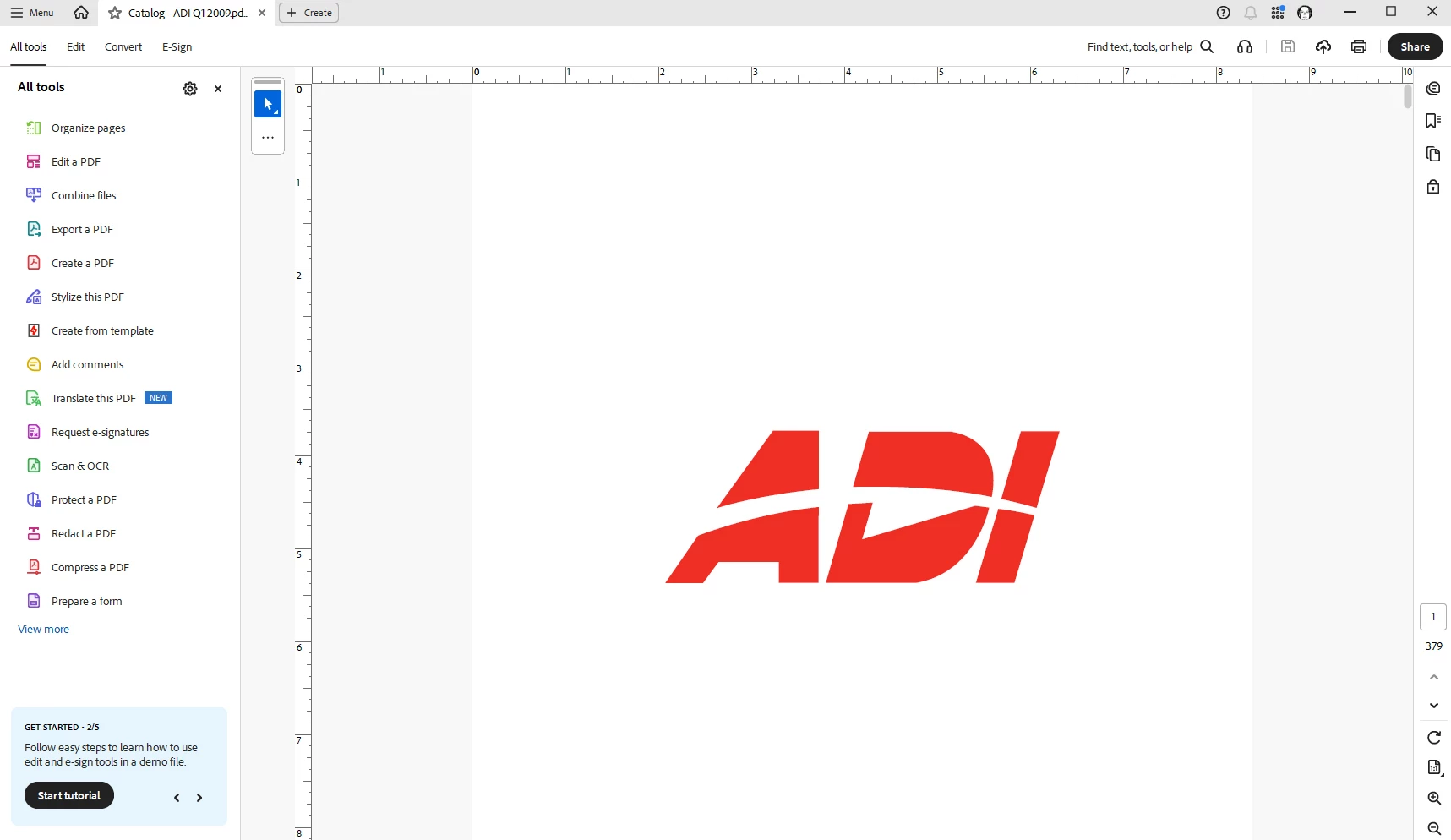
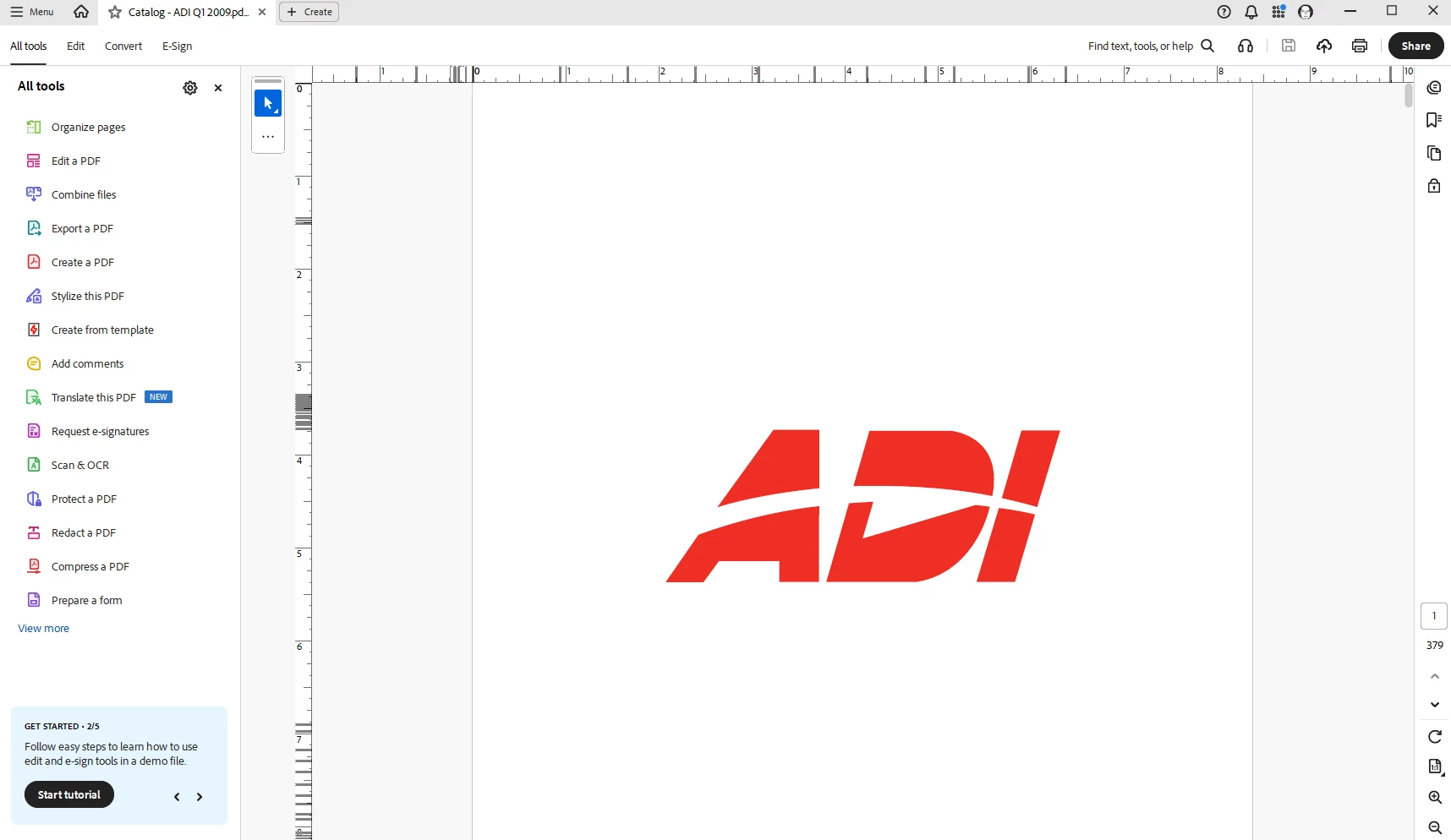
Weird lines created within the ruler when moving mouse over document

  • April 3, 2026
  • 31 replies
  • 2451 views

Hello All,

Couple days ago, my Acrobat Pro started creating weird lines withing the ruler when I move the mouse over the document. The more I move over the document, the more lines, until they completely saturate the ruler beyond recognition. I uninstall Acrobat Pro through the Creative Cloud Desktop and reinstalled; and it was working fine for a couple documents but has now returned. I do not have grid lines enabled, any ideas…?


I have included 3 pictures…

First picture is when I open the document, everything is normal.

Second picture, just a quick movement of the mouse over the document, weird lines are starting to appear on the ruler.

Third picture, continuing to move the mouse over the document (no clicking, just scrolling) and it completely saturates the ruler beyond recognition.


I have also closed out of Acrobat, shutdown the computer and restarted, same result.

Thanks for any help.

    Correct answer Tariq Ahmad Dar

    Hi all, 

    Thank you for your patience. 
    This is to update that this issue has been fixed and is available with the latest release: https://www.adobe.com/devnet-docs/acrobatetk/tools/ReleaseNotesDC/continuous/dccontinuousapr2026.html 

    Ensure your copy of Acrobat is updated, to check for pending updates:

    • Launch Acrobat
    • Help > Check For Updates.

    Let us know how it went. 


    ~Tariq


    31 replies

    BLJ-HM
    Participant
    April 17, 2026

    Good to know it’s not just me. But probably not good to know it’s not just me.

    It’s likely not the ideal fix, but if you’re careful, when you have your PDF document open, could you take a very careful and very quick snip of your screen without moving your cursor too much? Every time you click away from your PDF document the screen resets and the bug lines disappear until you start moving your cursor again. 

    It is annoying and cumbersome, but you could possibly refer to the screen shot you need for the most desperate moments...until this bug is fixed? Let me know if that works for any of you. 

    Also, will gridlines be of any help for some functions in the meantime?

    Stephen Stevie T
    Participant
    April 21, 2026

    Going on for weeks and still no fix? Another good reason to switch off Auto-Updates.  If it ain’t broke, don’t fix it.  Sure as …, once you update it will need fixed :-(

    aleahmach1
    Participant
    April 17, 2026

    Same here for about 2 weeks.  I have uninstalled and reinstalled - nothing fixes this and it’s distracting and makes the rulers useless.  I checked my graphics card for updates, nothing.  Searched AI for help.  Please find a fix.  

    Anand Sri Bhattacharya
    Community Manager
    Community Manager
    April 20, 2026

    Hello ​@aleahmach1 


    I hope you are doing well, and we are sorry for the trouble you had.

    The product team is working on isolating the root cause, as well as on a possible fix. Once it is validated and is available with the public build, we will share an update here.

    Thanks for your patience and cooperation on this.


    Regards,

    Anand Sri.

    Jason34600319vftj
    Participant
    April 16, 2026

    Any update on this issue as yet, this is crazy as it means the ruler is useless, it should be a major priority to be fixed please??

    Anand Sri Bhattacharya
    Community Manager
    Community Manager
    April 16, 2026

    Hello ​@Jason34600319vftj 

    I hope you are doing well, and thanks for reaching out. We’re sorry for the trouble.

    The product team is working on identifying the root cause and on a possible fix. We will share an update here once the fix is validated and is available with a public release. We may reach out to you to get some logs and information for further investigations.

    Thanks for your patience and cooperation on this.

    Regards,

    Anand Sri.

    yennyvillar
    Participant
    April 15, 2026

    I’m having the same issue. Has anyone found a solution?


    Thank you!

    Anand Sri Bhattacharya
    Community Manager
    Community Manager
    April 15, 2026

    Hi ​@yennyvillar 

    I hope you are doing well, and thanks for reaching out. We’re sorry for the trouble.

    The product team is working on identifying the root cause and on a possible fix. We will share an update here once the fix is validated and is available with a public release. We may reach out to you to get some logs, information for further investigations.

    Thanks for your patience and cooperation on this.

    Regards,

    Anand Sri.

    Raybomation
    Participating Frequently
    April 22, 2026

    I hear you, but it’s now almost 3 weeks from the first report, and still no fix. How hard could is be to find and fix this issue? I’m sure hundreds of people are having i this issue, but it’s so hard to report a bug they don’t bother. We need the ruler to work, as there is no work-a-round in Acrobat. I can use other tools to check item locations in a PDF, but it’s very time consuming and requires other more expensive software. Others may not have that option, and I really don’t have the time, but don’t have any other option right now.
    My company pays thousands of dollar every year for Abobe Creative Cloud, this should count for something. Stop wasting time on AI, and fix the bugs.

    Participant
    April 15, 2026

    Same here! Can’t place anything with any precision… Very annoying. Any fixes or workarounds yet?

    MTPeep32834031fv7k
    Participant
    April 14, 2026

    Same here!

    Participating Frequently
    April 13, 2026

    Thank you for posting this. I just got back from being gone a week and wondered what happened. It’s so annoying!

    Raybomation
    Participating Frequently
    April 11, 2026

    We are all having the same issue where I work. It’s either Adobe Acrobat itself or a Windows issue.
    Even happen on my home machine as well. All Windows 11 Enterprise or Pro.

    Can’t use rulers, which makes checking and fixing PDF files almost impossible.

    How long until a fix?

    PrinceWilliam3
    Participant
    April 9, 2026

    Having the same frustrating issue for the last few days, and I tried all of the troubleshooting tactics that the rest of thread did.

    504RoadTrips
    Participating Frequently
    April 9, 2026

    It’s driving me nuts.  The rulers become useless.