

WolfShade
Legend
Mar 30, 2020 3:01 PM UTC
Question

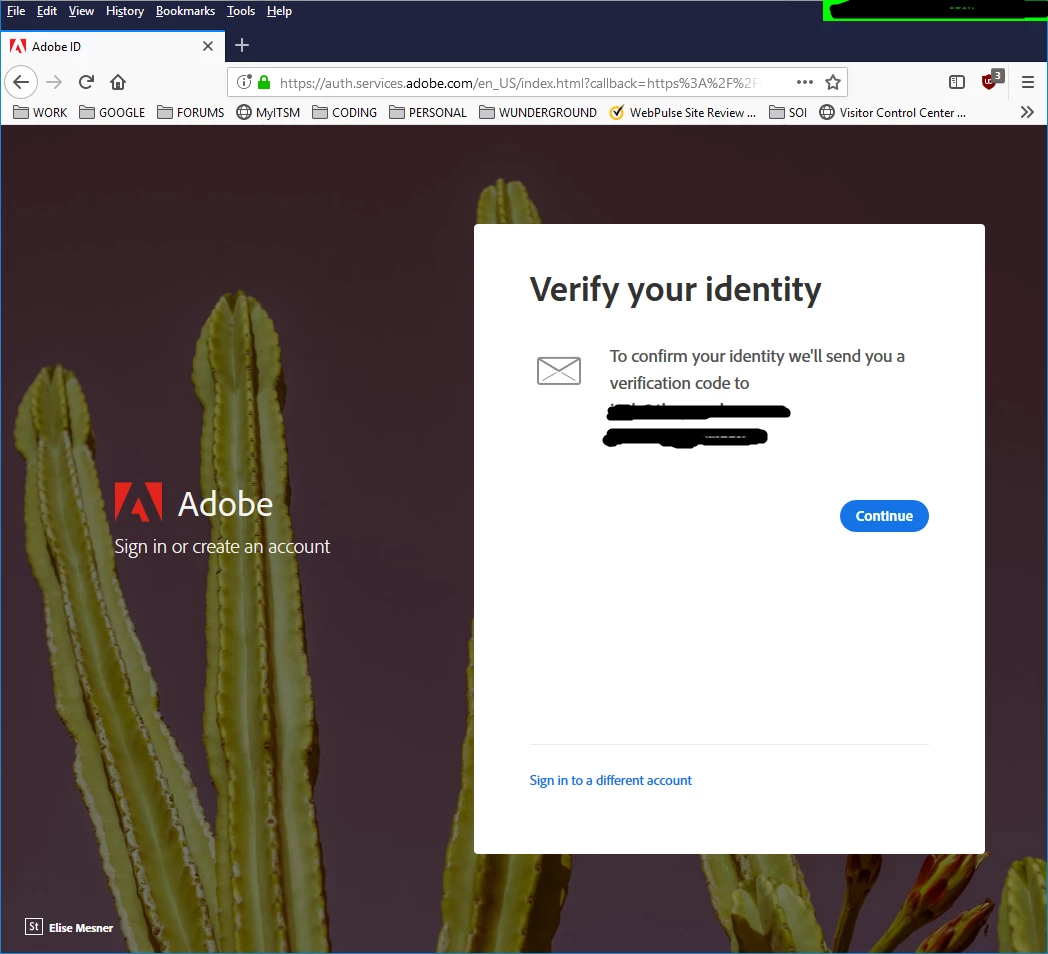
2FA/Verify issues - annoying

Hello, all,


I've already posted in the Community Feedback, but am not getting any response from an actual Adobe staff member (nothing against the people who have responded.)


This "we'll send you a code to verify it's you" bovine scatology needs to disappear.  I do not have access to my personal email at work, nor do I have access to my work email from home.  And, no, I'm not adding my work email to my account profile.


Adobe, get rid of this.  This is more than a mere annoyance.


^ _ ^

This topic is closed to new replies. Start a new post to keep the conversation going.

9 replies

WolfShade
WolfShadeAuthor
Legend
Jul 2, 2020 5:17 PM UTC

Aaaaaaand, it happened, again.  I logged on without this annoying nag about a verification code, had to restart the browser, and when I come back, it won't let me log on without a verification code.


Today, it's only an annoyance, as I'm working from home, today.  But if I were in the office, I'd be screwed, unable to access the Adobe Community because I DO NOT HAVE ACCESS TO PERSONAL EMAIL AT WORK, and vice-versa.


So.. how do I prevent this BS in the future?


V/r,


^ _ ^

Translate
WolfShade
WolfShadeAuthor
Legend
Apr 1, 2020 1:30 PM UTC

Allcon,


I am happy to announce that I have been able to log on without the annoying "we'll send you a code" message, this morning.


If this trend continues, all is okay.


If I get that annoying message, again, I'll be sure to post it, here.


V/r,


^ _ ^

Translate
John T Smith
Community Expert
Community Expert
Mar 31, 2020 12:31 AM UTC

Other users here can't help with an account problem
Be sure to remain signed in with your Adobe ID before accessing the link below
-you must also allow 'cookies' in your web browser for this to work
https://helpx.adobe.com/contact/support.html
-click the chat icon at the bottom right of the page to open a chat session
-the chat icon looks like '3 dots inside a circle' at the lower right
-type AGENT into the chat window to connect directly to a person rather than the AI

Translate
WolfShade
WolfShadeAuthor
Legend
Mar 31, 2020 1:04 PM UTC

Hi, John,


I've posted in Community Feedback, as well, no official Adobe response.


First-party cookies are allowed, always have been.  Third-party cookies are blocked (net admins, here, set this and lock it so no one can undo it.  I wouldn't if I could, anyway.)  Cookies are deleted upon browser exit (another net admin setting.)


Thank you for that link.  I will give that a shot, and report back.


V/r,


^ _ ^

Translate
WolfShade
WolfShadeAuthor
Legend
Mar 30, 2020 4:38 PM UTC

My account is already 2FA disabled.  It's still happening.


V/r,


^ _ ^


UPDATE:

Translate
LinSims
Community Expert
Community Expert
Mar 31, 2020 2:49 PM UTC

Huh. I dunno. I'm using Google Chrome with about a bazillion and one plugins and extensions, including two that prevent tracking and ads of all sorts, and I've never gotten that. 


What browser are you using? Is there maybe a setting that would force a 2FA or prevent cookies being saved or maybe even clearing cookies for the site when you close the browser? 

Translate
WolfShade
WolfShadeAuthor
Legend
Mar 31, 2020 3:00 PM UTC

Per net admins settings that we cannot change, first-party cookies are allowed, third-party cookies are denied, and all cookies are deleted upon browser close.  This has never presented any issues in the eight years I've worked here.


I use FireFox for 98% of everything I do, online.  The only time I open IE is if the page is designed specifically for IE (such as any SharePoint sites), or I will use it when done coding to see if IE breaks, then tweak from there.  No browser settings that I know of would tell community.adobe.com to force me into 2SA (step vs factor; I know, the title was typed in anger) mode.


So far, this appears to be happening on the first login of the day.  Once I get past that, it doesn't appear to be an issue, so I'm left scratching my head and wondering "why?"  But, still, it's an issue.. one that I'm sure Adobe won't be falling over themselves trying to fix.


We'll see, tomorrow.  🙂


V/r,


^ _ ^

Translate
LinSims
Community Expert
Community Expert
Mar 30, 2020 4:26 PM UTC

This is something under your control, not Adobe's.


  1. Log in to your Adobe account at accounts.adobe.com
  2. From the menu bar at the top of the page, click Profile
  3. In the menu panel on the left, click Password and Security
  4. Find the Two-step verification section. If you have it turned on, click Manage. The Two-step verification page is displayed.
  5. Slide the toggle for Two-step verification to the left to disable the verification.


Translate