
Known Participant
May 25, 2020
Answered

attaching screenshot

  • May 25, 2020
  • 3 replies
  • 1592 views

I have been receiving help from members on a photoshop 2020 question. I have had maybe around six suggestions but still remain puzzled  (obviously I am a bit slow!)  Early in the exchanges I managed to post a screenshot. I had the idea of posting several more showing the sequence I went through with the file. However now the insert photo button will not work.  Also the drag and drop box such as is present on this post is missing on my reply form.


Is there a limit to the number of interactions one can have with a correspondent, or is there another explanation?

Eain
    This topic has been closed for replies.
    Correct answer Just Shoot Me

    https://community.adobe.com/t5/photoshop/cannot-flatten-composite-layers/td-p/11133771 


    I think that confirms and explains something  I read  elsewhere on forum.  If that is the case I can live with it and apologise for wasting everybody's time  Eain


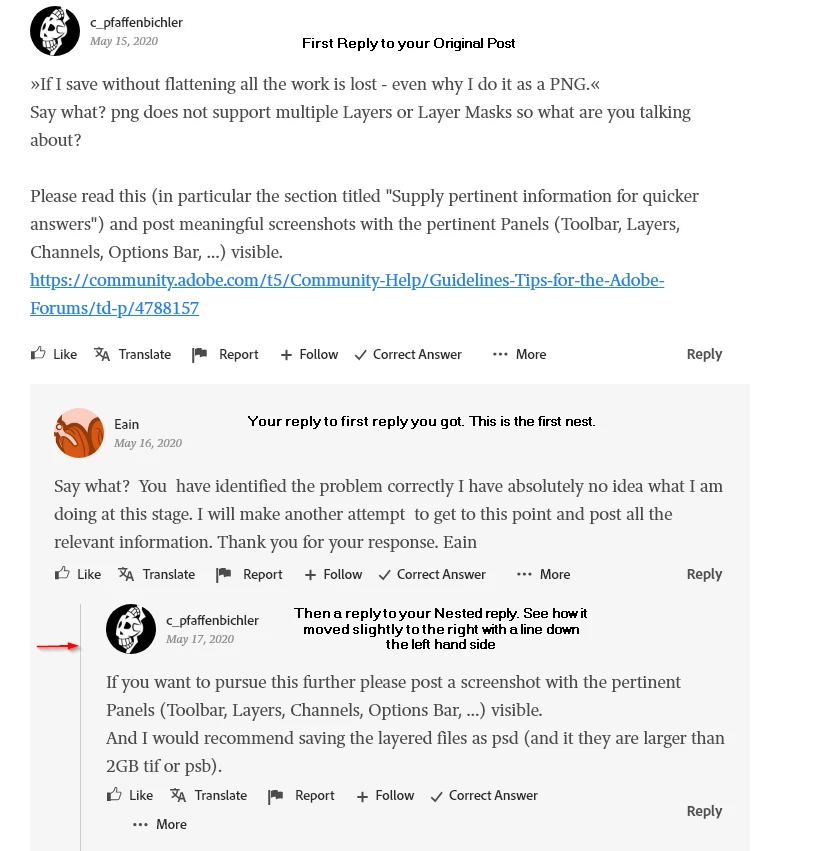
    Yes it looks like it is many many nested replies deep.


    The thing to do is use the Reply button under your Original post.


    This is just another problem with the Nested replying system of this forum.

     If you look at that conversation the second Nested reply, the reply just under the first reply to you moved slightly to the right.


    Then all others replies stay along that line to the left wheter they are replies to the First Nest and Nested to a nested reply and then another Nest and other nest. After a certain number of NESTS this forum system goes Bonkers. It is FURBAR.

    Best of luck to you and I hope your question get a proper answer.


    3 replies

    EainAuthor
    Known Participant
    June 3, 2020

    Thank you. That certainly clears that up. Eain

    Just Shoot Me
    Legend
    May 25, 2020

    What exactly do you mean by "Will Not Work"? Please descibe exactly what happens when you click this icon in the Tool Bar in a Reply window.


    EainAuthor
    Known Participant
    May 27, 2020

    Thank you for your response. By will not work I mean that clicking on it has no effect. It does not lead me to search for a photograph. However I have just tried it on this reply form and it does work.


    When I go back to my original thread  'cannot flatten composite layers  .." it does not work on my attempt to reply to the latest correspondent.  Eain

    Just Shoot Me
    Legend
    May 27, 2020

    Post an actual LINK to that other thread.

    I suspect it may be many layer deep of Nested replies (Nested replies are like your above (grey background) and mine > the one you are reading).


    This forum software has a problem with nested on nested on nested and so on replying.


    Peru Bob
    Community Expert
    Community Expert
    May 25, 2020

    Try signing out of the forum and sign back in.

    EainAuthor
    Known Participant
    May 25, 2020

    Thank you. I tried that but it still does not work.  I did find out that the option to attach screenshot is available if I go right back to the original post.  However that seems odd it would seem more logical to be able to illustrate a point where appropriate in the exchange. Eain