
December 3, 2010
Answered

Back button doesn't function properly

  • December 3, 2010
  • 2 replies
  • 1697 views

Firefox 3.6.12

OS X 10.6.2

If I'm on, say, page 3 of a forum and I read a post, if I hit the Back button in my browser it takes me back to page 1 rather than page 3. Super-unfriendly and annoying behavior... does this happen to anyone else?

(Why Adobe didn't just use known-great forum software like phpBB I'll never know...)
    This topic has been closed for replies.
    Correct answer the_wine_snob

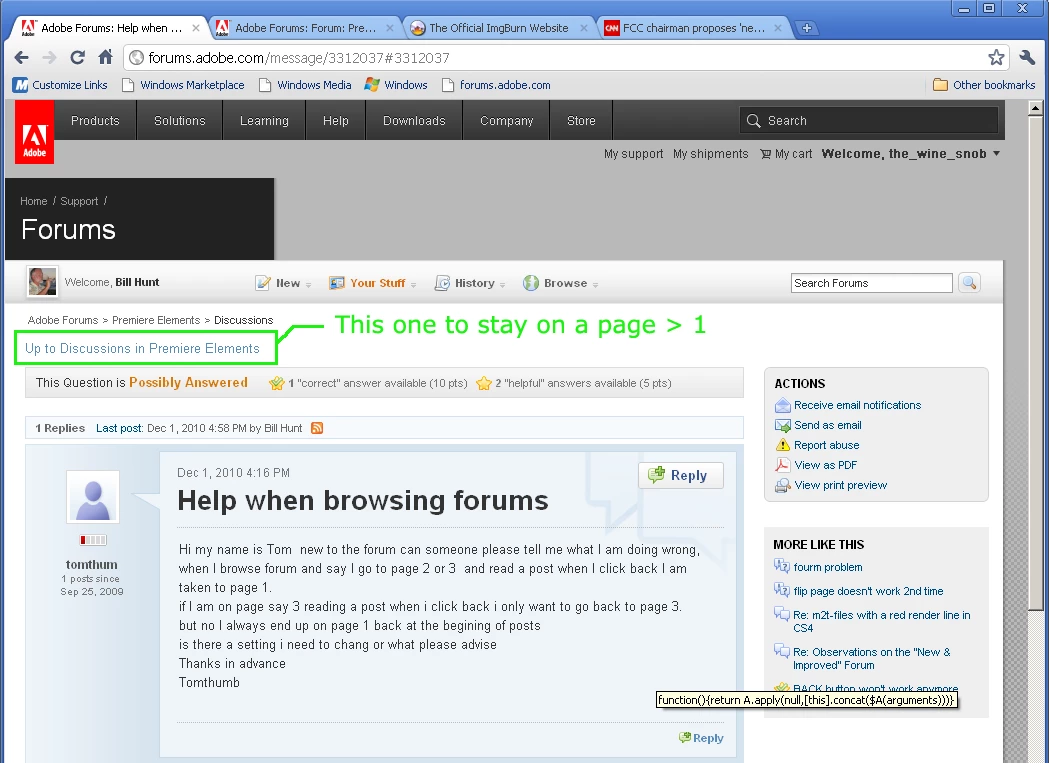
    When on a page, beyond Page 1, look near the top of the page, and choose Up to Discussions in ____ Forum. It is the second line, and appears in blue in Chrome. That should keep you on Page X. Now, if you post, you WILL end up on Page 1.

    Here's a look in Chrome:

    Good luck,

    Hunt

    2 replies

    pwillener
    Legend
    December 11, 2010

    Found a way to get around the problem with the Back button.

    Say I want to read a few posts on page 2 of a forum; I read the first post, then click on the 'Up to Discussions in ...' once. This will modify the URL in the address bar to http://forums.adobe.com/community/general/forum_comments?view=discussions&start=30

    After this I can use the Back button from every topic on that page, and it will always go to the same page 2 (start=30).  Of course the same will work on every subsequent page.

    the_wine_snob
    Inspiring
    December 14, 2010

    Neat and thanks. Will give this a go!

    Hunt

    the_wine_snob
    the_wine_snobCorrect answer
    Inspiring
    December 3, 2010

    When on a page, beyond Page 1, look near the top of the page, and choose Up to Discussions in ____ Forum. It is the second line, and appears in blue in Chrome. That should keep you on Page X. Now, if you post, you WILL end up on Page 1.

    Here's a look in Chrome:

    Good luck,

    Hunt

    December 3, 2010

    Awesome, thanks! Never even noticed that link before...