

LinSims
Community Expert
Community Expert
December 11, 2019
Answered

BUG: Returns being stripped from Macros text

  • December 11, 2019
  • 1 reply
  • 603 views

I have a multi-paragraph macro I use when directing posters to talk to customer support for subscription and billing issues. Up until yesterday, the text inserted fine into the reply window, but starting yesterday, all my returns are being stripped out.


This is how it looks in the Macro page:
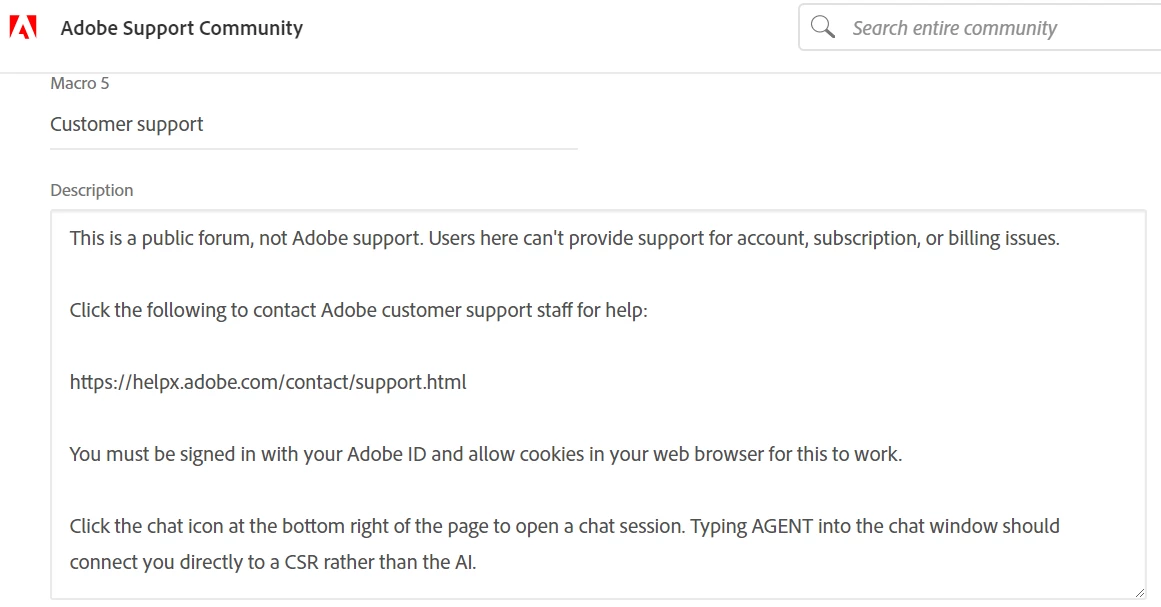
 

And this is how it is (now) being inserted into replies:


This is a public forum, not Adobe support. Users here can't provide support for account, subscription, or billing issues.  Click the following to contact Adobe customer support staff for help:  https://helpx.adobe.com/contact/support.html You must be signed in with your Adobe ID and allow cookies in your web browser for this to work. Click the chat icon at the bottom right of the page to open a chat session. Typing AGENT into the chat window should connect you directly to a CSR rather than the AI.

This topic has been closed for replies.
Correct answer LinSims

Testing again. This time added html code < br > < br >, because that's showing up in other macros I created that are working properly.


This is a public forum, not Adobe support. Users here can't provide support for account, subscription, or billing issues. .

Click the following to contact Adobe customer support staff for help: .

https://helpx.adobe.com/contact/support.html.

You must be signed in with your Adobe ID and allow cookies in your web browser for this to work. .

Click the chat icon at the bottom right of the page to open a chat session. Typing AGENT into the chat window should connect you directly to a CSR rather than the AI.


Ah, HAH! So that's the issue. I wonder why those weren't inserted when I created the macro, since they were when the others were created. Odd. Well, at least I know now.

1 reply

Ann Bens
Community Expert
Community Expert
December 11, 2019

Please post computer specs, OS build,
Premiere build (not just the latest),
Screenshot media used in Mediainfo in treeview.

Ann Bens
Community Expert
Community Expert
December 11, 2019

Above one of my macro's: think you need to make a shift+return.

Cannot check as my account settings are still unvailable.