August 31, 2010
Answered

Can't unsubscribe from user email notification in Forums

  • August 31, 2010
  • 1 reply
  • 3481 views

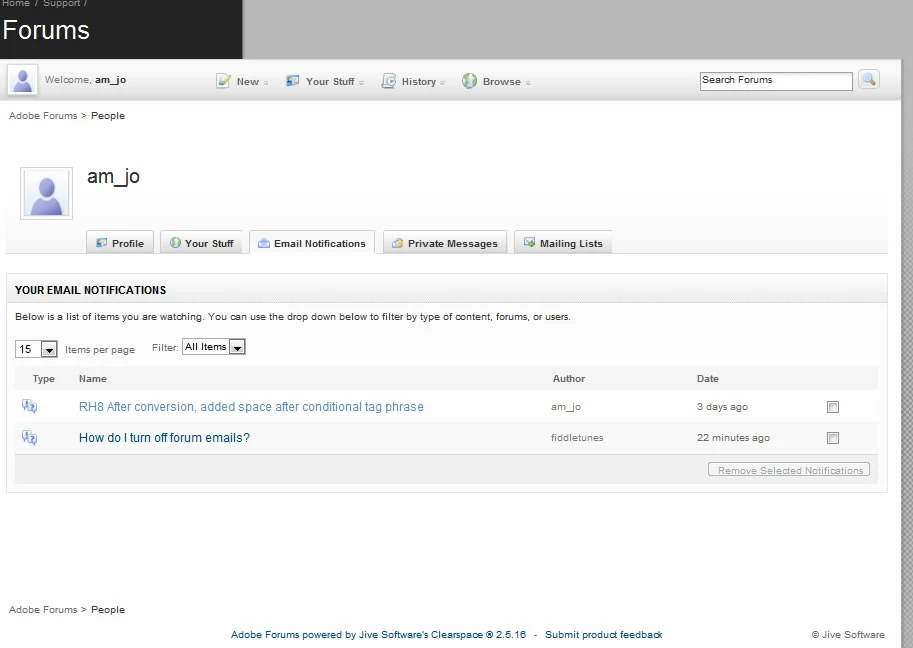
In this post http://forums.adobe.com/thread/416458, user Jochem said to start a new discussion if the steps provided did not unsubscribe someone from getting emails. I did all steps, and there's simply no way to mark the subscription I want to remove. Please see the screenshot Jochem said to attach (below). When I go to Your Stuff | Profile and choose Email Notifications, the user I'm following is not listed, even though the filter is set to "All Items."

Even if I chose "User" from the filter drop-down list, it does not display the user I'm following. If it did, I'm sure I could easily remove the notification. This seems to be a bug. Could someone confirm by signing up to follow a particular user and then verifying whether or not it displays under Email Notifications?

    This topic has been closed for replies.
    Correct answer John_Cornicello_Photo

    Here's what I got this morning. I have not subscribed to this thread; I'm receiving it because of subscribing to the user "MergeThis."

    I don't know what you mean by showing you the full reply-to address, since I posted what I thought you wanted earlier. If I reply to unwanted messages below, the address it wants to replies to is clearspace-522901024-583112-2-3096918@mail.forums.adobe.com. Others include clearspace-1715873125-583112-2-3093972@mail.forums.adobe.com, clearspace-1715873125-583112-2-3093725@mail.forums.adobe.com, and clearspace-479014015-583112-2-3070385@mail.forums.adobe.com taken from a few of the emails I've been getting.

    This is the email in its entirety; again, this is just one example of what I get on a daily basis from this user's posts.

    -----Original Message-----
    From: MergeThis [mailto:forums@adobe.com]
    Sent: Tuesday, August 31, 2010 8:31 AM
    To: [my name]

    Subject: [WebHelp] RH8 Single project not merging

    Possible issues:

    1. The parent is not calling for the child properly.

    2. The child folder is either incomplete or is in the wrong place.

    3. The perl script is incorrect.

    (1) You might check the parent TOC file (parent.hhc) for these two lines (in the proper order):

    <item name="child_dir" merge="::/" merge2="child_dir">

    </item>

    (2) The webhelp.ssl file (in the child_dir project) should have this line:

    <element name="DestinationProjectName" value="C:\generate_dir\mergedProjects\child_dir\start.htm" />

    (3) Compare the perl script for this child to any of the others that work.

    If these are all OK, it's time to put down the scalpel and pick up the chain saw.

    Generate the parent and this child only to an entirely new directory structure; does it appear now? If so, go back to your initial directory structure and:

    1. In Win Explorer, remove the entire folder for this child project (the "generated" folder under the mergedProjects folder).

    2. In RH (not your Perl script), generate the child project.

    3. In RH (not your Perl script), generate the parent project.

    Good luck,

    Leon

    --------------------------------------------------------------

    This message was sent to: amj0948

    To post a reply to the thread message, either reply to this email or visit the message page:

    http://forums.adobe.com/message/3096918#3096918

    --end--


    You are posting from an account named "am_jo" and this account is not subscribed to any users.

    The email was sent to an account name "amj0948" which is a separate account. You need to sign in with the amj0948 account to make changes to the notifications for that account.

    1 reply

    Inspiring
    August 31, 2010

    am_jo wrote:

    When I go to Your Stuff | Profile and choose Email Notifications, the user I'm following is not listed, even though the filter is set to "All Items."

    Which user do you think you are following? If I bypass your profile page and check the user watches for your account directly I don't see any subscriptions either. And please provide the reply-to address from one of the email notifications you are receiving and wish to unsubscribe from.

    I am following quite a few people and they show up both through my profile page and when I bypass it.

    August 31, 2010

    Thanks for the reply, Jochem. Did you see the image of my profile? No users are listed.

    Other than my own posts, I was only following the user MergeThis.

    Here's the latest reply-to email address from a post of his I received this morning: clearspace-522901024-583112-2-3096918@mail.forums.adobe.com. But I get notified on *all* his posts.

    (tried to reply to this via email but the site rejected it: "The following organization rejected your message: 10.137.24.42.")

    Inspiring
    August 31, 2010

    am_jo wrote on 8/31/2010 4:07 PM:

    Thanks for the reply, Jochem. Did you see the image of my profile? No users are listed.

    But there are 2 threads listed there. And if you go back now, there will

    be 3 threads listed since you are subscribed to this thread as well.

    Other than my own posts, I was only following the user MergeThis.

    Here's the latest reply-to email address from a post of his I received this morning: mailto:clearspace-522901024-583112-2-3096918@mail.forums.adobe.com. But I get notified on all his posts.

    Message 3096918 was posted in thread 679218:

    http://forums.adobe.com/thread/679218

    That thread is listed in your subscriptions. If you do not want to

    receive that message, unsubscribe from that thread.

    Please provide the reply to address from a message you think you should

    not have received.

    (tried to reply to this via email but the site rejected it: "The following organization rejected your message: 10.137.24.42.")

    Make sure your From address is the same one as is on your Adobe ID. If

    that doesn't work, quote the full email address.