
Known Participant
November 17, 2009
Question

Cannot log out of the forums...

  • November 17, 2009
  • 7 replies
  • 8420 views

About some of the new problems in these forums, Jochem wrote in another thread (http://forums.adobe.com/message/2399480#2399480)

I figured out what is going on. As soon as you log in your profile settings are partially reset. At the very least your "Last Name" is set to "Hide", not sure which other profile settings are reset when you log in.

As for me one of the main problems is that I was given a new identity, I decided to give this a try. Therefore, I used the "Sign out" button of the top row, logged in again using my normal ID and password, and found that apparently there had been no change in the forums. The only apparent change was that I am now welcomed as "Claudio González" in the rop row, but I am still logged in as "Claudio_González" in here:
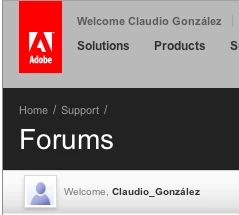
As reported in other threads, the information in my new profile is wrong, and I don't know if, once these new problems get solved -if they ever do- the data such as posts count of this new identity will be merged in my old, normal identity. Which is still there...

    This topic has been closed for replies.

    7 replies

    Inspiring
    November 18, 2009

    The logout instructions on the forum root page have been updated. The logout instructions in the FAQ have been extended with an axplanation of the cookies involved. Please only use this thread if you continue to experience problems logging out from the forums while you are following the new instructions. If you do, make sure you tell us the time you logged on to your Adobe ID, the time you logged on to the forums, whether you closed your browser in between and whether you have been inactive for 4 hours or more.

    Claudio González
    Legend
    November 18, 2009

    Jochem, two things:


    1. If I hover over the first link in your new version of that FAQ, the bottom line of my browser reads "Go to: http://www.adobe.com/cfusion/membership/logout.cfm". However, if i click on that link, I'm taken to http://www.adobe.com/ and I cannot see there any way of logging out.


    2. I finally succeeded in logging fully out, and then re logging correctly, using Safari/Vista, at around 12:30 (al times local, GTM-4), by the method described in #31 above. I have been opening and closing Safari, and visiting these forums without any problem, for about 3 hours. However, at about 16:15, I found that I was no longer logged in, although I did not have any difficulty in logging in correctly. And yes, I had checked the "Remember me" box when logging in earlier, same as I did when logging in now. And no, my computer's date is not showing year 2039, but November 28, 2009. Any thoughts?

    Inspiring
    November 18, 2009

    Claudio González wrote on 11/18/2009 8:41 PM:

    1. If I hover over the first link in your new version of that FAQ, the bottom line of my browser reads "Go to: http://www.adobe.com/cfusion/membership/logout.cfm". However, if i click on that link, I'm taken to http://www.adobe.com/ and I cannot see there any way of logging out.

    That is called a redirect.

    2. I finally succeeded in logging fully out, and then re logging correctly, using Safari/Vista, at around 12:30 (al times local, GTM-4), by the method described in #31 above. I have been opening and closing Safari, and visiting these forums without any problem, for about 3 hours. However, at about 16:15, I found that I was no longer logged in, although I did not have any difficulty in logging in correctly. And yes, I had checked the "Remember me" box when logging in earlier, same as I did when logging in now. And no, my computer's date is not showing year 2039, but November 28, 2009. Any thoughts?

    You are not describing a problem with logging out while following the

    new instructions. Please use another thread and only post here if you

    have a problem logging out while following the new instructions. If you

    post here make sure you post the required information:

    - the time you logged on to your Adobe ID

    - the time you logged on to the forums

    - whether you closed your browser in between

    - whether you have been inactive for 4 hours or more.

    Noise about other problems will be removed.

    Inspiring
    November 18, 2009

    "Tut... tut... Now, you're all complaining about not being able to log out... You guys are never happy... when i used to log you out you used to complain and said you didn't want to be logged out... Now, when i don't log you out, you complain and say you can't log out... Sheesh... why can't you guys make up your minds instead of Jivin' me all the time!" – Abode

    NB: With apologies... similar post already in another thread..."The joys of Jive"

    Participating Frequently
    November 18, 2009

    Look, horse, I am not complaining about log in vs log out. My name has been changed to

    Hudechrome-UvkmhB

    I don't like it. I don't like my e-mail being "xdgxioho8rwbrl8jgubhuvm". either.

    I tride the path of link 31 I am still

    Hudechrome-UvkmhB

    Cut the jive and fix it, please.

    See? Even spell check knows

    Hudechrome-UvkmhB

    is wrong.


    Claudio González
    Legend
    November 18, 2009

    Hudechrome-UvkmhB wrote:

    Look, horse, I am not complaining about log in vs log out. My name has been changed to

    Hudechrome-UvkmhB

    I don't like it. I don't like my e-mail being "xdgxioho8rwbrl8jgubhuvm". either.

    I tride the path of link 31 I am still

    Hudechrome-UvkmhB

    Cut the jive and fix it, please.

    See? Even spell check knows

    Hudechrome-UvkmhB

    is wrong.

    Well, this thread is about the logout problem...

    As I have explained, my problem was similar. Without my intervention, or any log in - log out process, I passed from being logged in as Claudio González (my usual screen name) to Claudio_González, with all the other data in my profile also wrong. The problem disappeared and hasn't come back since I finally managed to log out completely and then log in using my correct Adobe ID and password, by the method described in my message #31 above.

    November 18, 2009

    There is no logout option at the top for me to choose either. I close my browser and can come back logged in but can never logout now. How Sweet it is.

    Claudio González
    Legend
    November 18, 2009

    dec9 wrote:

    There is no logout option at the top for me to choose either. I close my browser and can come back logged in but can never logout now. How Sweet it is.

    Did you try the method I described in message #31 above?

    November 18, 2009

    The signout option at the top is bac

    k.

    (The carriage return problem, as shown, is still there)

    When I click on the signout at the top it shows me signed out. When I return I am still logged in but on the right side of the pane there is a log out option that when clicked logs me out. That works.

    I will try post 31 and see what happens.

    Edit:

    Ok, I did what you posted in post 31. At first when I logged out of the forums I was still logged in my account at the top. So I signed out and was logged out. Then I came back and clicked on log in and I was automatically logged in without typing anything which I think is normal.

    Edit: Spoke too soon. when I went to log out of the forums it logged me out but did not log me out of my account. so I have to log out in 2 places. Log out in the forums then go to the top and log out of my account to be fully logged out of the Adobe website.

    Oh well. Least I know to log out in 2 places now.

    pwillener
    Legend
    November 18, 2009

    This is a bit confusing...

    Found the new 'Sign-out' link on top of the forum and clicked it, in the hope of getting my lost display name back.

    After clicking it I was sent to the Adobe home page http://www.adobe.com/

    Manoevered back to http://forums.adobe.com/index.jspa, and here I am - still logged-in as 'pwillener'.

    The difference: the 'Sign-out' link has disappeared!

    the_wine_snob
    Inspiring
    November 18, 2009

    Claudio,

    Even with the Log-Out, I was unable to do that earlier today - about the time that the forum changed my Adobe I.D. and Logged me in to that.

    Removing all cookies, clearing the cache, restarting IE a half-dozen times, got it going. However, mid-session, it flipped by to that other I.D. and screen name and I had lost the Log-out again.

    Right now, things seem to be working, but I have to log in via Adobe.com and then navigate to the fora.

    Oh well, if Adobe can just get all of my registration data back, as it's gone too...

    Do not know what was done with the maintenance, but this is almost as bad as the last forum changeover.

    Good luck,

    Hunt

    adobe-admin
    Legend
    November 17, 2009

    Claudio, I can see the issue with your names, but don't have an explanation yet.

    You have two Adobe IDs. Until yesterday you were posting from one of them. As of today, you are logged in and posting from the other one. The account you used yesterday has 2932 messages associated with it. The account you are logged in with today has 389.

    The name on yesterday's account is Claudio Gonzáles and goes back to 2002, the account for today is just Claudio, and was registered in 2006. This might be tied to having an old Adobe ID that is a name instead of an email address.

    Are you giving a name or an email address on the Adobe sign in page?

    John

    Known Participant
    November 17, 2009

    Hello John, nice to see you around, and thanks for responding and trying to understand the problem of my split personality.


    It is possible, although unlikely, that I may have created a new account when I started visiting the ex Macromedia forums, which may have been around 2006. However, I think this is highly unlikely, because I had a very old account related to the Adobe Store, and I used the same screen name Claudio González in that and in my ex Adobe one, so there was no need for a new one. I have never used an email address as an Adobe ID; but the one I'm using now does not contain either Claudio or González in it.


    I have taken a look at the discussions associated with today's account (Claudio according to your records, Claudio_González according to what I see), and I was surprised, first, by finding such a short list, and second, by the fact that, as far as my memory can me trusted, they are discussions I initiated all over the Adobe forums, with a few very recent ones (7 and 8 months, not counting today's of course).


    My 24 hours are near to expiring in my other computer, so I think I will just wait to be logged out there, and then logging in again. I'll come back and report the result here. Wish me luck; I would hate to lose all my past history.

    Inspiring
    November 17, 2009

    I can see in the extended properties that your current account migrated from FuseTalk, so your current account has indeed een migrated from the Macromedia Forums.

    Inspiring
    November 17, 2009

    See the FAQ.

    Known Participant
    November 17, 2009

    You don't happen to think that it would be helpful to indicate that the FAQs have been updated, as in the case of discussions, do you?

    adobe-admin
    Legend
    November 17, 2009

    I have added a logout link on the front page of forums at http://forums.adobe.com as a temporary measure until the current login/cookie situation is resolved.