rcraighead
Legend
October 29, 2019
Answered

Cannot paste image from clipboard into a thread now days. Is this going to be fixed soon?

  • October 29, 2019
  • 8 replies
  • 2551 views

Chrome Version 77.0.3865.120

Mac High Sierra: 10.13.6

    This topic has been closed for replies.
    Correct answer Tacafy大尉

    rcraighead, thank you for your reply.
    This method does not require you to save the image to disk.
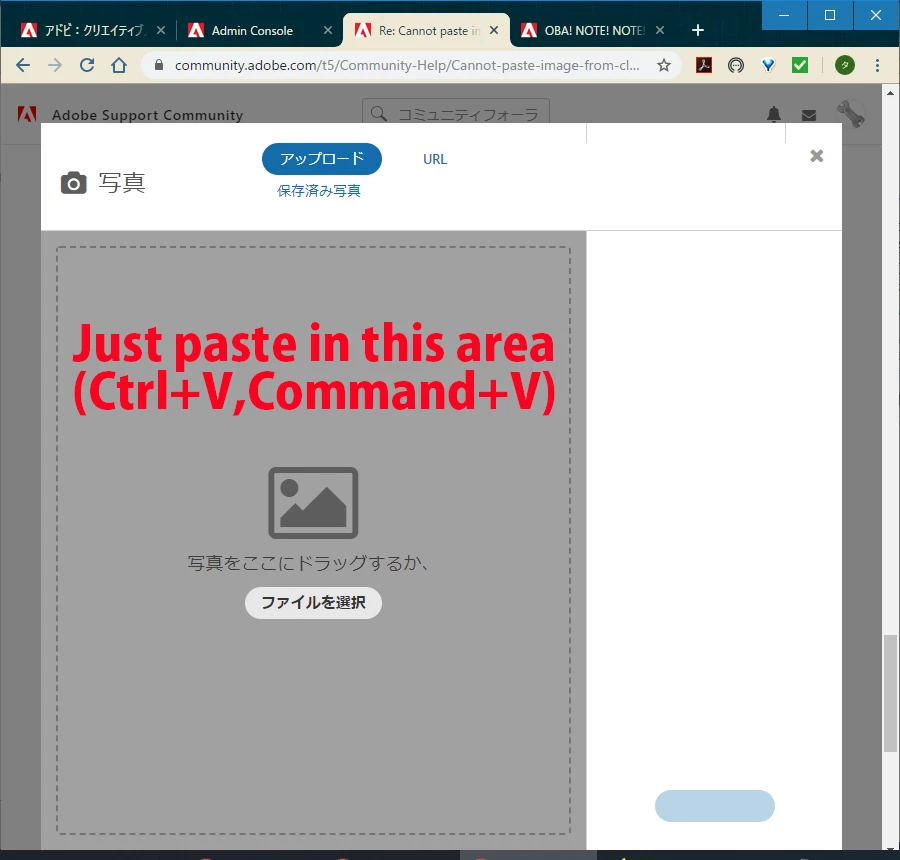
    Actually, this image is also edited using Photoshop CC, but the image was copied and pasted in this gray area without saving.

    Some people have actually been able to attach images using this method and have reduced man-hours.


    8 replies

    Nancy OShea
    Community Expert
    Community Expert
    November 1, 2019

    That image box and modal are super annoying.  The beauty of pasting directly into a reply was to avoid having to mess with that horrible modal window.  It consumes too much of my screen and truncates the bottom half. 


    Nancy O'Shea— Product User & Community Expert
    Nancy OShea
    Community Expert
    Community Expert
    October 30, 2019

    I  already reported this bug days ago in the Community Feedback forum.  Nobody from Adobe has responded. 

    https://community.adobe.com/t5/Community-Feedback/Bug-Can-t-Paste-Images-Into-Replies/td-p/10692425


    Nancy O'Shea— Product User & Community Expert
    LinSims
    Community Expert
    Community Expert
    October 29, 2019

    There are several threads in the Community Feedback forum. Find one and Like it or add a post. They tell us that's how they know what our pain points are.


    Mind you, a LOT about this new forum software is nothing but pain.


    ETA: https://community.adobe.com/t5/Community-Feedback/Bug-Can-t-Paste-Images-Into-Replies/td-p/10692425

    rcraighead
    Legend
    October 29, 2019

    Not being able to paste screen captures from clipboard makes working in the forum much more tedious. Where do I request Adobe reconsider this change?

    Tacafy大尉
    Legend
    October 30, 2019

    rcraighead, good evening.
    It ’s not a radical solution,
    You can paste the screen capture directly from the clipboard by pasting it into the gray area that appears after clicking “Insert Image” in the editor.

    I would like Adobe and the forum administrator to notify you.


    The detailed procedure is written in Japanese, but it is described here so please refer to it.

    https://community.adobe.com/t5/Get-Started/%E3%82%A2%E3%83%89%E3%83%93%E3%82%B5%E3%83%9D%E3%83%BC%E3%83%88%E3%83%95%E3%82%A9%E3%83%BC%E3%83%A9%E3%83%A0%E3%81%AB%E8%BF%94%E4%BF%A1%E3%81%99%E3%82%8B%E6%96%B9%E6%B3%95-%E6%9A%AB%E5%AE%9A-%E6%97%A5%E6%9C%AC-japan-20191024/m-p/10690621

    rcraighead
    Legend
    October 30, 2019

    But this requires the image to be saved to disk. Pasting from the clipboard allowed screen images be added without saving them to disk, clicking a button and dragging them to a certain location on the screen. This is a huge step backward.

    Tacafy大尉
    Legend
    October 29, 2019

    Thanks Ann Bens.


    Ann Bens
    Community Expert
    Community Expert
    October 29, 2019

    Was there a notice to general users other than ACP / MVP about how to change the screenshot?

    ------------------------------------------------------------------------------------------------------------------

    Have not found it yet..........


    Tacafy大尉
    Legend
    October 29, 2019

    Ann Bens, good evening.
    It seems that the method of adding screenshots has changed. Was there a notice to general users other than ACP / MVP about how to change the screenshot?
    If done without notification, the user will only be confused. I think the current forum lacks the ability to communicate these changes.
    Originally, it should be posted on Community Feedback, but it will be difficult to understand without linking to Ann Beans's post.

    John Waller
    Community Expert
    Community Expert
    October 29, 2019

    Was there a notice to general users other than ACP / MVP about how to change the screenshot?


    FYI, there was no notice given to anyone, not even ACPs/MVPs. We all woke up one day, signed in and discovered that pasting images no longer works.


    Adobe has been asked to reinstate it. No-one knows if or when that will happen.


    Until then you have to save your screenshot then use Insert > Photos in the forum toolbar. Safe to say the number of screenshots supporting high quality answers has dropped significantly since the convenience of pasting has disappeared.

    Ann Bens
    Community Expert
    Community Expert
    October 29, 2019
    1.  
    2. Is this going to be fixed soon?

    ---------------------------------------------------


    No, Adobe recently changed the way screenshots are added.