
mytaxsite
Inspiring
July 8, 2012
Answered

Differences beween IE9 and FF 13.0.1

  • July 8, 2012
  • 2 replies
  • 2777 views

I have noticed that when you view these forums in FF 13.0.1, the posters name does not include his total number of posts and date of joining.  For example this is what I see under my name in FF 13.0.1:
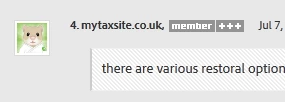
The same item in IE9 looks like this:

You can clearly see the number of posts and date of joining in the second picture.

Has anyone else noticed this?

    This topic has been closed for replies.
    Correct answer Noel Carboni

    I think I've figured it out.  It may have to do with whether you've logged-in to the forums.

    Safari was the only browser I did not have logged-in to the forums.  Once I logged in it showed the numbers for everyone.

    Why my stuff is visible even when logged-out...  People are always telling me they can see right through me. 

    -Noel

    2 replies

    pwillener
    Legend
    July 8, 2012

    Very confusing; here is what I see

    Waterfox 13 (signed in):

    Internet Explorer 9 (signed in):

    In both browsers the information is missing only in the first post, including the Correct answer embedded in it.

    P.S. I run CCleaner on a regular basis, so the caches of each browser should be clear.

    mytaxsite
    mytaxsiteAuthor
    Inspiring
    July 9, 2012

    P.S. I run CCleaner on a regular basis, so the caches of each browser should be clear.

    Does Ccleaner clears all cookies from your system?  You can prove this by logging into adobe forums and allowing your browser to "remember" you. Then you can run CCleaner to clear everything.  when this is done try going back into Adobe forums and see if the browser still remember your log-in details.  In FF you get a prompt when you start filling in your details.

    Noel Carboni
    Legend
    July 9, 2012

    As a career computer engineer with 36 years experience (geez, that's a long time) I advise against running any "cleaner" application.  CCleaner has a lot of fans, but I wouldn't trust it.  There is absolutely no reason you need to "clean" your system beyond occasional deletion of the files in the TEMP folder, which is easily done by hand.  It's a complete fabrication that a Windows registry needs to be "cleaned" - it does not.  I am running the same Windows installation I put in late in 2009, and it's light and fast as ever.

    I don't fault those of you who feel you get value from CCleaner.  I just wouldn't use it myself.

    -Noel

    Noel Carboni
    Legend
    July 8, 2012

    Looks okay in Firefox from here.

    What'ya bet it's an issue with something old still being in your local cache.  Purge, purge, PURGE I say! 

    -Noel

    mytaxsite
    mytaxsiteAuthor
    Inspiring
    July 8, 2012

    That's interesting because I looked at this link:

    http://forums.adobe.com/message/4544108#4544108

    And only your name has all the info but everybody  else's name is completely basic.  This is what your info shows at that particular link:

    Claudio González
    Legend
    July 8, 2012

    I see the data for every participant except the original poster:

    Firefox/Mac and Explorer/Win.