
Participant
October 16, 2012
Question

How do I stop email notifications?

  • October 16, 2012
  • 1 reply
  • 2523 views

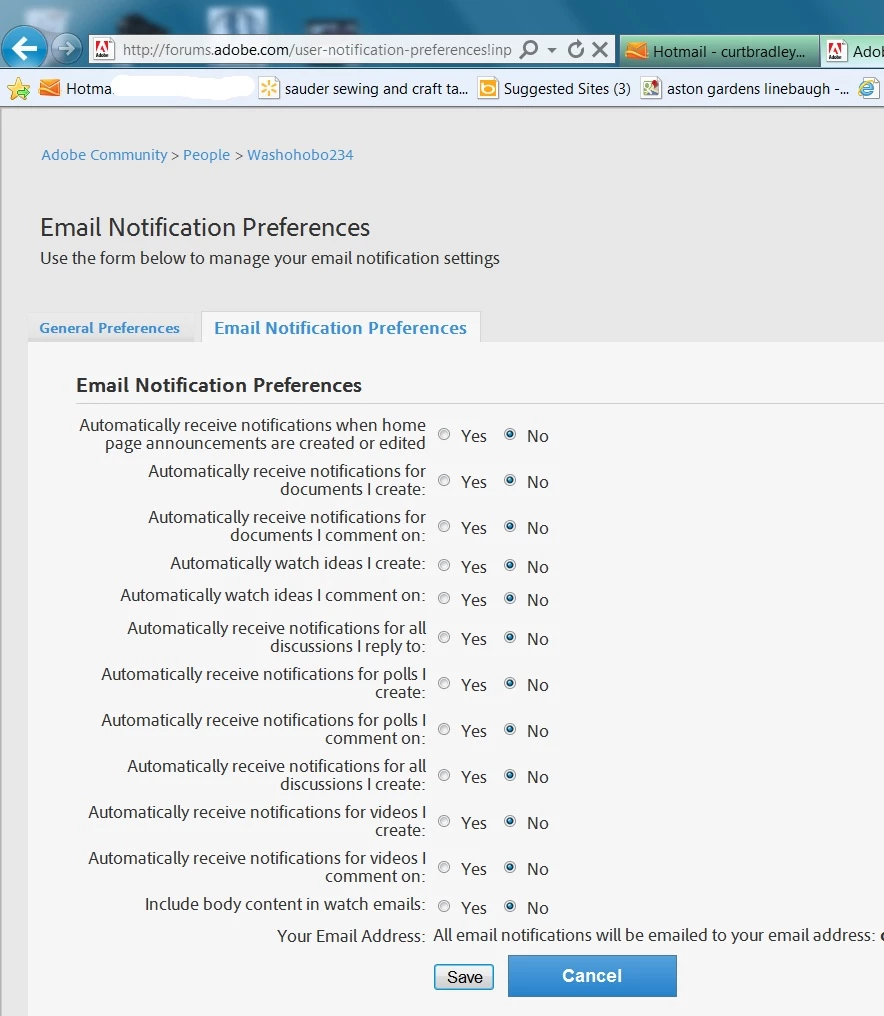
I have requested that all Adobe email notification be stopped. That did not work. I cannot seem to copy  and paste the reply address of any of the unwanted notifications. Please tell me how to stop the notifications.. If I uninstall Adobe will that stop the notifications?
    This topic has been closed for replies.

    1 reply

    pwillener
    Legend
    October 16, 2012
    Participant
    October 17, 2012

    Pat,

    As I understand it, if I change all of my email preferences to "No," which I have already done as shown in the original post (above), I should stop geeting those email notifications. And, further, if that does not work I am to send a screenshot of the Notifications Preferences (above) and a copy of the "Reply to"  address of one of the emails that I am getting. I am having trouble doing that..

    I assumed that they did not want the "Do Not Reply to" email address. So I am sending what I hope is the Reply toaddress from one of your emails that I received:


    jive-2130840402-hbgh-2-2ug99@mail.forums.adobe.com I hope someone can use that to help me stop those emails.

    --------------------------------------

    I have no idea how or why I started receiving this overwhelming number of emails in the past week.. I did not knowingly join any Forums or respond to any emails related to Adobe.

    .

    When I browse under "My Things" I find that I am not subscribed to any Forum. So I really do not know what it is I need to change.

    I will appreciate any help you can give me that will stop these emails.

    adobe-admin
    Legend
    October 17, 2012

    Those settings are for future posts. That stops you from becoming automatically subscribed to threads that you create or post in from now forward. It doesn't affect your current subscriptions.

    For your current subscriptions:

    Click on Your Stuff

    Click on Profile

    Click on Manage Email Notifications in the Actions panel on the right

    This will list all of the items you are currently subscribed to. You can filter this list to show full forums, indivdual threads, individual users, etc.

    There is a checkbox next to each item or a check all option at the top of the list.

    Check off the boxes for the items you want to unsubscribe from and click Remove Selected Notifications at the bottom of the list.

    That should clear out and stop your notifications.

    If this doesn't work, it usually indicates that you have more than one forum account and the subscriptions are part of the other account.