



Rocio_Lopez-Bretzlaff
Known Participant
April 24, 2023
Answered

How do I stop receiving emails from questions that have been resolved?

  • April 24, 2023
  • 3 replies
  • 973 views

How do I stop receiving emails from questions that have been resolved? I keep receiving emails and emails that are not longer relevant to me.  In one of those emails, at the bottom, there are TWO links to unsuscribe ( manage your notification settings or unsubscribe) but when I click in any of those links it send me to my profile page where there is not a place where I can unsuscribe or change notifications settings.

I have looked all over my account and the unsubsribe or change notifications options are not showing anywhere. One would think that such information should be something easy to find, but that is not the case.


Please, provide me with detailed info on how to change notifications settings, and on how to stop notifications from a TOPIC that has resolved the issue on hand.


Thank you kindly,
This topic has been closed for replies.
Correct answer SJRiegel

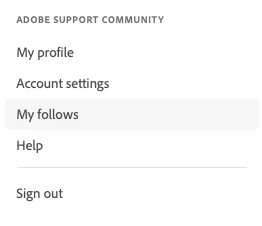
Under your account - go to My Follows

Once there, you can select any topics that you no longer want to see emails from, and click UnFollow at the top of the page

3 replies

Nancy OShea
Community Expert
Community Expert
May 1, 2023

I turned off all email notices.  I don't need them.  They just take up space in my inbox.


Click your web forum avatar and select Account Settings > Notifications. Uncheck the ones you don't need.


Nancy O'Shea— Product User & Community Expert
Peru Bob
Community Expert
Community Expert
April 24, 2023

Moved from the Photoshop forum.

SJRiegelCorrect answer
Legend
April 24, 2023

Under your account - go to My Follows

Once there, you can select any topics that you no longer want to see emails from, and click UnFollow at the top of the page
