-climb+V8
Participant
July 10, 2026
解決済み

I can't log out of the Community

  • July 10, 2026
  • 返信数 6.
  • 114 ビュー

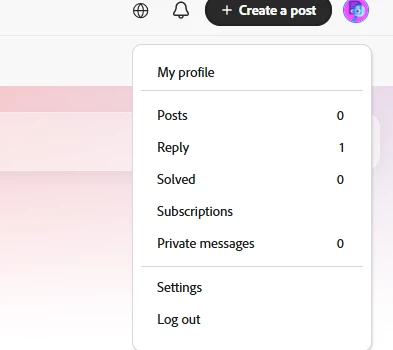
I cannot log out of the forum while I am logged in. Also, where can I change my nickname?

    解決に役立った回答 Nancy OShea

    To change your screen name, go to your main Adobe Account.

    Log-in below:  

    https://account.adobe.com/profile


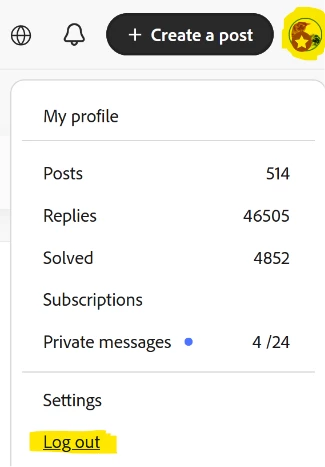
    To log-out of Adobe Community forums click your Avatar and scroll down to Log out.


    Hope that helps.


    返信数 6

    Nancy OShea
    Community Expert
    Community Expert
    July 13, 2026

    @-climb 

    You appear to have successfully changed your screen name, so I assume that problem is solved.

    When things don’t work as expected, you can check the Adobe System Status Report in real-time. 

    https://status.adobe.com/


    Nancy O'Shea— Product User & Community Expert
    Nancy OShea
    Community Expert
    Nancy OSheaCommunity Expert解決!
    Community Expert
    July 12, 2026

    To change your screen name, go to your main Adobe Account.

    Log-in below:  

    https://account.adobe.com/profile


    To log-out of Adobe Community forums click your Avatar and scroll down to Log out.


    Hope that helps.


    Nancy O'Shea— Product User & Community Expert
    kglad
    Community Expert
    Community Expert
    July 12, 2026

    @Nancy OShea 


    forum log out hasn’t been working for a while.

    Nancy OShea
    Community Expert
    Community Expert
    July 12, 2026

    I didn’t notice. But not surprised. 

    To log out, clear your browser’s Adobe cookies. It achieves the same thing.

    Nancy O'Shea— Product User & Community Expert
    Participant
    July 11, 2026

    CANT SAVE FILES


    Hello there
    I just bough an Adobe Photo Deluxe 2.0 CD and installed it on the computer and opened it and done a file. But I can not save the file! Please see a screen shot below
    Peru Bob
    Community Expert
    Community Expert
    July 11, 2026

    @FAT32 

    If you are running anything newer than Windows XP, I doubt it will run properly.

    kglad
    Community Expert
    Community Expert
    July 10, 2026

    @Pom_9Ming 


    try using a mobile phone's updated non-opera browser with wifi disabled to change your forum name.

    -climb+V8
    -climb+V8作成者
    Participant
    July 13, 2026


    Please take a look at my reply to Nancy and the image above for more details

    Community Expert
    July 10, 2026

    You are right. I am also not able to logout. There is some bug here

    -Manan
    Community Manager
    July 10, 2026

    Thank you for checking. Is there an error with the nickname change as well?

    Community Expert
    July 10, 2026

    Did not try the nickname change but logout button is just no op

    -Manan
    Community Expert
    July 10, 2026

    If the logout option is not working, check if you have some adblocker, userscript etc installed on your browser which may break a website. To change the nickname, click on “My Profile” in the page that open you will have a button called Edit Profile, click that and you can edit your nickname in the page that opens

    -Manan
    -climb+V8
    -climb+V8作成者
    Participant
    July 10, 2026

    Thank you for the response. However, the logout button is still not working. Even after clearing my browsing history, deleting temporary files, and trying a different browser, nothing happens when I click logout.Additionally, when I go to 'Edit Profile' and try to change my nickname, the updates are not saved.My colleague who is working from home is in the same situation.

    It seems like this might be a wider system issue rather than an isolated problem.Please help me resolve this issue as soon as possible.