YANNA26705213grl5
Inspiring
November 26, 2022
Answered

picture of my face to replace default graphic

  • November 26, 2022
  • 8 replies
  • 1347 views

I put a new picture in my account settings to replace the default graphic a long time ago and it hasn't changed. Is there some way to make it change ?

    This topic has been closed for replies.
    Correct answer LinSims

    If you're trying to change the avatar used in these forums, then you're doing it in the wrong place. 🙂 The picture for your Adobe profile doesn't carry over to these forums.


    1. At the top of the page, click your avatar and select My Profile from the pop-up menu.

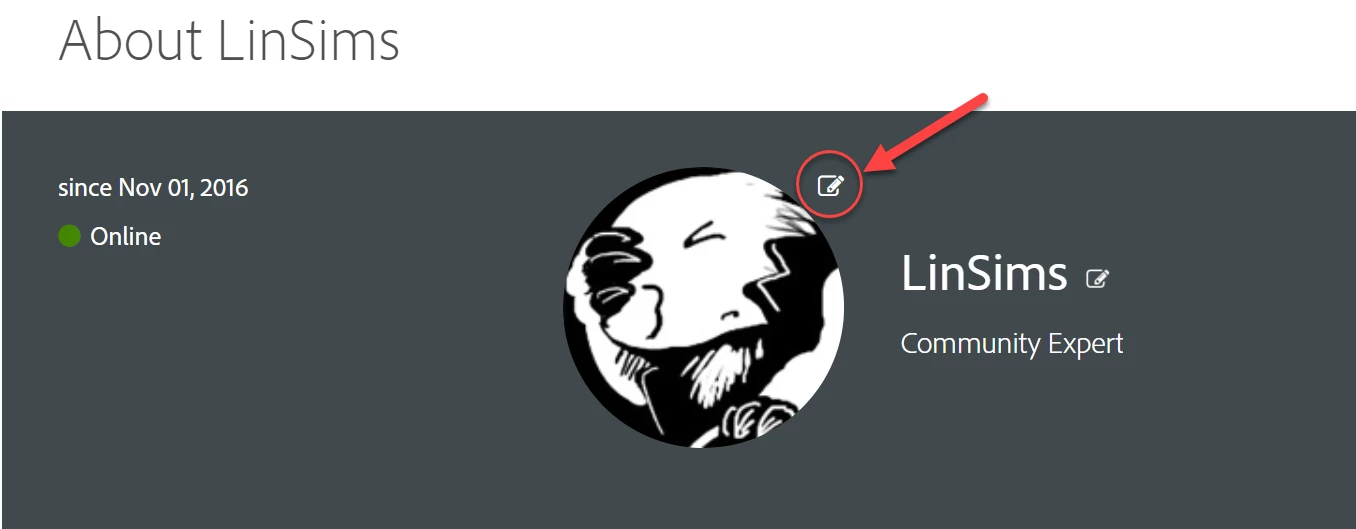
    2. In the banner, click the edit next to your avatar.

    3. Click Choose another avatar

    4. Click Browse to find the new avatar file and Save to upload it.


    8 replies

    LinSims
    Community Expert
    LinSimsCommunity ExpertCorrect answer
    Community Expert
    November 28, 2022

    If you're trying to change the avatar used in these forums, then you're doing it in the wrong place. 🙂 The picture for your Adobe profile doesn't carry over to these forums.


    1. At the top of the page, click your avatar and select My Profile from the pop-up menu.

    2. In the banner, click the edit next to your avatar.

    3. Click Choose another avatar

    4. Click Browse to find the new avatar file and Save to upload it.


    YANNA26705213grl5
    Inspiring
    November 28, 2022
    thank you for easy to follow instructions which worked perfectly !!!

    happy holidays !
    LinSims
    Community Expert
    Community Expert
    November 28, 2022

    You're welcome. And if you ever feel like changing your screen name in the forum, the edit next to your current screen name lets you do that.

    YANNA26705213grl5
    Inspiring
    November 27, 2022

    I took nancy's advice and made image 200 and got mssg the min is about 276 so I went back and made it bigger again...hehe... the face is so ugly it's really not important to have it displayed, but at the age of 72 these little challenges are sometimes worth pursuing just for the heck of it.. so my brain doesn't turn into oatmeal.


    : )


    YANNA26705213grl5
    Inspiring
    November 27, 2022

    thank you everyone for helping me with good advice and suggestions, etc. hope you all have a great holiday season !

    : )


    kglad
    Community Expert
    Community Expert
    November 27, 2022

    you're welcome, and happy holidays to you, too!

    Nancy OShea
    Community Expert
    Community Expert
    November 27, 2022

    What is the filesize of the avatar you uploaded?

    I think I had to rescale mine to 200 x 200 pixels to get it to work right with this forum system.


    Nancy O'Shea— Product User & Community Expert
    John T Smith
    Community Expert
    Community Expert
    November 26, 2022

    A long time ago (one or two forum software versions) users were allowed to change their own picture


    Until several users posted nude or semi-nude pictures


    The process  was then changed to require an employee review

    Henrik Heigl
    Community Expert
    Community Expert
    November 26, 2022

    Hi,


    maybe try to reload it in your Browser and also try to clear the Browser Cache. It seems that the Config in the Adobe Account is Ok so it has maybe to do with the config on your Device. Also just try to delete and Replace your Profile Pic again just to be on the safe side. Hope that helps.

    regards,Henrik
    YANNA26705213grl5
    Inspiring
    November 26, 2022


    kglad
    Community Expert
    Community Expert
    November 26, 2022

    you're good.


    you'll need to allow about 1 week because of the holiday situation in the usa.


    p.s. it's not a browser issue.

    kglad
    Community Expert
    Community Expert
    November 26, 2022

    attach a screenshot showing it selected as your default icon.