
Inspiring
February 9, 2021
Question

remove oneself from communty suppot page

  • February 9, 2021
  • 2 replies
  • 760 views

How do I remove myself from this community support page? Adobe is flooding my email inbox with every single post and comment being made by everybody. I called Adobe 1-800-585-0774 and the person hung up on me when I stated what i wanted to do. I called Adobe 1-800833-6687 and the person talked in circles because they didn't know how to do it. I will use those numbers in the future for Adobe product technical fails instead of this support page. Ironically, I have to get an email about this which I will probably never see because I am deleting pages of adobe emails daily from my inbox. I did go to an account settings page but the attempted changes to stop emails keeps getting reversed by adobe to receiving emails. What I'd really like to do is remove myself totally from this online support nonsense. Do I need to end my subscription and then start a new subscription with a new email address?
    2 replies

    Ko.Maruyama
    Community Expert
    Community Expert
    February 10, 2021

    Sorry that it's happening.  I know the feeling of that flooded inbox.


    One of the things I seem to remember (having done it), was that I had to make sure that I wasn't logged into any other browser windows when saving the settings for notifications.


    You can also go to your CreativeCloud preferences (outside the browser prefs) and turn off the notification setting there as well.

    It's a tough catch 22.  Like you said, most of the time, when you need the response, you want to have it pop up in your email, but if subscribed to a thread, you may get every post that gets made.


    Hope you figured it out - if not, DM me.


    Image: Notification Settings in CreativeCloud Preferences

    John T Smith
    Community Expert
    Community Expert
    February 9, 2021

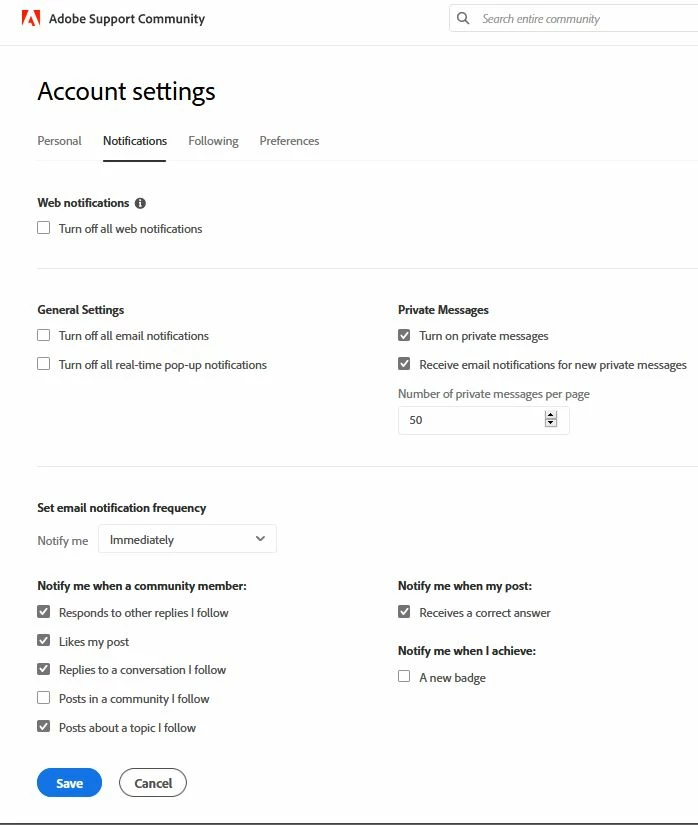
    YOU control emails
    Click your avatar picture at the upper right
    Click Account Settings
    Click Notifications
    Change the email settings to what you want
    Click SAVE

    pixelforAuthor
    Inspiring
    February 9, 2021

    Sorry, but no, you are wrong. I do not control emails. I went to that account settings page you speak of and did those steps you speak of. I clicked Save. The emails kept flooding in. I went back to the website and checked the settings. All of the settings were reset back to the receive email status. I repeated this several times.


    I called Adobe. I called Adobe several times. One Adobe rep actuall told me that the reason I'm getting all these emails is because I need to block cookies.


    These emails are posts and responses to posts which have nothing whatsoever to do with anything I have ever posted. Trying to change anything in settings has not only failed to change anything - it has failed to change anything anytime I tried to chnage anything in settings.


    Legend
    February 10, 2021

    For sure, Adobe Customer Service have nothing whatever to do with this. One thing you can try is to go to the SPECIFIC community page for each one sending you messages, and look at the top of the heading. If it says "Unfollow", click it.