



GoldingD
Legend
October 15, 2024
Answered

Replies not sticking

  • October 15, 2024
  • 3 replies
  • 267 views

In the LrC community, but this may apply to the entire community. For two different posts I inputted a simple reply, And then clicked on Post. And no reply, no message, no error, nothing. Refresh shows as if I never looked at the post.


Windows 11, Mozella Firefox.


these are the two posts:


One reply was a simple request to confirm LrC version, the other to share /preferences/performance/


Now, I was attempting to use Quote, but to quote not the OP but the final reply. Syntax issue???

And I now can make a simple reply to another post (where I just typed in text, nothing fancy)


/Followup/


Attempted again but without using the quote feature, still failed, However I did copy and paste the OP ID. Attempted again without quote and without copy/paste of member ID, instead typed in that ID (so no possible link) and that works



This topic has been closed for replies.
Correct answer jane-e


@GoldingD  wrote: I was attempting to use Quote, but to quote not the OP but the final reply. Syntax issue???


Adobe uses forum software and has limited control for making changes to the way the forum software works.

  • When you reply to a bug or idea and use the quote button, the quote is alway the one from the OP and the replies are not threaded.
  • When you reply to a discussion and use the quote button, the quote is the one that you replied to and the replies are threaded.


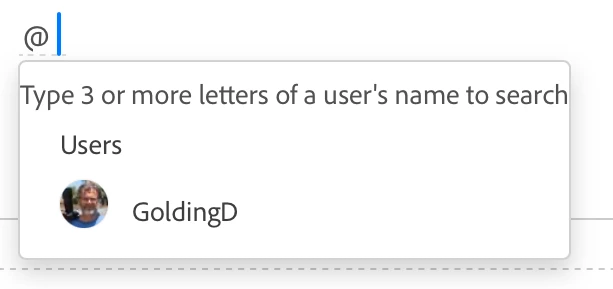
If you type the "at" symbol "@", you will get a list of users on that thread. Click their name to tag them. If it does not appear because there are lots of replies, start typing the name until you see it, then click on it.


Sometimes I'll select and copy an appropriate sentence and paste it into my reply so that it's clear what I am replying to.


I'm not sure that I answered your question, so please post again if I missed it.


Jane


3 replies

Nancy OShea
Community Expert
Community Expert
October 16, 2024

1. If you dawdle while composing, as I sometimes do when my attention is diverted to something else, your client-side session may get lost in the ether. 

2. This also happens when another user posts or modifies a reply ahead of yours, or a moderator moves the topic.  In other words, stuff happens, but it's almost never repeatable. 😮


Hope that helps.


Nancy O'Shea— Product User & Community Expert
kglad
Community Expert
Community Expert
October 16, 2024

i sometimes see this.  if i do, i slightly change my reply and click post again and then it works.


if i don't make a change, the post button repeatedly fails.

jane-e
Community Expert
jane-eCommunity ExpertCorrect answer
Community Expert
October 16, 2024


@GoldingD  wrote: I was attempting to use Quote, but to quote not the OP but the final reply. Syntax issue???


Adobe uses forum software and has limited control for making changes to the way the forum software works.

  • When you reply to a bug or idea and use the quote button, the quote is alway the one from the OP and the replies are not threaded.
  • When you reply to a discussion and use the quote button, the quote is the one that you replied to and the replies are threaded.


If you type the "at" symbol "@", you will get a list of users on that thread. Click their name to tag them. If it does not appear because there are lots of replies, start typing the name until you see it, then click on it.


Sometimes I'll select and copy an appropriate sentence and paste it into my reply so that it's clear what I am replying to.


I'm not sure that I answered your question, so please post again if I missed it.


Jane