the_wine_snob
Inspiring
January 21, 2014
Answered

Thread Formatting Gone Wonky

  • January 21, 2014
  • 2 replies
  • 1704 views

I have seen similar, in the past, but for recently. This thread: http://forums.adobe.com/message/6034224#6034224 goes "wonky" at Reply #22, and it appears that whatever has happened, carries over to following Replies. Does anyone know the cause, or better yet, the fix. I looked at Reply #22 carefully for any formatting code, but saw nothing out of the ordinary, but maybe it's beyond the reach of my MOD console.

Any comments, or help (John C??? ) would be appreciated.

Thanks,

Hunt

    This topic has been closed for replies.
    Correct answer Claudio González

    Hello Bill,

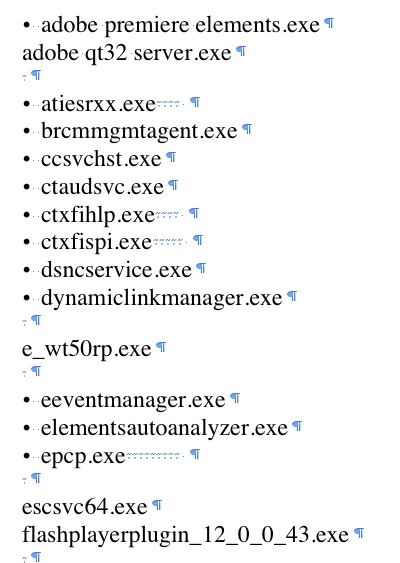
    This may be related with the way the list in message #22 was bulleted. I copied and pasted part of the list to Word, and this is what I got:

    I see normal spaces after the bullets and, as I am no heavy user of Word, I don't know that those strange spaces after some elements of the list and before the pargraph indicators mean.

    And of course I have no idea if this is really the cause for the format problem, or how to correct/prevent this break if it is...

    2 replies

    adobe-admin
    Legend
    January 21, 2014

    Do you have a screen shot? I'm missing something.

    Claudio González
    Legend
    January 21, 2014

    If the funny way the list in message #22 was bulleted was related with the wonky formatting, you are missing nothing. The wonky formatting is gone, and the same part of the list, copied and pasted to Word, now has this much more normal look:

    Claudio González
    Claudio GonzálezCorrect answer
    Legend
    January 21, 2014

    Hello Bill,

    This may be related with the way the list in message #22 was bulleted. I copied and pasted part of the list to Word, and this is what I got:

    I see normal spaces after the bullets and, as I am no heavy user of Word, I don't know that those strange spaces after some elements of the list and before the pargraph indicators mean.

    And of course I have no idea if this is really the cause for the format problem, or how to correct/prevent this break if it is...

    Phillip M  Jones
    Inspiring
    January 21, 2014

    They mean corruption. In a List such as this there should be absolutely no extra spaces nor any extranious characters.  The little faint almost impossible to see dots are spacing characters. When show invisibles ¶ button is  clicked will show ¶ paragraph marks, .(only centered between words top to bottom and side to side) is space character the the are tab markers sort of look 7  only very small and superscripted.

    In a list such as for example the custom dictionary. should show as:

    One

    Two

    Three

    And so on. Any extra characters such as additionl spaces or other Marks indicate corruption. They either should be removed or the list discarded and start over with new list.