
JP Hess
Inspiring
December 11, 2019
Answered

Trouble with Google Chrome

  • December 11, 2019
  • 5 replies
  • 1153 views

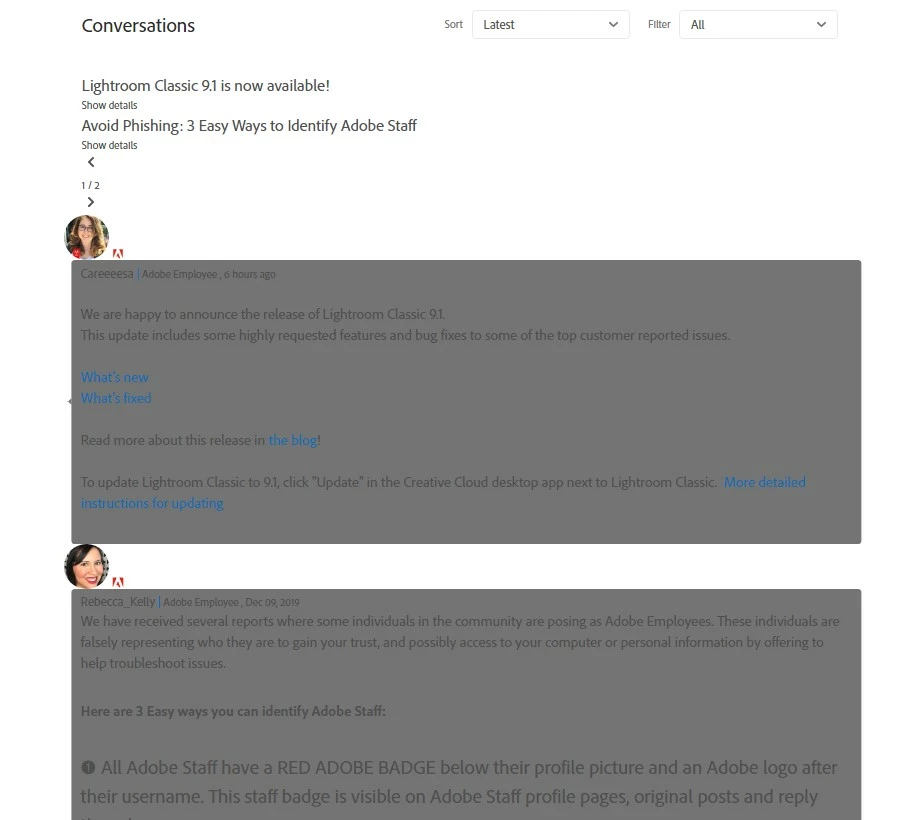
Can someone explain to me why Google chrome is displaying the messages at the top of the forum this way? Really irritating.

 

This topic has been closed for replies.
Correct answer Tacafy大尉

Good morning, JimHess.
It seems that it is necessary not only to restart the PC but also to clear the browser cache. Please refer to this post.

https://community.adobe.com/t5/adobe-community-professionals/is-anyone-else-seeing-this/m-p/10793697#M24478

* If you can't see the post above, please clear the cache and then visit the forum. The symptoms are improved.


5 replies

LinSims
Community Expert
Community Expert
December 13, 2019

You can also just clear cookies for the community.adobe.com site and refresh the screen.


  1. Launch Google Chrome and click on the ⁞ atthe top right corner and click Settings from the drop-down.
  2. Scroll to the bottom and click Advanced.
  3. Under Privacy and Security section, click on Site Settings.
  4. Under All sites, click on View permissions and data stored across sites.
  5. Find the listing for adobe.com and expand it.
  6. Click community.adobe.com
  7. Click Clear data in the Usage section.
  8. Reload/refresh the tab for the community pages.


I got the basics for this from this site. https://7labs.io/tips-tricks/clear-site-specific-cookies-cache.html

It's a bit out of date, but enough to get you started, and it covers several browsers.

Tacafy大尉
Tacafy大尉Correct answer
Legend
December 11, 2019

Good morning, JimHess.
It seems that it is necessary not only to restart the PC but also to clear the browser cache. Please refer to this post.

https://community.adobe.com/t5/adobe-community-professionals/is-anyone-else-seeing-this/m-p/10793697#M24478

* If you can't see the post above, please clear the cache and then visit the forum. The symptoms are improved.


Abambo
Community Expert
Community Expert
December 11, 2019

Moved from Lightroom Classic to Community help.

ABAMBO | Hard- and Software Engineer | Photographer
JP Hess
JP HessAuthor
Inspiring
December 11, 2019

I experienced the issue yesterday. I restarted the computer, and it resolved itself once. But it is back today. Microsoft Edge doesn't show the problem, but I have other issues with it. And I don't like Firefox. Oh well, now I know I'm not the only one seeing the problem.

John Waller
Community Expert
Community Expert
December 11, 2019