Greg_S.
Community Expert
Community Expert
November 8, 2019
Answered

Unable to translate post into English

  • November 8, 2019
  • 8 replies
  • 1466 views

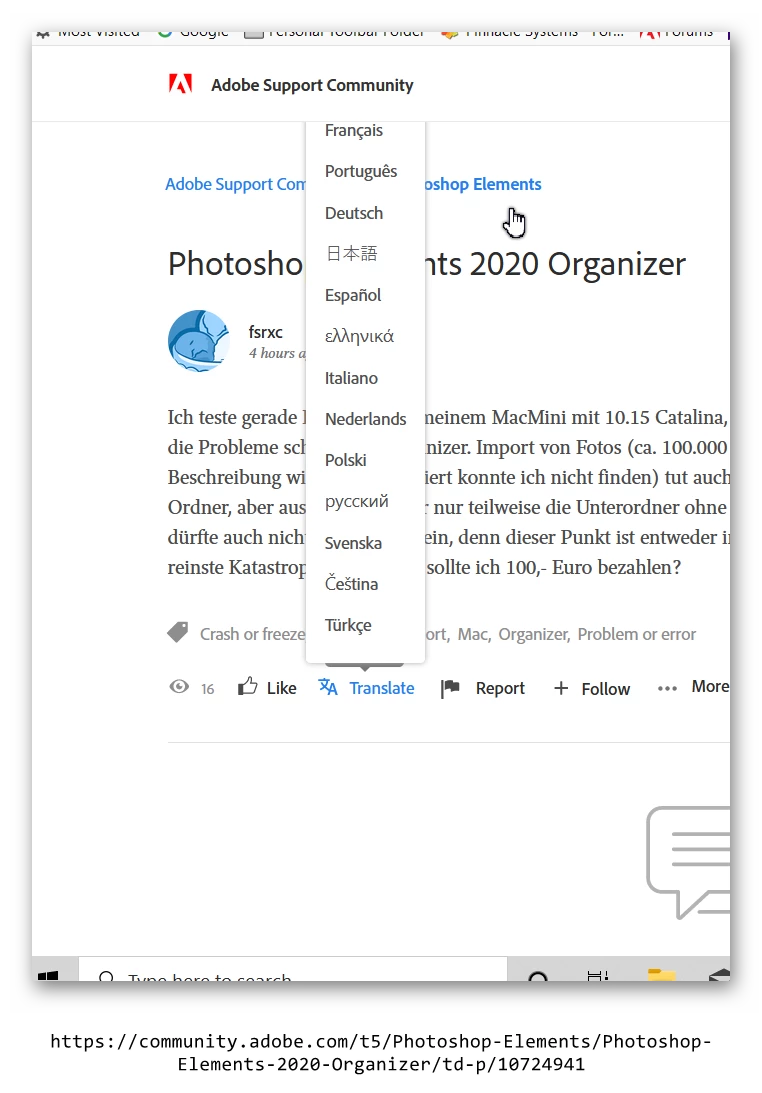
. . .  because the English option is at the top of the list and is off screen (in Firefox). Zooming the post out does not help. And this doesn't seem to be related to the fact that translation doesn't work where the Conversation title is in English.


This topic has been closed for replies.
Correct answer John Waller

>> because the English option is at the top of the list and is off screen


Looks like this was fixed in the Nov 11 update. Accessing the English option at the top of the menu works OK for me now.

https://community.adobe.com/t5/Community-Feedback/November-11th-Release-Notes/td-p/10739478


"Bug: Translation menu should no longer show above button and should no longer hide the English option."


However, no error message appears when the Subject language = target translation language but the body text still requires translation. In that case now, the Translation option just does nothing. I preferred the error message. At least we knew what was going on then.


Surely all they need to do is extend the script fired by the Translate button to check the language for both Subject and body? Or ignore the Subject entirely and check the body text?


8 replies

Ann Bens
Community Expert
Community Expert
November 24, 2019
John Waller
Community Expert
John WallerCommunity ExpertCorrect answer
Community Expert
November 14, 2019

>> because the English option is at the top of the list and is off screen


Looks like this was fixed in the Nov 11 update. Accessing the English option at the top of the menu works OK for me now.

https://community.adobe.com/t5/Community-Feedback/November-11th-Release-Notes/td-p/10739478


"Bug: Translation menu should no longer show above button and should no longer hide the English option."


However, no error message appears when the Subject language = target translation language but the body text still requires translation. In that case now, the Translation option just does nothing. I preferred the error message. At least we knew what was going on then.


Surely all they need to do is extend the script fired by the Translate button to check the language for both Subject and body? Or ignore the Subject entirely and check the body text?

axmelissarios1
Legend
November 19, 2019

Hi John, in regards to the translation issues: yes, we're aware of the issue you're talking about and are finding ways to solve it. For the translation menu, you're correct that it was fixed in the November 11th release.

Melissa Rios, Product Manager, Community Experiences & Platforms | Adobe
John Waller
Community Expert
Community Expert
November 19, 2019

Thanks for the feedback, Melissa.

NB, colourmanagement
Community Expert
Community Expert
November 12, 2019

I saw exactly that here on Chrome Mac. 

Greg_S.
Community Expert
Greg_S.Community ExpertAuthor
Community Expert
November 9, 2019

OK, the workaround I just found is to counter-intuitively zoom IN to the post (several times from my normal viewing ratio).  I have my Windows display scale and layout set to 125%. Changing it to 100% had no effect.  It was only when I hit Ctrl+ several times in my browser that the top of the menu showed up.


Added:  And the behavior of the menu has also changed.  There is no warning message that the target language is the same as the post.  Such a warning would pop up previously if the subject line is in English.

John Waller
Community Expert
Community Expert
November 9, 2019

Yes, same behaviour here for that particular post on a small screen. Unable to scroll to top of menu.


When I set my hi-res monitor to full screen browsing, the menu appears below the Translate button. Seems like the script which fires the menu needs tweaking to improve menu positioning.

The irony here is that Translate to English still doesn't work because the Subject header is deemed to already be in English.

Greg_S.
Community Expert
Greg_S.Community ExpertAuthor
Community Expert
November 8, 2019

John, normally I can do that too.  But in this case, I am at the top of the browser window and can't scroll any further.  The pop up menu doesn't extend beyond the window in view.  Here is a link to the thread, if anyone wants to try it.

Nancy OShea
Community Expert
Community Expert
November 9, 2019

It works OK for me.  Desktop Firefox. 


Nancy O'Shea— Product User & Community Expert
John Waller
Community Expert
Community Expert
November 9, 2019

Shrink your browser window to force the menu to appear above the Translate button, Nancy. You can see the top and bottom of the browser viewport in Greg's screenshot.


Then the English option at the top is inaccessible.

John Waller
Community Expert
Community Expert
November 8, 2019

When this happens to me, I am able to scroll the browser window down to reveal the English option at the top of the menu.


No clicking or the menu disappears. Just scroll up or down on my mouse wheel or track pad.

Ann Bens
Community Expert
Community Expert
November 8, 2019

Yes known issue.