



gabibadu
Known Participant
Oct 8, 2022 12:15 PM UTC
Answered

where to report / denouce scam email from fake "adobe support"

Dears:
yesterday I was desperatly looking for an info on how to download an old version of Premiere.
I got several emails from a fake "Team Adobe" account.
I know its scam cause they got in touch with me via private message, trying to sell expensives versions of Premiere, even though I'm already a costumer, and those versions would never fit my High Sierra.
They are still sending me mesages via email, and I can tell, it is not a "protocol comunication".
How can I report them?
Thank you very much

This topic is closed to new replies. Start a new post to keep the conversation going.
jane-e
jane-eCorrect answer
Community Expert
Oct 9, 2022 12:25 AM UTC

@gabibadu 


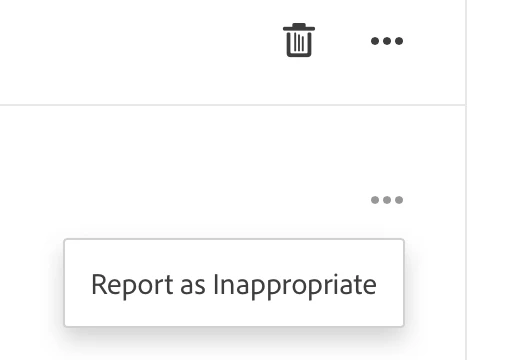
In addition, you can report the scammer as soon as you see his/her/its post. Under the Trash can is a second set of three dots. Click the three dots (menu) and choose "Report as inappropriate".


Jane

6 replies

jane-e
Community Expert
jane-eCommunity ExpertCorrect answer
Community Expert
Oct 9, 2022 12:25 AM UTC

@gabibadu 


In addition, you can report the scammer as soon as you see his/her/its post. Under the Trash can is a second set of three dots. Click the three dots (menu) and choose "Report as inappropriate".


Jane

Translate
kglad
Community Expert
Community Expert
Oct 9, 2022 1:59 AM UTC

@jane-e , these were emails, not forum posts.


@gabibadu , if you're still getting emails, mark one as spam so future emails from that address go directly to spam

Translate
Ged_Traynor
Community Expert
Community Expert
Oct 9, 2022 8:30 AM UTC

@kglad what Jane posted above is from the Private Messages option

Translate
kglad
Community Expert
Community Expert
Oct 8, 2022 12:23 PM UTC

thank you for that post (and hello, again).


you can report here, http://www.adobe.com/genuine.html


Translate