
hugh_1870
Participant
May 21, 2026
Question

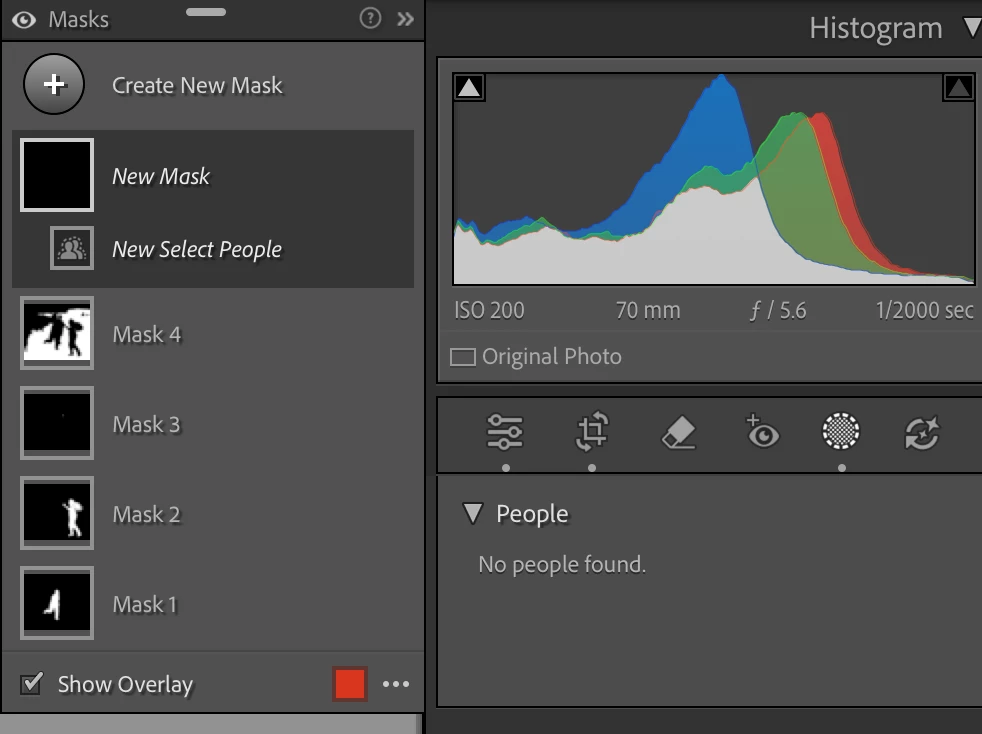
masking tool is no longer detecting people in images. Was working earlier this week, now it says "no people found"
  • May 21, 2026
  • 4 replies
  • 52 views

Editing photo in LRC. Open masking tool; select “Open New Mask”; choose “Select People”. Receive message “no people found”


    4 replies

    johnrellis
    Legend
    June 1, 2026

    Your Help > System Info didn’t get posted here. You can do that menu command, click the Copy button, and then paste the text here.

    sjgruning
    Known Participant
    June 1, 2026

    Lightroom Classic version: 15.3 [ 202604090947-8f3672ed ]
    License: Creative Cloud
    Language setting: en-US
    Operating system: Mac OS 26
    Version: 26.5.0 [25F71]
    Application architecture: x64
    Logical processor count: 16
    Processor speed: 3.8GHz
    SqLite Version: 3.36.0
    Adobe GSDK Version: 1.4.0.213

    Built-in memory: 32,768.0 MB
    Dedicated GPU memory used by Lightroom: 5,534.3MB / 8,176.0MB (67%)
    Real memory available to Lightroom: 32,768.0 MB
    Real memory used by Lightroom: 7,698.4 MB (23.4%)
    Virtual memory used by Lightroom: 82,030.7 MB
    Memory cache size: 5,899.8MB
    Internal Camera Raw version: 18.3 [ 2527 ]
    Maximum thread count used by Camera Raw: 5
    Camera Raw SIMD optimization: SSE2,AVX,AVX2
    Camera Raw virtual memory: 4873MB / 16383MB (29%)
    Camera Raw real memory: 5790MB / 32768MB (17%)

    Cache1: 
    Final1- RAM:689.0MB, VRAM:2,538.0MB, Gretchen_James May 2026-431.DNG
    Final2- RAM:289.0MB, VRAM:0.0MB, Gretchen_James May 2026-589.DNG
    NT- RAM:978.0MB, VRAM:2,538.0MB, Combined:3,516.0MB

    Cache2: 
    m:5,899.8MB, n:541.1MB

    U-main: 324.0MB

    Standard Preview Size: 4096 pixels
    Displays: 1) 4096x2304

    Graphics Processor Info: 
    Metal: AMD Radeon Pro 5500 XT
    Init State: GPU for Export supported by default
    User Preference: Auto
    Enable HDR in Library: ON
    GPU for Preview Generation: Auto (S5_7)

    Application folder: /Applications/Adobe Lightroom Classic
    Library Path: /Volumes/WD 12 TB 1/Lightroom Classic/Lightroom Classic-v13-3.lrcat
    Settings Folder: /Users/GheeGhee/Library/Application Support/Adobe/Lightroom

    Installed Plugins: 
    1) AdobeStock
    2) Aperture/iPhoto Importer Plug-in
    3) Flickr
    4) Topaz Photo (Studio)
    5) Topaz Photo AI

    Config.lua flags: 

    sjgruning
    Known Participant
    June 1, 2026

    Same, I am getting this as well. Very frustrating.

    johnrellis
    Legend
    May 25, 2026

    Please do the LR menu command Help > System Info, click the Copy button in the upper right corner, and paste into your reply here, so we can see exactly which versions of hardware and software LR thinks you're running and important LR options that are set.

    sjgruning
    Known Participant
    June 1, 2026

    I am having the same issue and I just posted my system info.