sbn85
Known Participant
June 17, 2026
Question

P: PS v27.8 new home screen

  • June 17, 2026
  • 20 replies
  • 273 views

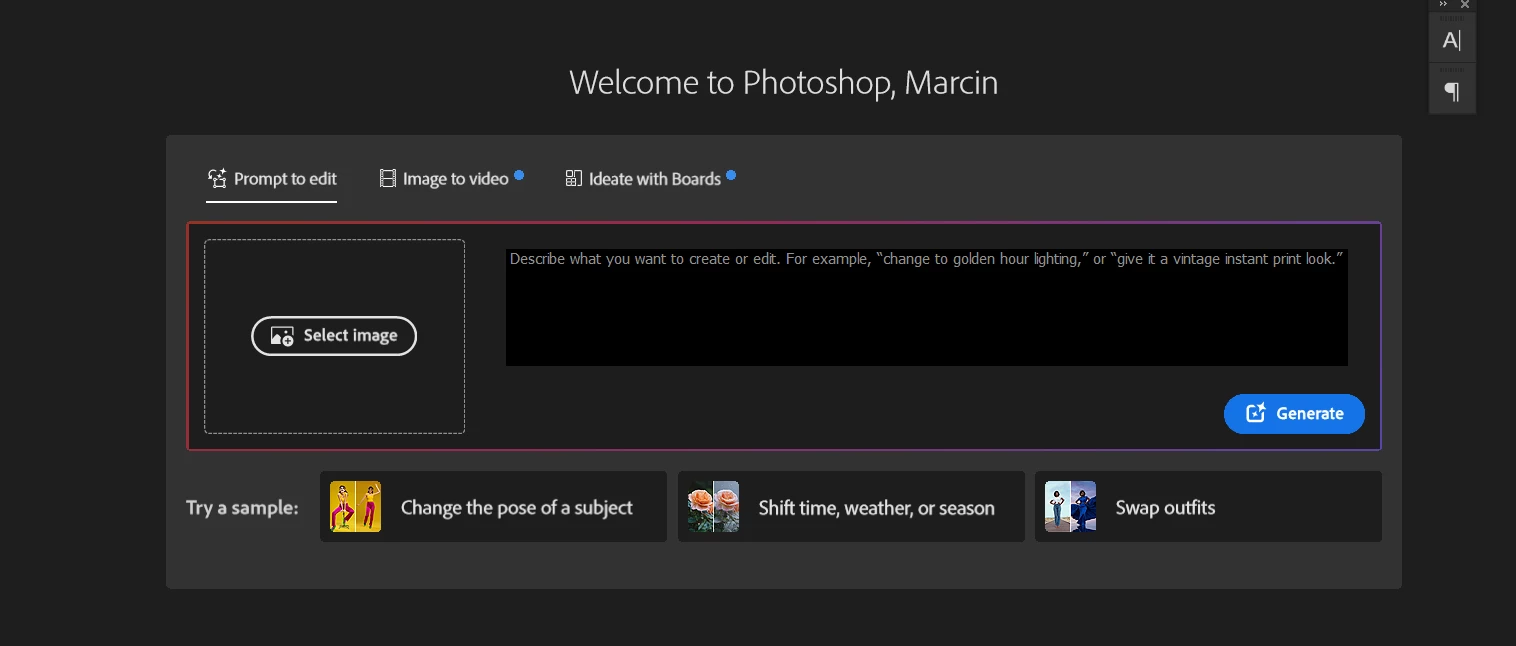
How to disable/hide this thing in home screen of photoshop?
 

    20 replies

    Known Participant
    June 19, 2026

    v26.11.6

    I tried the [ use legacy document ] doesn’t change anything….

    Will be nice to have it back as it was. only see the recent document and nothing else..


    benoit Kapture foto
    jane-e
    Community Expert
    Community Expert
    June 19, 2026

    @Kapture benoit wrote: I tried the [ use legacy document ] doesn’t change anything


    See the post from staff (marked in yellow):

    https://community.adobe.com/questions-712/p-ps-v27-8-new-home-screen-1628247?postid=7686803#post7686803

    “Currently, there is no Preferences setting to hide or disable this”


    For the interim, I’ve disabled the Home Screen in Preferences.


    Jane


    bellevue scott
    Inspiring
    June 18, 2026

    To avoid seeing this abomination that Adobe is calling a “new Home Screen Experience”, uncheck the auto show home screen in the Settings → General area. 


    Participating Frequently
    June 18, 2026

    This is a genuinely horrendous change. We’re already having gen AI forced down our throats enough without having this in our face every time, and then also having to scroll down to find our documents.

    I’m hanging on by a thread already, so I’ll likely be cancelling my sub if this isn’t changed.

    jane-e
    Community Expert
    Community Expert
    June 18, 2026

    @Anshul_Saini wrote: Your feedback matters! If you'd prefer an option to hide or minimize this section of the Home Screen. We'd love to hear that feedback.


    Count me in as needing the ability to hide this new monstrosity.

    I’ll miss seeing previews of my Recents list, but have now disabled the Home Screen in Preferences.


    Jane


    Anshul_Saini
    Community Manager
    Community Manager
    June 18, 2026

    Hi Everyone,

    Thank you for reaching out about the updated Home Screen in Photoshop. What's happening is that
    with the Photoshop version 27.8 (June 2026) update, the product team introduced a redesigned Home Screen experience.


    We understand that not everyone wants to interact with the Home Screen in the same way. Currently, there is no Preferences setting to hide or disable this.

    The existing preference under Edit > Preferences > General > "Auto Show the Home Screen" controls whether the Home Screen appears at all when no documents are open. Still, it does not control the content shown within the Home Screen itself. The new tabbed creative experience is part of the Home Screen content and doesn't have a separate on/off switch at this time.
     

    This new experience is being rolled out gradually. Some users may see it while others don't; this is intentional as we monitor feedback and performance. If you're not seeing it, your account may not be in the current rollout group yet.


    Your feedback matters! If you'd prefer an option to hide or minimize this section of the Home Screen. We'd love to hear that feedback. I can report this directly to the Photoshop product team on your behalf.
     

    We appreciate you taking the time to share your experience.


    Best,

    Anshul Saini

    sbn85
    sbn85Author
    Known Participant
    June 19, 2026

    Ok, so here's my feedback too:

    • It's terrible.

    I also have no interest in using any ai prompt randomizer when I open Photoshop to start my daily work (or later on anytime during the day). I would appreciate having the option to remove it completely or at least hide it.

    I like the old home screen as it is. Having a gallery of thumbnails of your recent work when you open Photoshop is great, as it allows you to quickly locate exactly what you want to open without having to remember the file name. That's the only thing I care about and expect from the home screen.

    I don't want to dig through AI features to find my own files.

    The option to simply disable the home screen altogether and use File > Open or Open Recent is not a great alternative.

    Trevor.Dennis
    Community Expert
    Community Expert
    June 18, 2026

    I only see it in the release version (it’s not in the beta version).  I can’t see from your screen shot, but I have a Hide Suggestions button that turns it off.


    Ged_Traynor
    Community Expert
    Community Expert
    June 18, 2026

    Hi Trevor, this is what I have in the release 27.8 version, looks different from your screenshot, is that a Beta screenshot you posted


    Trevor.Dennis
    Community Expert
    Community Expert
    June 18, 2026


    Stepanka+Pavlikova
    Participant
    June 18, 2026

    Yes please. I would also appreciate being able to see only my work on the PS home screen,  not optional suggestions. Thank you 


    davescm
    Community Expert
    Community Expert
    June 18, 2026

    Have you tried disabling the home screen altogether - Preferences > General > then uncheck ‘ Auto show the home screen’. 


    I do that here. You can still see list of recent files in File > Open Recent.

    Dave

    davescm
    Community Expert
    Community Expert
    June 18, 2026

    Have you tried disabling the home screen altogether - Preferences > General > then uncheck ‘ Auto show the home screen’. 


    You can still see list of recent files in File > Open Recent.

    Dave

    Participating Frequently
    June 18, 2026

    Yes, this works, but I think many users (myself included) quite linke the thumbnails for a quick overview. Of course this can be solved by naming, but this doesn’t always work when you are in the def_def_final stretch.

    My main issue is that you used to be able to hide/collapse the AI panel in previous versions. An option which has now been removed.

    Ged_Traynor
    Community Expert
    Community Expert
    June 18, 2026

    @RG631971 you’re not alone, and there’s currently no way to disable it
