


Exit
  • Global community
    • Language:
      • Deutsch
      • English
      • Español
      • Français
      • Português
  • 日本語コミュニティ
  • 한국 커뮤니티
0

Javascript for dividing one field and answering into another field

New Here ,
Dec 13, 2018 Dec 13, 2018

I have Adobe Acrobat DC - and I have a fillable PDF with Columns.

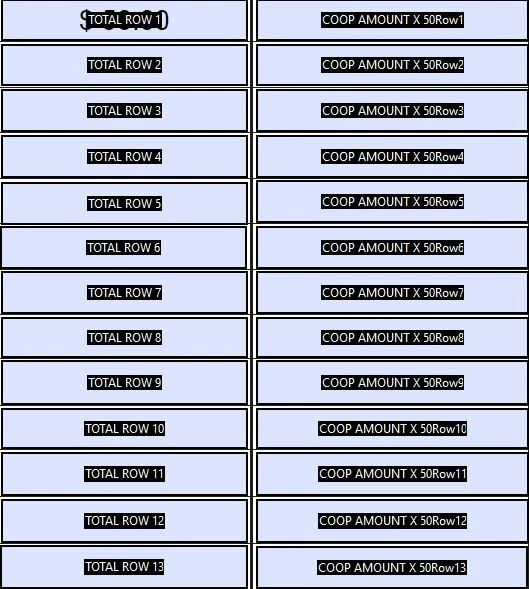
I am attempting to divide one field (TOTAL ROW 1) by 2 to answer in the column field beside it COOP AMOUNT x 50Row1.

I tried multiplication and that didn't seem to work either. I can easily change the name of the field

I supplied a small portion of the form below.
adobe help.JPG

THank you so much, as I have been trying everything

TOPICS
Acrobat SDK and JavaScript , Windows
4.2K
Translate
Report
Community guidelines
Be kind and respectful, give credit to the original source of content, and search for duplicates before posting. Learn more
community guidelines

correct answers 1 Correct answer

Community Expert , Dec 13, 2018 Dec 13, 2018

So you want the field "COOP AMOUNT x 50Row1" to be ("TOTAL ROW 1"/2) ?

These names will cause the "Simplified Notation" calculation to fail.  The field names cannot contain spaces or punctuation.

But this could be done with JavaScript without changing the field names.

For example:

event.value = this.getField("TOTAL ROW 1").value/2;

You could even create a generic document function to perform the calculation. 

Read more about scripting calculations here:Calculating field values and more

and here: https://acrobatusers.com/tutorials/how-to-do-not-so-simple-form-calculations

...
Translate
Community Expert ,
Dec 13, 2018 Dec 13, 2018

So you want the field "COOP AMOUNT x 50Row1" to be ("TOTAL ROW 1"/2) ?

These names will cause the "Simplified Notation" calculation to fail.  The field names cannot contain spaces or punctuation.

But this could be done with JavaScript without changing the field names.

For example:

event.value = this.getField("TOTAL ROW 1").value/2;

You could even create a generic document function to perform the calculation. 

Read more about scripting calculations here:Calculating field values and more

and here: https://acrobatusers.com/tutorials/how-to-do-not-so-simple-form-calculations

Thom Parker - Software Developer at PDFScripting
Use the Acrobat JavaScript Reference early and often

Translate
Report
Community guidelines
Be kind and respectful, give credit to the original source of content, and search for duplicates before posting. Learn more
community guidelines
New Here ,
Dec 13, 2018 Dec 13, 2018
LATEST

Thank you so much Thom!! THAT WORKED!!

Translate
Report
Community guidelines
Be kind and respectful, give credit to the original source of content, and search for duplicates before posting. Learn more
community guidelines