Participant
October 23, 2017
Answered

Adobe After Effects CS6 upscaled 1440p unable to render in 60 FPS

  • October 23, 2017
  • 1 reply
  • 2203 views

Good day everyone. I am definitely new here, but have been using AE as well as Premiere Pro for around 3-5 years now, on and off.

I come from a gaming scene where the game with all the flora and background messes up the YT algorithm, which makes the scenes look extremely bad, thus we came up with the idea to upscale the footage to 1440p or even 4K, which helped a lot.

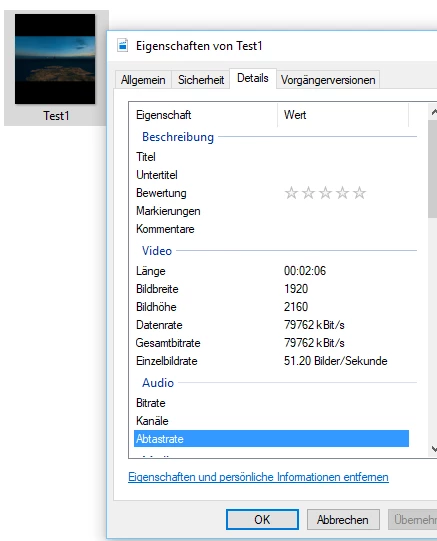
But at that point, we ran into a problem, one, which for whatever reason changed over the years. Whenever we upscaled the footage, we were limited to 30 FPS renders, instead of the 60 FPS we initially selected and worked with. By now, AE still lowers doesn't render with 60 FPS, but with 51.20. This has the problem with it that the music which is attached to it, is all over the place, since it was put in for 60 FPS, while being rendered in 51 FPS. Took me some time to understand that as well. Not fully sure why that is and how to work around that. Would be very glad for some help. How does this happen and how could I fix this? I am currently working on a new project and would love to be able to render it in 60 FPS, however as of right now, this is impossible.

Additional infos: I tried around in Premiere today, in order to render it in there, in 1440p, but it wouldn't let me since there is no pre-setting for 1440p in CS6. Trying to put it together myself, it limits it to 30 FPS instead of 60.

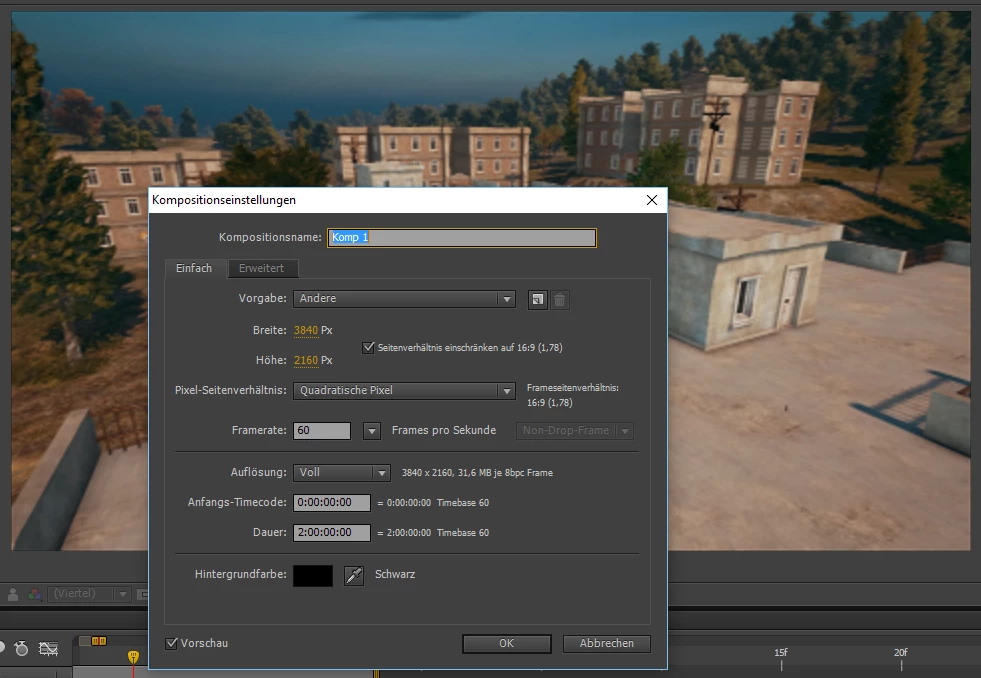
I put some screenshots in as well so you can see the actual numbers and render/composition settings. My apologies for it being in german. The example is in 4K, however represents the 1440p situation perfectly as well.
Thanks for answers in advance.

Alpha

This topic has been closed for replies.
Correct answer Alpha 141

Hello Kevin!

Kind of funny that an answer comes in now, now that I was able to at least pin point the problem and sort of work around it.

As far as I now understand, the CS6 AME was the problem. A friend who works a lot with Adobe products told me to download the CC AME and try it through that. And it actually does work now (to some extend. normal CS6 Premiere projects work fine).

Sadly, I am running into a new problem which basically makes it unable for me to render any After Effects project in 1440p/4K 60 FPS, not even through Premiere, because of the "Could not connect to Adobe After Effects.  Please verify that Aobde After Effects and Adobe Dynamic Link components are installed" error.

Any idea how to fix that? I read through multiple posts and forums, but couldn't find anything that works with CS6 and the newest version of CC.

Cheers and thanks for the help,

Alpha

1 reply

Kevin-Monahan
Community Manager
Community Manager
November 8, 2017

Hi Alpha,

Have you tried rendering to an intermediate codec rather than .mp4 H.264? That should probably function better. Let us know.

Thanks,
Kevin

Kevin Monahan - Sr. Community and Engagement Strategist – Adobe Pro Video and Audio
Alpha 141AuthorCorrect answer
Participant
November 8, 2017

Hello Kevin!

Kind of funny that an answer comes in now, now that I was able to at least pin point the problem and sort of work around it.

As far as I now understand, the CS6 AME was the problem. A friend who works a lot with Adobe products told me to download the CC AME and try it through that. And it actually does work now (to some extend. normal CS6 Premiere projects work fine).

Sadly, I am running into a new problem which basically makes it unable for me to render any After Effects project in 1440p/4K 60 FPS, not even through Premiere, because of the "Could not connect to Adobe After Effects.  Please verify that Aobde After Effects and Adobe Dynamic Link components are installed" error.

Any idea how to fix that? I read through multiple posts and forums, but couldn't find anything that works with CS6 and the newest version of CC.

Cheers and thanks for the help,

Alpha

Kevin-Monahan
Community Manager
Community Manager
November 17, 2017

Hi Alpha,

You cannot use older versions of After Effects with newer versions of AME via Dynamic Link. Sorry.

Thanks,
Kevin

Kevin Monahan - Sr. Community and Engagement Strategist – Adobe Pro Video and Audio