
bartekb1720799
Participant
September 16, 2017
Question

[After Effects CC 2017] Preview not Caching before playback and Display Acceleration Disabled

  • September 16, 2017
  • 3 replies
  • 5216 views

I'm using After Effects CC 2017, the problem I have is with the preview which seems not being able to cache properly before playing, I tried checking the option to 'cache before playback' and 'if caching, play cached frames' but it seems to change nothing. At first, after pressing num 0 it goes normally and then the 'Display Acceleration Disabled' starts flashing and 'NOT realtime' indicator - the playback starts to slow down and play at random pace, making the whole preview pointless (especially if you're trying to synchronise animation with music). In the previous versions of AE using RAM preview, I could normally render the whole work area and play from the cache, in normal time.

The drivers should be up to day as the whole pc doesn't even have a month yet but the AE seems not to recognise everything. I'm attaching the screenshot of the GPU info and preview settings.

Can the graphics card or drivers be at fault here?

Have anyone had a similar problem?
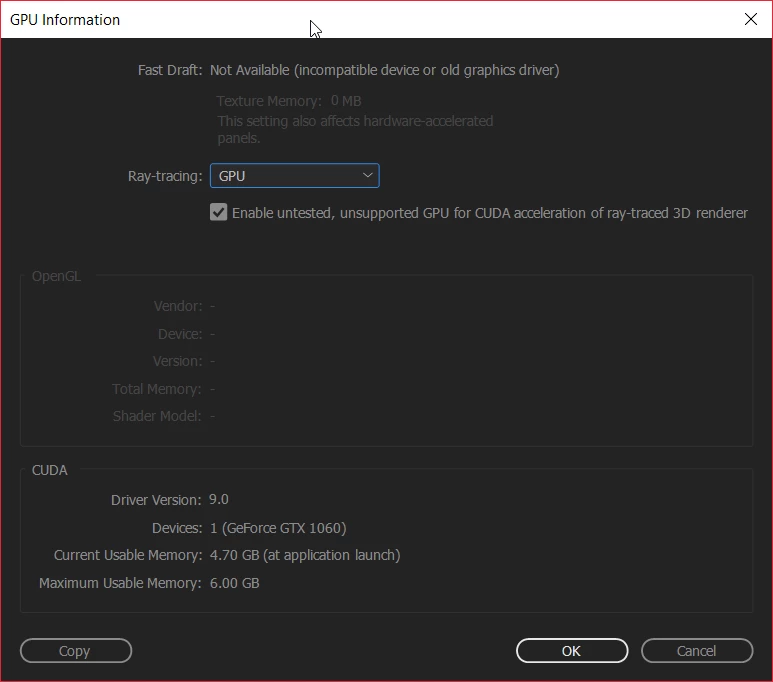
x4yZ8px.png

This topic has been closed for replies.

3 replies

davids24801153
Participant
October 29, 2020

Hi I am working with Premiere 2018, and I don't have the preview options listed above. Is this a version issue? I need some urgent help with this. Is there anyone I can call directly? There is no range issues or cache options.

Hussin Khan
Participating Frequently
October 4, 2017

This is a version issue. I am having the same problems...let's wait for an update :-)

angie_taylor
Legend
September 16, 2017

A couple of things to try. It may be that your disk cache is full or is on a hard drive that is quite full, making it hard to playback the farms in real time. Try going to your disk cache preferences and emoting the disk cache. Then, go to the edit menu no choose Purge > All Memory and Disk Cache to make sure your RAM is also cleared. Now try previewing again. BTW in the latest version of AE you can hit space bar to preview, no need to RAM preview anymore.

Please let me know if this helps you.

bartekb1720799
Participant
September 16, 2017

Thank you for the quick response. Alas, still no luck. Even though the cache was full, clearing it and purging didn't solve the problem. It rendered some part of the footage to cache and on playback, it started doing exactly the same thing again.

The cache has 23 GB allocated on Samsung SSD 960 EVO which still has over 100 GB of free memory

Kevin-Monahan
Community Manager
Community Manager
October 3, 2017

Hi BartekB,

Sorry for this issue. Did you ever find a solution? Please let us know if you have or if you still need help.

Thanks,

Kevin

Kevin Monahan - Sr. Community and Engagement Strategist – Adobe Pro Video and Audio