Jon7801
Participant
November 26, 2016
Answered

After Effects animation lagging after export

  • November 26, 2016
  • 1 reply
  • 14108 views

Hey,

I made a little animation in after effects ( just a picture turning around in 10 seconds, so nothing complex ). The after effects RAM preview is pretty smooth but after the render it is lagging. I export it with the media encoder ( I also tried to render it in after effects ) at 4K resolution, 30 fps (motion blur activated) with 10 MB/s bitrate and mp4 format. The rendering takes 10 - 15 min. The size of the MP4 file is about 15 MB but it is pretty lagging when I play it with my media player (Quik Time player on a Mac)
This topic has been closed for replies.
Correct answer Roei Tzoref

The After Effects file: Dropbox - Animation.aep

I don't know if you can open it when you don't have the Illustrator files.

So I uploaded them too:

Dropbox - Color.ai

Dropbox - Shape.ai

Dropbox - Logo.ai 


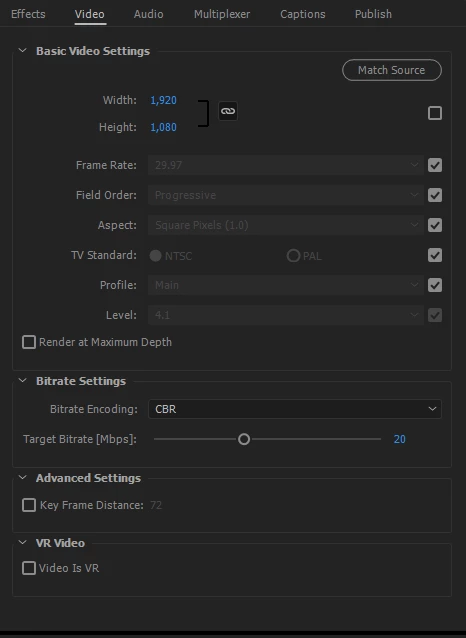
thank you. in Ae the animation is not strobing. I believe it's the compression killing your movement. Mpeg 4 does not go well with these type of details (thick lines, vibrant colors, color shifts) I exported the file with the preset match source - high bit-rate but made a larger bit-rate of 20. and reduced it to HD1080. unless you have a way for a viewer to play it back at 4k resolution (a monitor, projector etc,) it's really all you need)

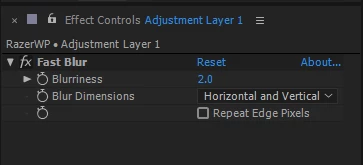
I also used a fast blur on an adjustment layer at 2.0.

the results were better. try it

1 reply

Roei Tzoref
Legend
November 26, 2016
I export it with the media encoder ( I also tried to render it in after effects ) at 4K resolution, 30 fps (motion blur activated) with 10 MB/s bitrate and mp4 format.

if you want to preview a playback using a video player or upload to a sharing platform - then you should use AME which you did.

The size of the MP4 file is about 15 MB but it is pretty lagging when I play it with my media player (Quik Time player on a Mac)

Quicktime is not such a great video player. try using VLC. maybe the term lagging can be misleading - what do you exactly mean? can you upload to video? use any legit cloud service and we can examine it.

Jon7801
Jon7801Author
Participant
November 26, 2016

Dropbox - animation.mp4

This is the animation. It's just the layer with the colors spinning behind the layer with the pattern

Roei Tzoref
Legend
November 26, 2016

I am watching it in Ae and even with real-time playback it is choppy. this means it is choppy to begin with. did you happen to animate this using keyframes on a layer style?