



dparsons85
Legend
February 21, 2018
Answered

Change Bit Rate of DNxHD with Alpha

  • February 21, 2018
  • 1 reply
  • 1406 views

Is there any way to export DNxHD or DNxHR with an alpha channel and a bit rate lower than 574Mbps? So far every codec I've tried exports with the same bit rate of 574Mbps, here's what I've tried:

DNxHD SQ

DNxHD HQ

DNxHR HQ
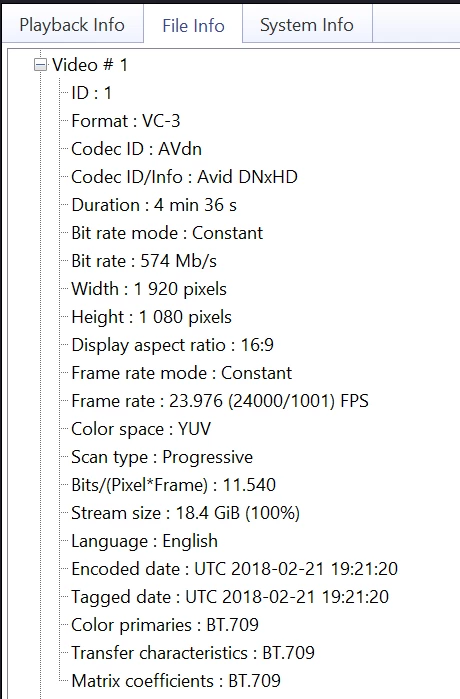
When I export using Cineform it exports at 272Mbps so I get a much more manageable file size, unfortunately the client I'm working with only accepts DNxHD so I'm trying to make it work.

What's weird is, according to this codec comparison page there is no Avid codec with a bit rate of 574Mbps so I don't know where that's coming from: https://blog.frame.io/2017/02/13/50-intermediate-codecs-compared/

Any and all help is appreciated.

Thanks!

    This topic has been closed for replies.
    Correct answer Roland Kahlenberg

    Ah, then the client probably made a mistake.  If the clients needs the alpha channel, you have to use the higher bit rate.  The client probably forgot to take that into consideration.


    DNxHD uses an uncompressed Alpha Channel. It's not adjustable.

    1 reply

    Dave_LaRonde
    Inspiring
    February 21, 2018

    I'd ask the client about it.

    Maybe they're using some off-the-wall variant of DNxHR in an ill-advised plan to save storage space.

    dparsons85
    Legend
    February 21, 2018

    I'm a freelancer so all these test are from my personal computer. Those codecs export at the correct bit rate for each variant (SQ, HQ, etc...) if I turn the alpha channel off so it looks like the alpha channel is forcing the bit rate of 574Mbps despite the variant of DNxHD that I choose.

    Dave_LaRonde
    Inspiring
    February 21, 2018

    Ah, then the client probably made a mistake.  If the clients needs the alpha channel, you have to use the higher bit rate.  The client probably forgot to take that into consideration.