
Participant
June 26, 2017
Answered

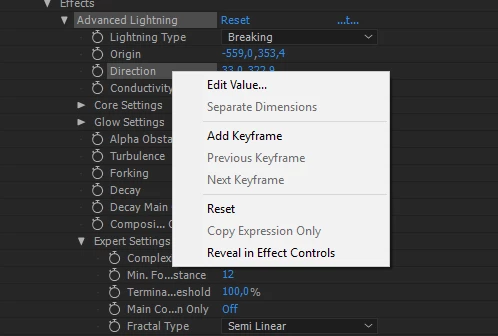
How can I use expresions only on x dimension if I cant separate 'em ?
  • June 26, 2017
  • 2 replies
  • 8565 views

This is effect called advanced lightning, it has those anchor point-like start and end points, I want to sync the the point going up and down to music. For that I will use the value Im getting from Sound keys effect [Im syncing it to bass]. I'd  be parenting the value I get to anchor point X value, but I can't separate dimensions, what can I do to make this happen ?

This topic has been closed for replies.
Correct answer Kyle Hamrick

Yep, as Mylenium said.

Arrays are expressions' way of addressing properties with multiple values. (Here's some good explanation.)

For 2d position, x & y become [0] and [1] in expressions. (For 3d: [0], [1], [2])
While technically not necessary, it's often helpful to use variables to keep track of what you're doing. So, yours might look like:

x=value[0];
y=(pickwhip to appropriate property);
[x,y]

If you wanted to retain control over the Y value, but have it also be affected by another property, you could do something like:

x=value[0];

y=value[1]+(pickwhip to appropriate property);

[x,y]

In that second case, it'll be linked to the Sound Keys property, but you'd also be able to keyframe the Direction independently of the expression. Whether you use +, -, *, /, etc. is up to you.

2 replies

Kyle Hamrick
Community Expert
Kyle HamrickCommunity ExpertCorrect answer
Community Expert
June 26, 2017

Yep, as Mylenium said.

Arrays are expressions' way of addressing properties with multiple values. (Here's some good explanation.)

For 2d position, x & y become [0] and [1] in expressions. (For 3d: [0], [1], [2])
While technically not necessary, it's often helpful to use variables to keep track of what you're doing. So, yours might look like:

x=value[0];
y=(pickwhip to appropriate property);
[x,y]

If you wanted to retain control over the Y value, but have it also be affected by another property, you could do something like:

x=value[0];

y=value[1]+(pickwhip to appropriate property);

[x,y]

In that second case, it'll be linked to the Sound Keys property, but you'd also be able to keyframe the Direction independently of the expression. Whether you use +, -, *, /, etc. is up to you.

Participant
June 27, 2017

Thank you! Just needed to not be as stupid as I was, that cleared out a lot for me. It works !

Andrew Yoole
Inspiring
June 27, 2017

Dan Ebberts is the grandfather of After Effects Expressions.  His site is great for learning some of the basics and useful tricks:

MotionScript.com - main page

Mylenium
Legend
June 26, 2017

Position values are arrays and you always can splice out a single value by addressing its array index, in your case simply as value[0] for the X component.

Mylenium