You could do that with a track matte from a copy of the octagon pattern, fractal noise + colorama + glow.
Something like this:
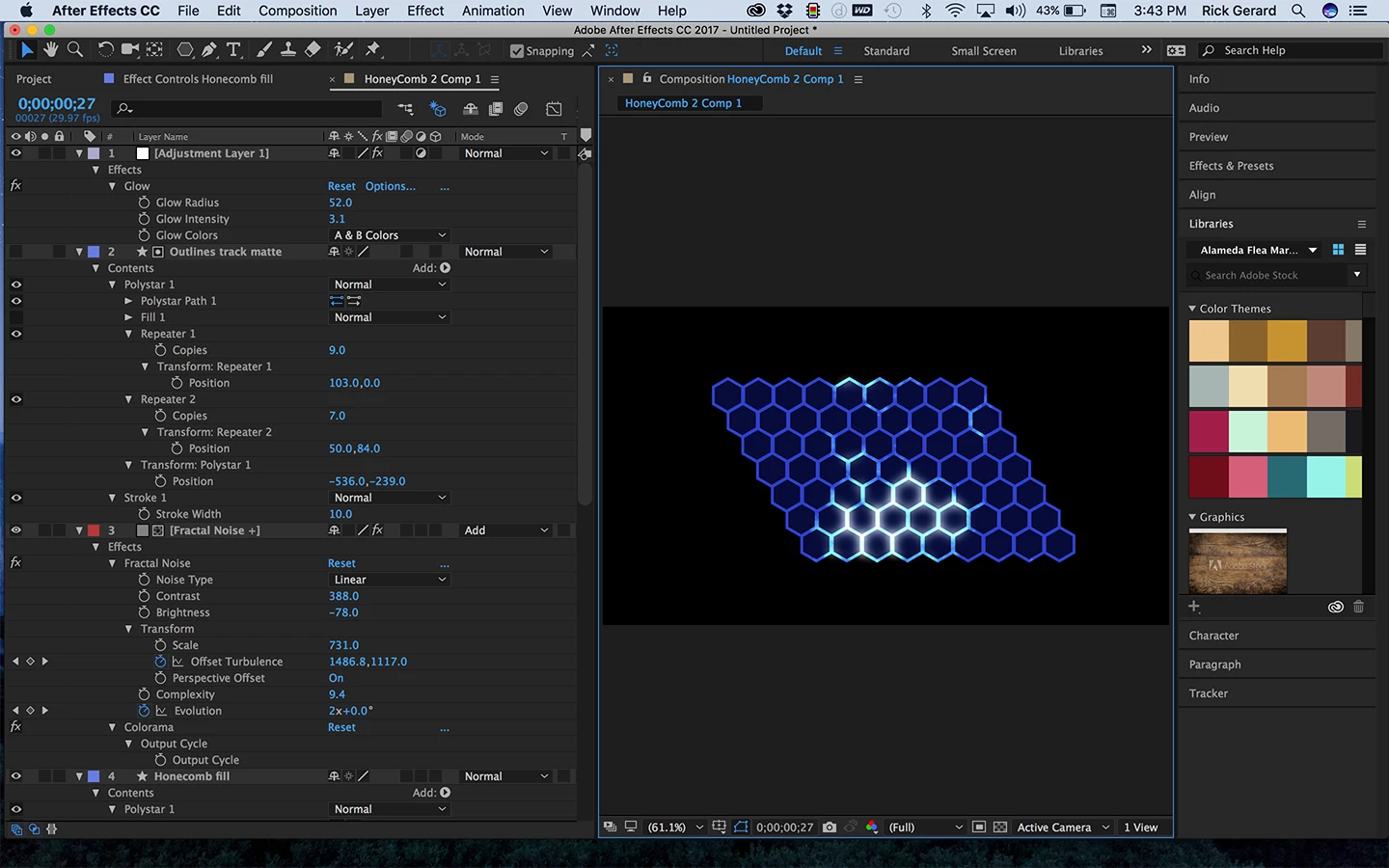
There are about a million ways to do this. I created the honeycomb with a simple hexagon polyester and two repeaters. One copy had stroke only, the other copy fill only. I used the stroke only copy as a track matte for a solid with fractal noise and Colorama applied. On top of everything I added an adjustment layer with glow applied. The blend mode for the fractal noise layer was set to add to give it a bit more punch. Pretty simple really. Animating the evolution and the offset for fractal noice give me moving bright patterns.
You can use any kind of animated shapes to bring out the highlights, I just thought fractal noise would easily give me something to start with. Just for fun, here's the project file: Dropbox - honeycomb fractal.aep (note: your browser may add a .txt extension to the .aep file. Just delete it and it should open just fine.
With a little more tweaking and and maybe a couple of other effects I could have exactly matched the look but this should give you a starting point.

 AdChoices