RichardL712212682
Inspiring
August 24, 2017
Answered

How to import an audio file when they show as greyed out in the import dialog of after effects
  • August 24, 2017
  • 4 replies
  • 1681 views

I am unable to select an audio file when importing in AE:
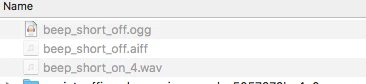
Can someone point me to the right direction to be able to import wav file, aiff file or mp3 files corretly?

    This topic has been closed for replies.
    Correct answer RichardL712212682

    Thank guys. Ended up having to reinstall. Everything seemed setup properly. I even ended up comparing between my 2015 and 2017 installations which were identical.

    4 replies

    RichardL712212682
    Inspiring
    August 25, 2017

    Added note: The support is much better then originally expected.

    Once re-installed, AE showed pretty much all wav file format I had converted as available.

    RichardL712212682
    RichardL712212682AuthorCorrect answer
    Inspiring
    August 25, 2017

    Thank guys. Ended up having to reinstall. Everything seemed setup properly. I even ended up comparing between my 2015 and 2017 installations which were identical.

    Mylenium
    Legend
    August 25, 2017

    Agree with Rick. Your files are likely simply out of spec. AE is not an audio tool and simply doesn't like 24 or 32bit audio files or whatever else those files may be.

    Mylenium

    Community Expert
    August 25, 2017

    Convert your incompatible audio files to 16 bit 48 Khz PCM uncompressed stereo or mono wave files. That is the broadcast standard.

    You should be able to do that in Audition or the Adobe Media encoder providing your original audio files are not corrupted.

    RichardL712212682
    Inspiring
    August 25, 2017

    Negative. Doesn't seem to be the issue.

    I have passed on this file to a colleague on my team and AE can load and play the same file.