


Bas.Ruve
Participant
October 22, 2019
Question

Preview Artifacting in Bridge with NEF files

  • October 22, 2019
  • 7 replies
  • 1774 views

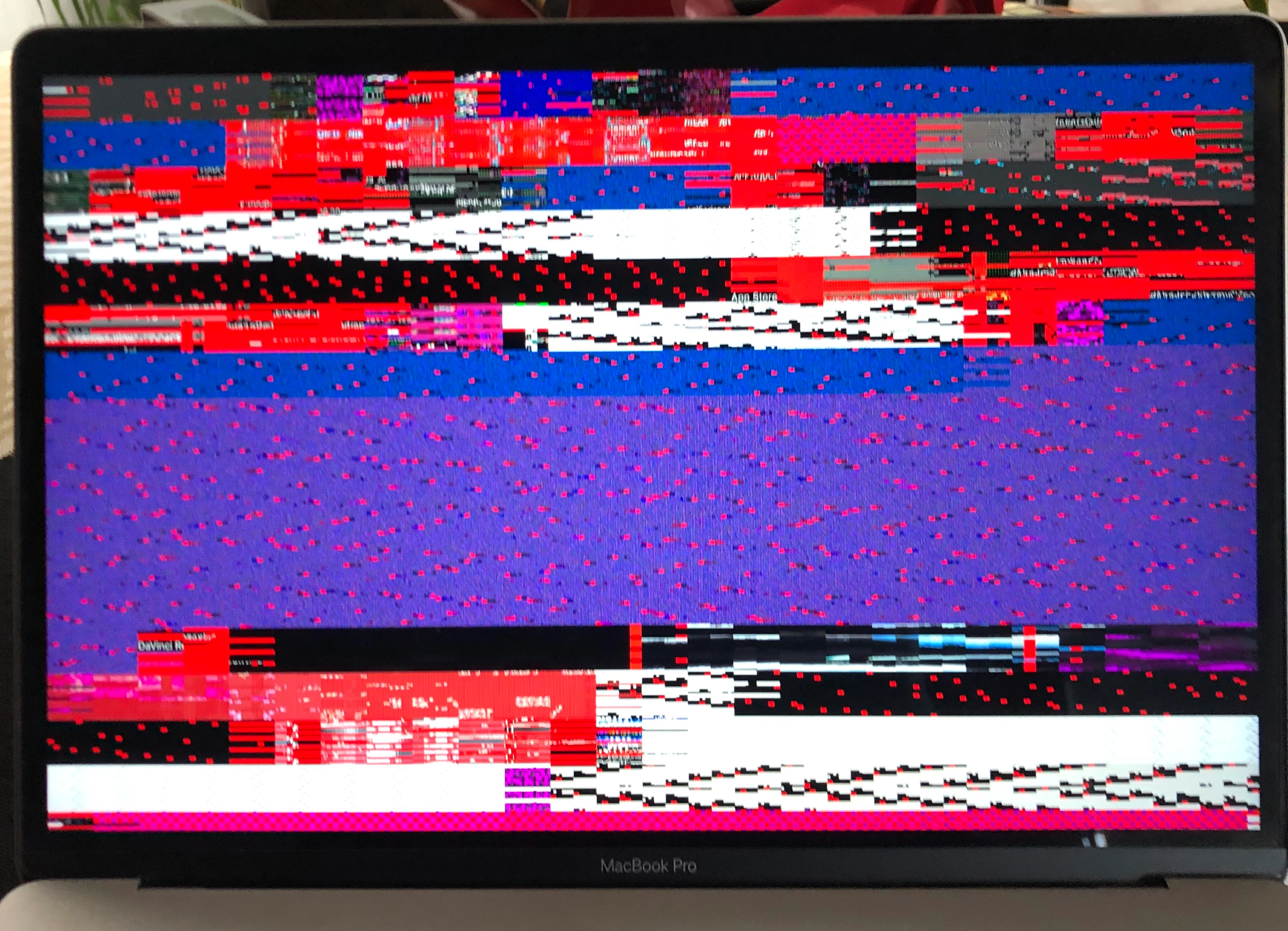
So everything was working fine with bridge until yesterday, when I try to preview RAW files (.NEF) the preview has some weird artifacting on it. Thought it was a problem with my graphics card but no other app does it and everything else works just fine. Any clues as to what might be happening? I have uninstalled and reinstalled the app twice and it doesnt seem to do anything. Also my computer is new so this problem looks like a software issue.
 

This topic has been closed for replies.

7 replies

Participant
November 18, 2019

The same issue, I can sometimes get around this by closing Photoshop. DNG and other RAW files, JPG also affected.

Varun Varshney
Adobe Employee
Adobe Employee
October 30, 2019

Hi,

Many of the Bridge Catalina issues have been addressed in v10.0 which will be released early next month.

If you need early access to this release, you can sign up for the prerelease program from https://adobeprerelease.com under NDA.

Select Adobe Bridge. Once we approve your request, you will be able to download v10.0 (choose the latest drop).


Please check this build and report back.


Thanks,

Varun Varshney

Participant
November 4, 2019

Thank you. I've already applied

Akash Sharma
Legend
October 24, 2019

Hi Everyone,


Thanks for the update.


It looks like reinstalling Bridge fixes this issue in most cases. Please let us know if you continue to face this issue. 


Regards,

Akash

Participant
October 24, 2019

Reinstalling seemed like the solution, but this is not the case. Unfortunately! what now? Apple, points to Adobe. Bridge without 'space key or cmd L' function is not cool.

Participant
October 24, 2019

Hi, Same here. It started after i updated my Mac, to 'catalina'.


Participant
October 24, 2019

Same here! 

jbm007
Community Expert
Community Expert
October 24, 2019

Not seeing that issue here Mac Pro

Catalina

Same Bridge version


all preview windows are clean and sharp.

could be GPU chipset related


Akash Sharma
Legend
October 23, 2019

Hi there,


Sorry that raw images in Bridge are showing some preview artifacts.


I have a couple of questions to better help with the issue:


  • Which version of Bridge are you using? 
  • Are you only facing this issue while working with raw images? Have you tried opening other images or image formats? Also, do you only see the artifacts with a full screen preview or it happens with thumbnails as well?
  • Could you please navigate to Preferences> Camera Raw and uncheck the option "use graphics processor" in Bridge and let us know if the issue persists?


Thanks,

Akash


Participant
October 23, 2019

Hi guys, I have the same problem, its really upsetting as I use the Bridge as my main photo viewer and I dont know how to fix it.

I asked the same thing in apple support group and thats the answer I got:

try to do safe mode,reset smc and try to reset NVRAM, here's the articles for that:

https://support.apple.com/en-gb/HT201262

https://support.apple.com/en-gb/HT201295

https://support.apple.com/en-gb/HT204063


It looks more and more people have the same error , it probably happened once I updated the software on Mac.

Akash, I tried to do as you said, uncheck the option 'use graphics processor' but the problem didnt resolve. 

I am not comfortable to do safe mode on Mac so I am hoping there is another way for this problem to be solved. 

See the attached

Larissaphotographer
Participant
October 23, 2019

Hello!!! Thank you so much for your support! Yes, it happened to me as well, once I updated the software on Mac.

Oh...

Larissaphotographer
Participant
October 23, 2019

Hello! I have the same!!!! Help me!!!