Inspiring
December 11, 2017
Answered

Hair layer behind body is moving and distorting with the body, not the head

  • December 11, 2017
  • 2 replies
  • 9076 views

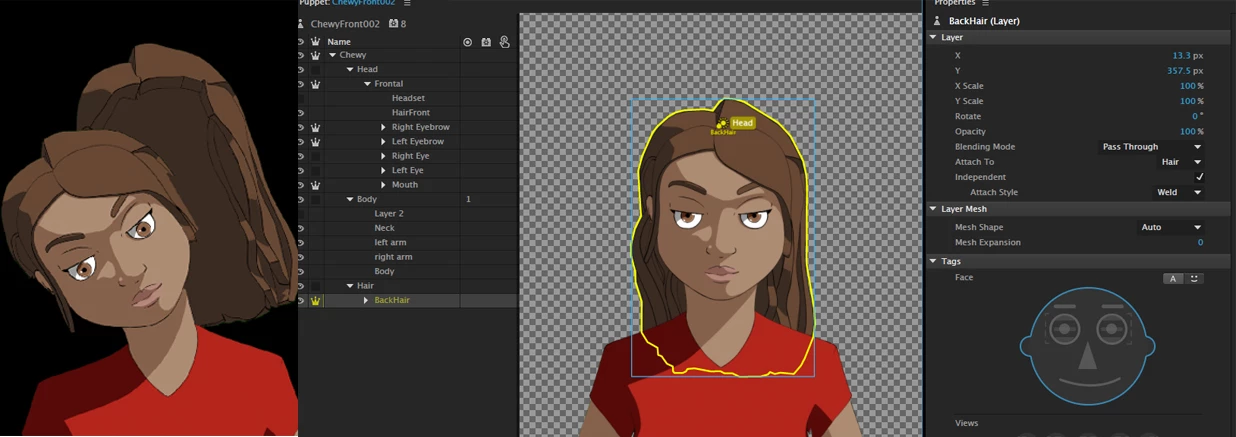
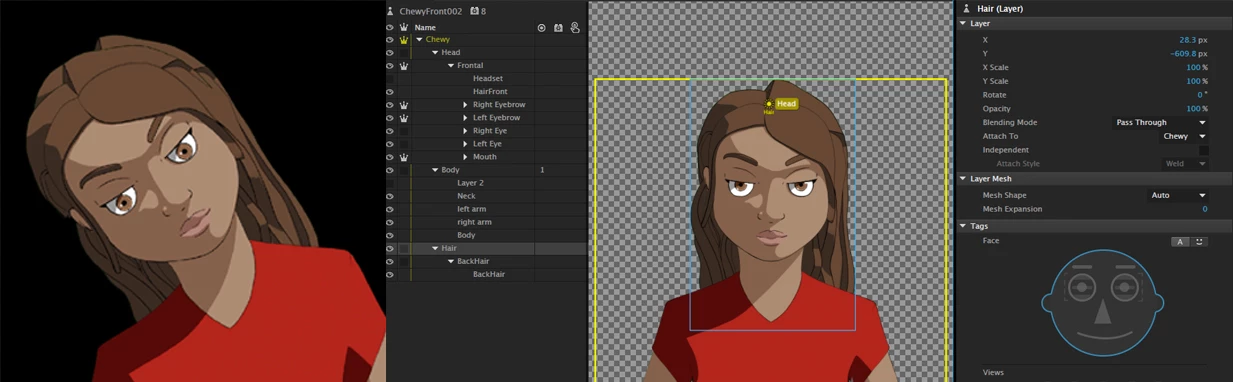
With the removal of the staple system in Character Animator, I can't get the back long hair layer to move and attach with the head, and definitely can't add dangle physics to it. Currently, it moves with the body no matter which way I rig it, and dangle either doesn't work or adds the body to the dangle. Attached are pictures showing what's happening. Opening up previous puppet files that used the old staple system still works, but I can't replicate it with a new puppet in Character Animator CC.

Set up 1: You can see that the back hair layer doesn't move completely with the head, and when I try to attach a dangle to the hair layer here, the body becomes distorted.

Set up 2: Changing the hair layer to independent

This topic has been closed for replies.
Correct answer CoSA_DaveS

Hey Dave,

Sorry for the long delay, but finally got back around to this. I still haven't been able to figure this out. I had a previous character that was built in the old character animator build where individual staples were being used and dangle worked perfectly. As a test, I imported that same PSD file and tried to rig it from scratch again within the new build with Auto attachments (sans staples), and same issues are happening. It seems like Auto is setting the hair layers to Body instead of Head.

Here's the puppet with staples that worked: Dropbox - Mia_Staples.puppet

Here's the puppet with current issues without manual Staples: Dropbox - Mia_AUTO.puppet

Thanks!!

Jen


Sorry for the delay in my reply Jen. Glad to see others posting solutions to your problem in the meantime.

> It seems like Auto is setting the hair layers to Body instead of Head.

Indeed that's what happening. This is why: the Auto attach mode for a group means "attach this group's origin to an auto-staple in the parent group -- but only if the parent group has some solid mesh to attach to there, otherwise attach to the parent's origin". That's what the dotted green line is trying to tell you.

So, to fix it, you can still create what the old manual stapling process created:

1. select the Mia group

2. add a handle to the top center of her head

3. hit Return to rename it to "scalp" (so you can find it in the attach menu)

4. select both the Right Hair and Left Hair groups (click & cmd/ctrl-click)

5. set the Properties panel > Layer > Attach To = scalp

Now those back groups will move with the scalp handle -- which, since Mia and the Head group share the same mesh (since Head doesn't have a crown) moves with them too.

Frankly, I was surprised this worked so well, because having a handle in Mia that's placed off of the mesh like that usually leads to problems (which are fixed by adding an invisible eyeball-off "neck" or whatever to create enough mesh so that the handle is embedded in it). That's why Auto doesn't do this for you automatically. But this gives me hope that we can make it always do this, which would mean less rigging work for you!

2 replies

americanjesus
Participating Frequently
February 21, 2018

what about using sticks to keep that part of the hair from morphing?

alank99101739
Legend
February 21, 2018

Thanks for the suggestion! 

I think the problem is around getting origins and attachment points right, especially if you use Head Position Strength, Head Tilt Strength, Head Size Strength.  E.g. Head Size Strength makes the head bigger or smaller as you lean forwards/backwards. Sticks cannot (and should not) stop that movement. Also it feels more natural to have the head hinging on the neck near the the chin (low on the head), whereas rear hair dangling is more like half way down the head. I suspect sticks can help, but not completely solve the problem. (Or at least I cannot see how they can solve it.)

CoSA_DaveS
Adobe Employee
Adobe Employee
December 13, 2017

Change Attach To in the properties panel to Auto — that should fix the problem (you may need to do this for multiple groups). Stapling is gone now because Auto takes care of it automatically. But only when it defaults on as it's supposed to! Because of a bug in v1.1, newly added groups defaulted it off. That is now fixed in v1.1.1 which was released last night. We highly recommend updating to v1.1.1 for everyone. It has squashed this bug and many others.

Note that updating to v1.1.1 won't fix this problem for existing puppets, so you'll still need to manually set those to Auto. But it will prevent newly added groups from falling prey to this issue.

Inspiring
December 15, 2017

Hi Dave,

Unfortunately changing all the layers to Auto didn't fix the issue. I also upgraded to v1.1.1 and the same issue is happening. Any ideas on what else it could be?

bobokirk
Inspiring
December 15, 2017

I created 1/8  and 1/4 head turns in each direction, and moved my character's hair (pony tail in my case) to the right position in each.

That solved it for me.