Legend
April 26, 2019
Answered

Unable to open .svg file in Dreamweaver

  • April 26, 2019
  • 3 replies
  • 2983 views

New to DreamWeaver, but already appreciating how it makes things easier :-}  Current task, create an imagemap.

  1. File > New, design view
  2. Insert > Image
  3. select *.svg from filelist

result: "broken link" icon :-{

The .svg in question opens correctly in Illustrator, Chrome, Mozilla and (even!) IE. I'm clearly missing something, but what?

Tittle was edited by Moderator

This topic has been closed for replies.
Correct answer Nancy OShea

Copy SVG code from Illustrator into your HTML document.  Save & preview in browsers.

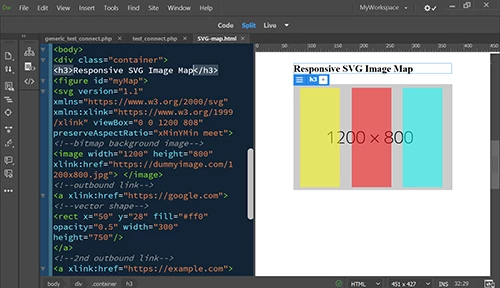
Below is a crude example of a responsive SVG image map. Copy code into a new, blank document to test.

<!doctype html>

<html lang="en">

<head>

<meta charset="utf-8">

<title>Responsive SVG Image Map</title>

<meta http-equiv="X-UA-Compatible" content="IE=edge">

<meta name="viewport" content="width=device-width, initial-scale=1">

<style>

.container {

width: 70%;

margin: 0 auto

}

#myMap {

position: relative;

width: 100%;

padding-bottom: 77%;

vertical-align: middle;

margin: 0;

overflow: hidden;

}

#myMap svg {

display: inline-block;

position: absolute;

top: 0;

left: 0;

}

</style>

</head>

<body>

<div class="container">

<h3>Responsive SVG Image Map</h3>

<figure id="myMap">

<svg version="1.1" xmlns="https://www.w3.org/2000/svg" xmlns:xlink="https://www.w3.org/1999/xlink" viewBox="0 0 1200 808" preserveAspectRatio="xMinYMin meet">

<!--bitmap background image-->

<image width="1200" height="800" xlink:href="https://dummyimage.com/1200x800.jpg"> </image>

<!--outbound link-->

<a xlink:href="https://google.com">

<!--vector shape-->

<rect x="50" y="28" fill="#ff0" opacity="0.5" width="300" height="750"/>

</a>

<!--2nd outbound link-->

<a xlink:href="https://example.com">

<!--vector shape-->

<rect x="440" y="28" fill="#f00" opacity="0.5" width="300" height="750"/>

</a>

<!--3rd outbound link-->

<a xlink:href="https://yahoo.com">

<!--vector shape-->

<rect x="825" y="28" fill="#0ff" opacity="0.5" width="300" height="750"/>

</a>

</svg>

</figure>

</div>

</body>

</html>

3 replies

Nancy OShea
Community Expert
Nancy OSheaCommunity ExpertCorrect answer
Community Expert
April 26, 2019

Copy SVG code from Illustrator into your HTML document.  Save & preview in browsers.

Below is a crude example of a responsive SVG image map. Copy code into a new, blank document to test.

<!doctype html>

<html lang="en">

<head>

<meta charset="utf-8">

<title>Responsive SVG Image Map</title>

<meta http-equiv="X-UA-Compatible" content="IE=edge">

<meta name="viewport" content="width=device-width, initial-scale=1">

<style>

.container {

width: 70%;

margin: 0 auto

}

#myMap {

position: relative;

width: 100%;

padding-bottom: 77%;

vertical-align: middle;

margin: 0;

overflow: hidden;

}

#myMap svg {

display: inline-block;

position: absolute;

top: 0;

left: 0;

}

</style>

</head>

<body>

<div class="container">

<h3>Responsive SVG Image Map</h3>

<figure id="myMap">

<svg version="1.1" xmlns="https://www.w3.org/2000/svg" xmlns:xlink="https://www.w3.org/1999/xlink" viewBox="0 0 1200 808" preserveAspectRatio="xMinYMin meet">

<!--bitmap background image-->

<image width="1200" height="800" xlink:href="https://dummyimage.com/1200x800.jpg"> </image>

<!--outbound link-->

<a xlink:href="https://google.com">

<!--vector shape-->

<rect x="50" y="28" fill="#ff0" opacity="0.5" width="300" height="750"/>

</a>

<!--2nd outbound link-->

<a xlink:href="https://example.com">

<!--vector shape-->

<rect x="440" y="28" fill="#f00" opacity="0.5" width="300" height="750"/>

</a>

<!--3rd outbound link-->

<a xlink:href="https://yahoo.com">

<!--vector shape-->

<rect x="825" y="28" fill="#0ff" opacity="0.5" width="300" height="750"/>

</a>

</svg>

</figure>

</div>

</body>

</html>

Nancy O'Shea— Product User & Community Expert
Jon Fritz
Community Expert
Community Expert
April 26, 2019

Paul-M is right, SVG won't display in Design View. If you really need to create an image map on an SVG, replace it with a jpg or png, place the map areas, then replace the src with the svg file path.

A word of warning though, if you plan to have a responsive image (I assume that's at least part of the reason you're using .svg), a standard image map won't work for you.

The coordinates of the <area> tags of an image map are positioned absolutely, so as your graphic changes size with the browser viewport, the map areas remain fixed in their original locations and either disappear when the image is smaller, or drift away from the visual they're supposed to be attached to.

Legend
April 26, 2019

Hi,

Design view hasn't been updated for a long time, I think that idea was/is that live view replaces it.  To my knowledge, I don't think a svg it will show up in design view, as long as it works correctly in all major browsers/devices then I wouldn't worry ...

Paul-M - Community Expert
HARSHIKA_VERMA
Community Manager
Community Manager
April 26, 2019

Hi FieryPantone,

Thank you for using Dreamweaver, we really appreciate that you mentioned the steps clearly and confirmed that it is working fine on other browsers except for Dreamweaver.

I completely agree with Paul, here are the screenshots to give you a more clear image of the situation.

1.When I am in Design mode. This is what I see.

2. When I am in Live mode. I see the file clearly.

I would request you to switch to the live mode and let us know if that works for you.

Thanks,

Harshika