
Participant
November 13, 2013
Answered

Local admin rights required to update Creative Cloud?

  • November 13, 2013
  • 5 replies
  • 13012 views

Hi,

We have a marketing department that uses the Creative Cloud team product. They have laptops running Windows 7, we do not give them local admin rights for obvious reasons.

When they try to update the CC software it comes up with an error message:
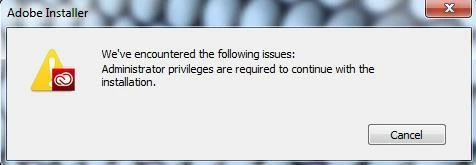
How can we allow our users to update this software without granting them local admin rights?

Thanks,

Mike

This topic has been closed for replies.
Correct answer Rajashree Bhattacharya

Hi Mike5435,

As of now the Admin rights are required for installation. please go the following articles.

How ever you can create a Creative package using Creative Cloud Packager & deploy it to users machine.

http://helpx.adobe.com/creative-cloud/packager/creating-packages.html

The latest version update is here:http://helpx.adobe.com/creative-cloud/packager.html

Hope it works for you.

Regards,

Rajshree

5 replies

Participant
February 26, 2016

In a "zero admin rights" environment, packaged deployment is a necessary. For updating, here are a couple options.

1. Manual with Packager - When it's necessary to provide updates to your Creative Cloud users, an admin can open the Packager tool and Create a new package. When you reach the Applications and Updates screen, check off the updates you want to deploy, then build it. Then deploy this package which contains ONLY updates to your Creative Cloud users.

Resource: Creative Cloud Help | Applying updates

2. Remote Update Manager (RUM)- this is a selection you make when configuring your original package. When selected it is part of your .msi/.pkg build and is installed on your users machines. Now an admin can invoke updates remotely with command line or whatever tool is used for package deployment. The updates will be coming from Adobe update servers. This method is limited in that it can't be used to update Edge Code or Reflow.

Resource: Use Adobe Remote Update Manager

3. Remote Update Manager and Adobe Update Server setup tool (AUSST) - For larger environments with the ability to set up their own update server. AUSST will collect updates from Adobe update servers which can then be invoked by RUM.

Resource: Using the Adobe Update Server Setup Tool (AUSST)

I hear confusion around VIP deployment on a daily basis and came across this thread. I hope these resources are helpful!

Best

Jason.Myers
Participant
June 12, 2015

I am in the same boat with several users utilizing the CC software and the number is growing daily. Are there any directories that we can give the users Read/Write access to that will allow them to update without our helpdesk remoting in and providing admin credentials?

jrp78
Participating Frequently
September 28, 2015

Has anyone found a solution other than giving the user local admin rights to the computer? This is a completely unacceptable solution in a large network environment. We only allow users to be standard users.

Participating Frequently
December 18, 2015

I agree. I have Creative Cloud on my work computer but can't run Creative Cloud itself to make use of such things as TypeKit and other Assets. Am I missing something, or will I just not be able to without admin privileges?

Participant
June 10, 2015

I also have a user that has Adobe Creative Cloud installed and it seems in order to use the app properly she has to be a local Admin.  This seems a little short sighted by Adobe to create an application that needs admin privileges to run properly, especially considering that most enterprise environments lock down the machine from the user.

garyw44356979
Participant
May 7, 2015

This seriously needs resolving soon. I'm just starting to deploy CC and already getting users needing me to log on to update their software.

Rajashree Bhattacharya
Legend
November 20, 2013

Hi Mike5435,

As of now the Admin rights are required for installation. please go the following articles.

How ever you can create a Creative package using Creative Cloud Packager & deploy it to users machine.

http://helpx.adobe.com/creative-cloud/packager/creating-packages.html

The latest version update is here:http://helpx.adobe.com/creative-cloud/packager.html

Hope it works for you.

Regards,

Rajshree

Participant
February 19, 2015

The end user doesn't have to an admin just to use the products correct? Only when the application needs an update to be installed?

Rajashree Bhattacharya
Legend
February 24, 2015

Yes, you are correct. Creative Cloud Help | Packager

Regards

Rajshree