


horeen732993839
Participant
January 21, 2017
Answered

Adobe Creative Cloud is needed to resolve this problem

  • January 21, 2017
  • 4 replies
  • 3851 views

hi

i've big problem when i open Creative Cloud and i'm windows 8.1

Adobe Creative Cloud is needed to resolve this problem, However, it is missing or damaged. please download and install a new copy of the Creative Cloud

from http://www.adobe.com/go/adobecreativecloudapp'.
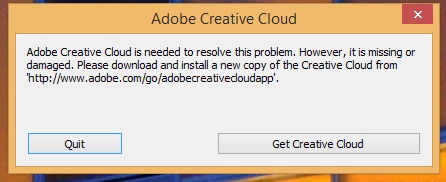
i tried everything   reinstall,and clean every thing

please help me

thank you for reading and i hope you can help me

This topic has been closed for replies.
Correct answer David__B

We now have this kb article which goes through solutions to this issue:
Error: "Adobe Creative Cloud is needed to resolve this problem"

4 replies

David__B
Adobe Employee
David__BCorrect answer
Adobe Employee
March 2, 2017

We now have this kb article which goes through solutions to this issue:
Error: "Adobe Creative Cloud is needed to resolve this problem"

wfzen
Inspiring
April 21, 2017

I'm on Windows 7.

I tried solution 1 and 2. With 1, I can't uninstall. With 2, I was able to get rid of the Adobe Creative Cloud from the Programs and Features list. Then I was able to install Adobe Creative Cloud. Once installed and loaded, the same error message showed up the first time running. With this, I'm stuck with whatever Adobe CC I have installed. No upgrades. Also with CC 2017. I can't open another person's Premiere file that was created with the current version of Premiere CC 2017. I can't upgrade mine with corrupt Adobe Creative Cloud application. I'm surprised to find that I can't open another CC 2017 file. It says it is too new.

kglad
Community Expert
Community Expert
April 21, 2017

uninstall everything cc including preferences, https://helpx.adobe.com/creative-cloud/help/uninstall-remove-app.html

then uninstall the cc desktop app, https://helpx.adobe.com/creative-cloud/help/uninstall-creative-cloud-desktop-app.html

clean your computer of cc files per http://www.adobe.com/support/contact/cscleanertool.html

restart your computer (don't skip this)

reinstall the cc desktop app, https://creative.adobe.com/products/creative-cloud using admin account*

use the desktop app to install your cc programs/trials

*for info on how to use admin account, see solution 3 here, https://helpx.adobe.com/creative-cloud/kb/creative-cloud-missing-damaged.html

horeen732993839
Participant
January 21, 2017

no it's not

Kanikas
Community Manager
Community Manager
January 23, 2017

Hi Horeen732993839,

Kindly Contact Customer Care for help and support.They will be able to work on your machine remotely and help you resolve the issue.

Hope this helps !

horeen732993839
Participant
January 21, 2017

i didn't find my problem over there

kglad
Community Expert
Community Expert
January 21, 2017

contact adobe support.

horeen732993839
Participant
January 21, 2017

i did

kglad
Community Expert
Community Expert
January 21, 2017
horeen732993839
Participant
January 21, 2017

it's for mac bro i'm windows 8.1

kglad
Community Expert
Community Expert
January 21, 2017

if you cant figure out how to apply the last message to win 8.1, using a browser that allows popups and cookies,  contact adobe support during pst business hours by clicking here and, when available, click 'still need help', http://helpx.adobe.com/x-productkb/global/service-ccm.html