Exit
  • Global community
    • Language:
      • Deutsch
      • English
      • Español
      • Français
      • Português
  • 日本語コミュニティ
  • 한국 커뮤니티
Locked
5

Coresync causes high Explorer.exe CPU usage

Explorer ,
Apr 02, 2019 Apr 02, 2019

I have two machines running Windows 1809 and the latest versions of Adobe CC.

Whether file sync is running or paused, Core Sync causes the Windows Explorer process to use a minimum of 42% CPU.

I'm writing this on a machine with no files left to sync. No files are being synced at this time. Core Sync is running, and Windows Explorer is hitting 43.8% CPU usage.

Killing Core Sync returns usage to normal.

This is not a machine specific issue but occurs on multiple Win 10 1809 devices.

It appears Adobe has a bug to squish.

For reference, this user is having the same trouble: https://www.reddit.com/r/Adobe/comments/9o7a4c/core_sync_causes_windows_10_explorer_more_to_have/

Any thoughts, Adobe?

TOPICS
Creative Cloud
6.0K
Translate
Report
Community guidelines
Be kind and respectful, give credit to the original source of content, and search for duplicates before posting. Learn more
community guidelines

correct answers 1 Correct answer

New Here , Jun 28, 2019 Jun 28, 2019

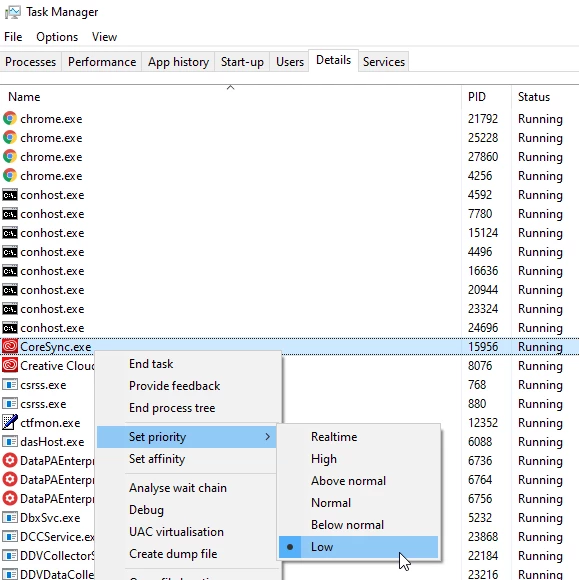
It would be nice if Adobe actually fixed this, but in the meantime you can limit the amount of CPU the process uses to prevent your machine hanging for 10 minutes at a time. You need to do the following;

  1. Open task manager (windows key + T or just search task manager from the start menu)
  2. If it opens in the reduced view, click on more details;
    file1.png
  3. Click on the Details tab
  4. Find CoreSync.exe in the list
  5. Right click and select Set priority --> Low
    file3.png
  6. Right click again, and select set affinity
  7. Uncheck <All Processo
...
Translate
New Here ,
Apr 07, 2019 Apr 07, 2019

You're not the only one, I have the same problem both on my desktop and laptop. And I even reset windows to its original state, to no avail (and a loss of a lot of time).

Very disappointed because it is the only cloud service I encountered with this problem, it simply makes the service unusable at times.

Translate
Report
Community guidelines
Be kind and respectful, give credit to the original source of content, and search for duplicates before posting. Learn more
community guidelines
Community Expert ,
Apr 09, 2019 Apr 09, 2019

Feature Request/Bug Report Form  — to report suspected bugs.

ABAMBO | Hard- and Software Engineer | Photographer
Translate
Report
Community guidelines
Be kind and respectful, give credit to the original source of content, and search for duplicates before posting. Learn more
community guidelines
Explorer ,
Apr 10, 2019 Apr 10, 2019

Already done. Posting HERE, however, confirms my suspicions that I'm not the only one with this issue.

Translate
Report
Community guidelines
Be kind and respectful, give credit to the original source of content, and search for duplicates before posting. Learn more
community guidelines
Community Beginner ,
Jun 11, 2019 Jun 11, 2019

I have the same issue on both machines authorized for CC, and it renders my computer useless for about 20 ~ 30 minutes as the  CPU is pegged at 100%. Very frustrating, and completely negates the advantage in boot-speed I was seeking when I installed M.2 drives as the boot drives.

Translate
Report
Community guidelines
Be kind and respectful, give credit to the original source of content, and search for duplicates before posting. Learn more
community guidelines
Community Expert ,
Jun 11, 2019 Jun 11, 2019

if you do not use cloud space disable syncronization.

ABAMBO | Hard- and Software Engineer | Photographer
Translate
Report
Community guidelines
Be kind and respectful, give credit to the original source of content, and search for duplicates before posting. Learn more
community guidelines
Community Beginner ,
Jun 11, 2019 Jun 11, 2019

I have nearly 12GB of files on Creative Cloud. Cloud storage is very important to me. Adobe needs to fix this bug.

Translate
Report
Community guidelines
Be kind and respectful, give credit to the original source of content, and search for duplicates before posting. Learn more
community guidelines
New Here ,
Jun 28, 2019 Jun 28, 2019

It would be nice if Adobe actually fixed this, but in the meantime you can limit the amount of CPU the process uses to prevent your machine hanging for 10 minutes at a time. You need to do the following;

  1. Open task manager (windows key + T or just search task manager from the start menu)
  2. If it opens in the reduced view, click on more details;
    file1.png
  3. Click on the Details tab
  4. Find CoreSync.exe in the list
  5. Right click and select Set priority --> Low
    file3.png
  6. Right click again, and select set affinity
  7. Uncheck <All Processors>
  8. Check just one processor

Hope this helps. It at least stopped the process from hanging my machine almost every morning.

Translate
Report
Community guidelines
Be kind and respectful, give credit to the original source of content, and search for duplicates before posting. Learn more
community guidelines
Community Beginner ,
Jun 28, 2019 Jun 28, 2019

Just made this change, as it sounds VERY promising. I'll try it out for the next week and report back.

THANKS NICK!

--Kevin

Translate
Report
Community guidelines
Be kind and respectful, give credit to the original source of content, and search for duplicates before posting. Learn more
community guidelines
New Here ,
Apr 29, 2020 Apr 29, 2020

SOLVED!
THis instance of CoreSync.exe with the adobe loge turned out to ba VIRUS.
It's a Bitcoin miner.  After getting rid of it no more issues. 
Nothing to do with Adobe.
Just google coresync.exe virus et viola...
CoreSync. If the location of CoreSync.exe is in a subfolder of the Windows folder for temporary files, then this mean that your system has been compromised to a Trojan Horse virus. The CoreSync Virus is a Cryptocurrency Miner. The Trojan Horse viruses are pretty common online infections.7 nov. 2019

Translate
Report
Community guidelines
Be kind and respectful, give credit to the original source of content, and search for duplicates before posting. Learn more
community guidelines
Community Beginner ,
Jul 12, 2020 Jul 12, 2020
LATEST

Not true unfortunatelly.

I have the same problem. On multiple devices (Win 10). CoreSync.exe is located in "C:\Program Files (x86)\Adobe\Adobe Sync\CoreSync". It is not miner Trojan. It is a genuine process of Adobe Creative Cloud bundle. 😞

I think it's caused by the loop in the syncing process. Because mine sync is forever stuck in 1748 files from 4714 and never moves up. Don't know how to solve it. 😞

Translate
Report
Community guidelines
Be kind and respectful, give credit to the original source of content, and search for duplicates before posting. Learn more
community guidelines