


_jul_
Participant
July 23, 2018
Answered

Creative Cloud Won't Update (error code 183)

  • July 23, 2018
  • 3 replies
  • 5386 views

Hi guys.

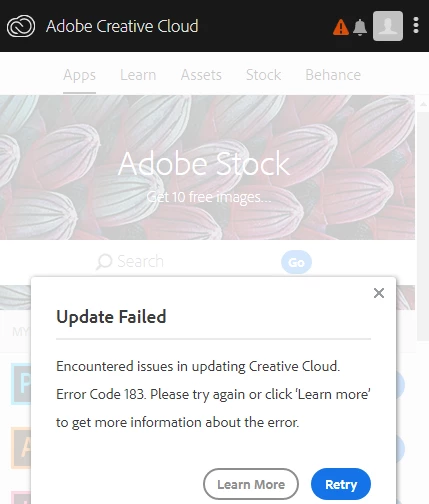
I have an issue with my CC app. It is constantly trying to update itself, but when it cross 90%, the red triangle would appear. I tried to hit Retry button few times, uninstall the app, repair the app, but still no progress.

The error message is this:

But it doesn't matter how many times I push Retry, the app just doesn't want to be ok.

Can you help me please?


(Even my libraries are not updating, I assume, it is because of the CC app issue)


Thanks ❤️
This topic has been closed for replies.
Correct answer kglad

using a browser that allows popups and cookies,  contact adobe support during pst business hours by clicking here and, when available, click 'chat', http://helpx.adobe.com/x-productkb/global/service-ccm.html

3 replies

Kanikas
Community Manager
Community Manager
July 23, 2018
_jul_
_jul_Author
Participant
July 25, 2018

Guys,

I have tried everything from your answers, but I have to say, that the only thing that was helpful was actually contacting the Help Center and have a chat with them. They deleted all the files I didn't even know they existed and were important for running CC, reinstalled the app and now it works as new.

But anyway, thanks for your help

kglad
Community Expert
Community Expert
July 25, 2018

you're welcome.

AxelMatt
Community Expert
Community Expert
July 23, 2018
My System: Intel i7-8700K - 64GB RAM - NVidia Geforce RTX 3060 - Windows 11 Pro 25H2 -- LR-Classic 15 - Photoshop 27 - Nik Collection 8 - PureRAW 5 - Topaz Photo
kglad
Community Expert
kgladCommunity ExpertCorrect answer
Community Expert
July 23, 2018

using a browser that allows popups and cookies,  contact adobe support during pst business hours by clicking here and, when available, click 'chat', http://helpx.adobe.com/x-productkb/global/service-ccm.html
