



Jason Burnett
Inspiring
October 29, 2019
Question

Exporting assets adds transparent borders

  • October 29, 2019
  • 7 replies
  • 3900 views

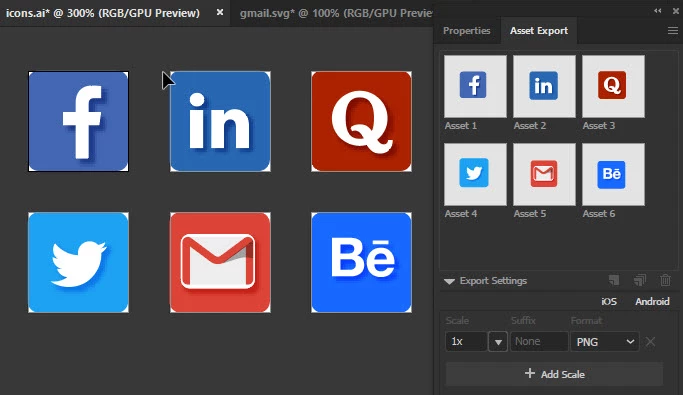
I have several 48px x 48px simple icons set up in 6 different artboards. I select each icon and collect for export. The size of the resulting PNG should be 48px x 48px but it's not. 


All of the icons have a square shape with rounded corners (48px square with 5px radius corners). However, the exports are somewhere between 101-104 px x 101 -104 px and never square. I have fit all the artwork to be pixel perfect and it still messes up.


I do have a layer that applies an SVG blur to the center icon as a secondary fill, but it is well within the bounds of the icon background. 

Below is a screenshot of my individual artboards for each icon, and my asset panel. 


I'll try a couple of different ways, but this just seems really odd.
 

7 replies

Ton Frederiks
Community Expert
Community Expert
November 3, 2019

I saw here:        Nov 02, 2019      that you already tried the Document Raster Effects setting.

That it did not work for you can be caused by your copying into a new file, which has the default 36 px settings again.


Ton Frederiks
Community Expert
Community Expert
November 2, 2019

If you go to Effect > Document Raster Effects Settings and set the Add 36pt Around Object to zero, it works fine.

Export for Screens and using Artboards works fine also.

Ton Frederiks
Community Expert
Community Expert
November 2, 2019

Can you share an Illustrator file with one of these artboards that gives the problem?

Jason Burnett
Inspiring
November 2, 2019

icons.ai 


Hopefully, the link above will work for you, let me know if it doesn't. Thanks for your time and consideration.

Ton Frederiks
Community Expert
Community Expert
November 2, 2019

Thanks for sharing, but unfortunately the link does not work.

Could you try CC file sharing, Dropbox, WeTransfer or something like that?

Jason Burnett
Inspiring
November 2, 2019

I thought I had it figured out. checked the "Document Raster Effects" setting and there was a setting to add 36px around artwork. YEAH! So I changed that to 0 and attempted to recreate my document by cutting and pasting the source artwork from one to the other. NOPE. When I select one icon and attempt to make it a symbol, same thing happens.

Participant
October 30, 2019

Hello, I think that the problem is the export format. When you use Illustrator for after use in the Internet sofware (Adobe muse, Dreamweawer etc... is better to use export with SVG format (SAVE AS------SVG format), this format is perfect for keep the vectorial information and you can scale the size whithout losing resolution. Try it please you will discover a amazing propiety.

Best regards

Jason Burnett
Inspiring
November 2, 2019

Although I do like the use of SVG, it is problematic in a number of specific situations. I was hoping to use this as part of an email signature and I have read several reports that SVG in various email clients render as text--ugly text. I will try it again and do some tests, but I am fairly certain that this is not the problem. Besides, if the requirement was PNG for whatever reason, it should work and changing formats doesn't solve the problem.

Ton Frederiks
Community Expert
Community Expert
October 30, 2019

What happens if you choose File > Export > Export for Screens and use the Artboards option?

Jason Burnett
Inspiring
November 2, 2019

Same thing happens with export. Somehow, though the artboards are 48x48px and spaced 2px apart, they still export as some random width and height>100px.

Monika Gause
Community Expert
Community Expert
October 30, 2019

How does the bounding box look, wehn you select those objects? Does it reflect that export result?

Jason Burnett
Inspiring
October 30, 2019

Unfortunately, the bounding box does not reflect the larger space. To be certain there wasn't something else going on I tried creating a symbol from the same selection and there was no space around the art in the symbol bounds.   Thanks for replying. 

Jason Burnett
Inspiring
November 2, 2019

Actually, I wanted to take that back. All kinds of crazy happens with the symbols. But it is indicative of the same mess. Here is a screen shot of the symbols, layers, and the artboards. Notice the white space on the symbols and layers? No explanation. Opening the layers shows two items, neither of which justify the size of the symbol. Looking at the properties of the symbols shows them random widths and heights, but opening the symbols shows that there are only 2 layers. Neither layer is more than 48px wide by 48px tall. Select all, deselect the two elements, nothing is selected. Very Odd.