
Participant
May 6, 2019
Answered

InDesign 2019 doesn't recognize installed fonts on Windows

  • May 6, 2019
  • 4 replies
  • 7980 views

Hello, I've been having issues since I reinstalled Adobe Indesign 2019 on the same machine it was working on just previously.

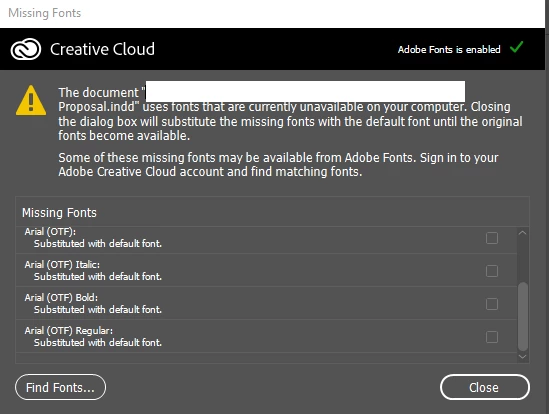
My old template files are now giving me Missing Fonts (Aria (OTF)) when it wasn't before.
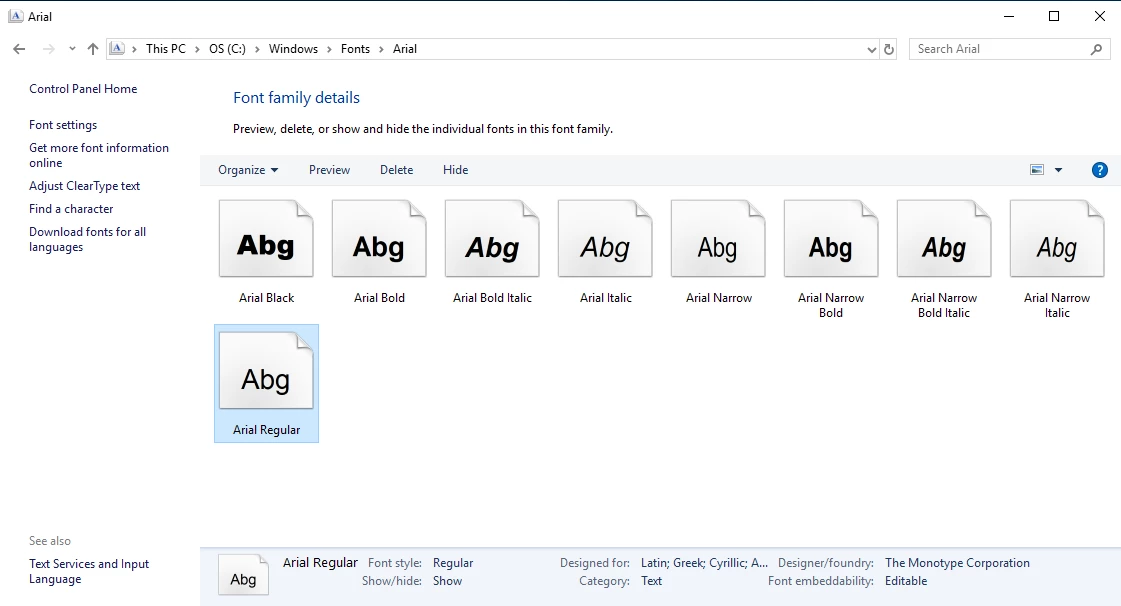
Checking my fonts, it clearly shows that that font is available.
Thoughts or any possible fixes? Thanks in advanced.

{Renamed by MOD}

    This topic has been closed for replies.
    Correct answer Srishti Bali

    Hi Oliver,

    Thanks for reaching out. I see that fonts are there in Windows fonts folders, however, InDesign is still not recognizing them. It might be possible that names of the fonts are the same but the versions are different. As suggested above, it might be possible that the font installed on your system is TTF and fonts used on file are OTF.

    • Have you created this file on the same system or it was created on some other system?
    • Has the file location changed?

    A similar issue has been discussed here: InDesign 2019 doesn't recognize installed fonts after upgrading to Windows 10. Please try the steps shared on this thread and let us know if that works or if you need any further assistance.

    Regards,

    Srishti

    4 replies

    Participant
    April 13, 2020

    The link does not lead to a discussion thread.


    October 21, 2019

    3 of our Graphic Designers are having this exact issue at my workplace.

    The computers in question were brand new computers almost a year ago and we installed Windows 10 Enterprise 1709 on these computers, at this stage we haven't updated these computers to a later version of Windows so the other forum of Windows 10 not recognising the fonts after updating to a later version of Windows 10 is not relevant here.


    The issue is with the Arial font just as the original poster has raised in this forum. 

    I have checked the computer to confirm the fonts exist and the fonts all look to be the same on all our marketing computers and other Windows 10 computers we have in the business. I can see the file name for Arial is called "arial.ttf" in the C:\Windows\Fonts folder.

    The name of the font however suggests an OpenType font. 

    I have looked in C:\Program Files\Adobe\Adobe InDesign CC 2019\Fonts and there are no fonts in this location, copying the Arial fonts on the computer to this location does not fix the issue.

    I have tried checking on the old Windows 7 computers the marketing team used to see if there were any fonts on those computers but found nothing.

    I did ask the staff member if these documents affected were taken home and one staff member mentioned loading the fonts on her Mac computer. Opening the file on a Mac would answer why Arial might be seen differently but I need confirmation the Arial file on a PC is different to a Mac. I tried opening a Word Document on a Mac and using the Arial font and then moving the document to a Windows PC to see if there were any font issues and no issues with Word between PC and Mac but don't have access to Adobe Creative Cloud for the Mac to test.


    Any other suggestions to test or an actual fix?


    Srishti Bali
    Community Manager
    Srishti BaliCommunity ManagerCorrect answer
    Community Manager
    May 16, 2019

    Hi Oliver,

    Thanks for reaching out. I see that fonts are there in Windows fonts folders, however, InDesign is still not recognizing them. It might be possible that names of the fonts are the same but the versions are different. As suggested above, it might be possible that the font installed on your system is TTF and fonts used on file are OTF.

    • Have you created this file on the same system or it was created on some other system?
    • Has the file location changed?

    A similar issue has been discussed here: InDesign 2019 doesn't recognize installed fonts after upgrading to Windows 10. Please try the steps shared on this thread and let us know if that works or if you need any further assistance.

    Regards,

    Srishti

    Jongware
    Community Expert
    Community Expert
    May 6, 2019

    Not a direct solution (because it should not happen right after an InDesign update), but presumably that Arial is a TTF, not an OpenType OTF. (To confuse things more: either can be the other one as well.)

    Type some text in your "current" Arial and see what path InDesign found it on with Find Font. Is it this one? If you temporarily remove it, can InDesign still find another? Perhaps you have multiple versions installed & active.