
Inspiring
February 7, 2017
Question

Why so greeking?

  • February 7, 2017
  • 6 replies
  • 2677 views

So i checked the preferences and I can't find a threshold text size on screen to set greeking below (a Quark flashback maybe). The only thinkg relating to Greeking is the Hand Tool preference.

Strangely the same text resized for a banner (860 x 2000 mm) file is greeking at a much larger on-screen font size than it is in the file I pulled it from. But this seems to be arbitrary, not thresholds to set in prefs.

<——— original file A4 (210x297mm) page, quite small on screen.
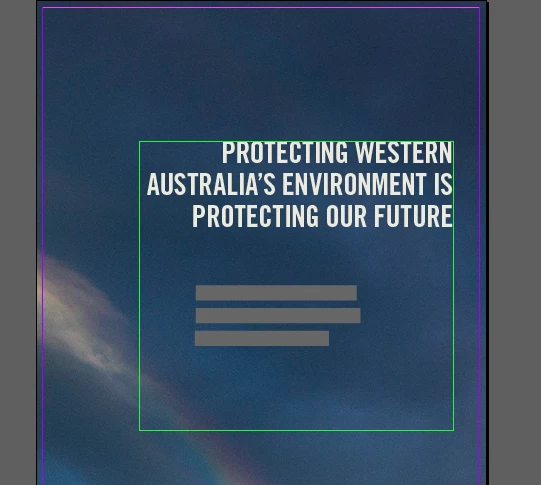
<——— same image and text rescaled to go from A4 to 860x2000 mm banner. Significant thing is it is much larger on the screen (as you can see from screenshots) yet is greeking the bottom text. The top text on banner file also greeks if I zoom out a small amount.

I'd actually like to compose this onscreen with out going into AI, exporting to PDF or printing the thing every time I change something!

This topic has been closed for replies.

6 replies

jane-e
Community Expert
Community Expert
February 10, 2017

wideEyedPupil wrote:

So i checked the preferences and I can't find a threshold text size on screen to set greeking below (a Quark flashback maybe). The only think relating to Greeking is the Hand Tool preference.

Speaking of QuarkXPress — many years ago I asked a Quark engineer if the Preference for greeking could be set to 0, and he said, yes, I think we can do that. And in the next version, greeking was set to zero by default. I haven't thought to ask the InDesign team until this second.

(I'm pretty sure greeking is lower case, for those who care about these things.)

Inspiring
February 18, 2017

yeah i'm putting the capitalisation down to autocorrect (Lol) greeking.

Jeff Witchel, ACI
Community Expert
Community Expert
February 7, 2017

If you follow Bob's advice above and set your Display Performance Preference to 0 for "Greek Type Below," the type will render no matter how far you Zoom out. At some point you will not be able to read the type, but it won't be Greek.

Inspiring
February 7, 2017

Yes it was set to 7pt and greeking text that was much larger than that at the onscreen resolution. I tried it down to 3pt and still greeking at >10pt, but at least i can see all the type at size to fit now. Thanks.

For anybody who came here later the documentation is here: View the workspace in InDesign

BobLevine
Community Expert
Community Expert
February 7, 2017

First thing I do is set that zero. That 7pt is left over from 1999.

Frans v.d. Geest
Community Expert
Community Expert
February 7, 2017

Setting it to zero, but you need to do this for Normal and again for High quality display, so twice ;-)

rob day
Community Expert
Community Expert
February 7, 2017

Look at Preferences Display Performance>Greek Text Below. The greeking isn't applied literally at the threshold—the zoom level is considered. And you can set different greeking thresholds for the different view settings.

Zaid Al Hilali
Community Expert
Community Expert
February 7, 2017

Did you change Greek setting in Preferences? Do you want to give it a try.

Inspiring
February 7, 2017

Somebody who has permission to create new tags please make a tag in InDesign forum for Greeking and apply it :-)