Sam A.
Inspiring
March 4, 2019
Answered

missing hyphen in end-of line word division (hyphenation) with parts of words in parentheses

  • March 4, 2019
  • 3 replies
  • 1592 views

Some words in my files have prefixes attached in parentheses, e.g. "(an)treffen" or "(zer)streuen". Now when these happen to appear near the end of a line, InDesign chooses to break them as follows:

xxx (an)

treffen

xxx (zer)

streuen

whereas, of course, these should be

xxx (an-)

treffen

xxx (zer-)

streuen

How make InDesign insert a hyphen in such circumstances?

I tried inserting U+00AD discretionary hyphen before the closing parenthesis, but it will remain invisible even though InDesign breaks the word at this point.

This topic has been closed for replies.
Correct answer Jongware

It sure feels like InDesign ought to be able to do this on its own, so someone may still come up with a pure InDesign-based solution. I can't think of any -- all "reasonable" attempts with any combination of visible and/or invisible characters don't work.

But here is a solution using … a custom font! (I used my own IndyFont​ , which automatically takes care of the required OpenType programming, but of course you can use other font editor you want. All I'm saying it took 5 minutes, no more, to pull this off with IF </plug>.)

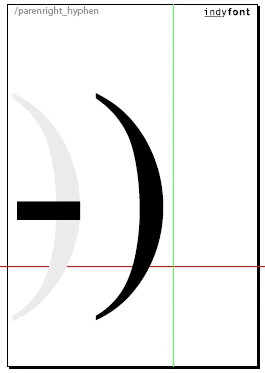
For this, all you need is a font that has 3 characters: a regular closing parenthesis, a regular hyphen (because that is the character that InDesign inserts when it needs to display a soft hyphen), and a ligature consisting of a closing parenthesis followed by a hyphen. Make sure it does not look like that -- it actually looks like this!
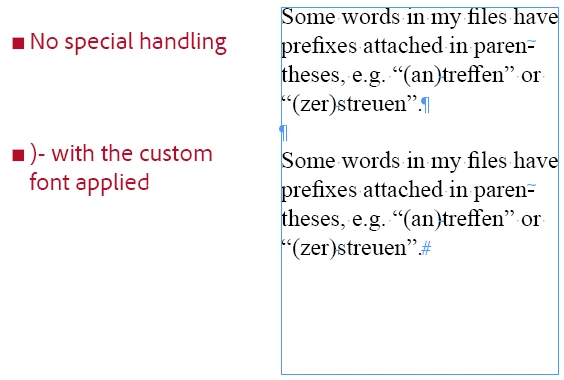
Then, use Find/Change to add a soft hyphen after all closing parentheses, and at the same time set the font for just these two characters to your custom font. This is what it looks like when not hyphenated, when the closing parenthesis is shown "as usual":
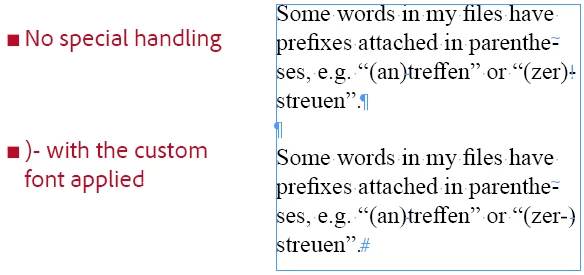
but this is what happens when InDesign breaks on the discretionary hyphen, and so displays the combination ")-" using the custom font!
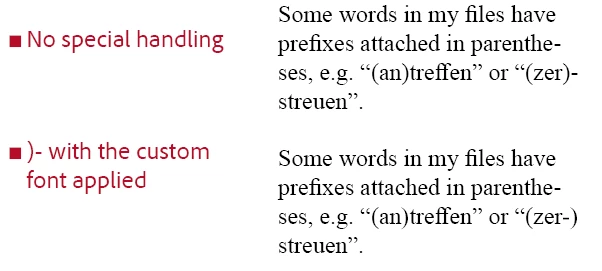
… for clarity, without the frames and invisibles it looks like this:

3 replies

Jongware
Community Expert
JongwareCommunity ExpertCorrect answer
Community Expert
March 7, 2019

It sure feels like InDesign ought to be able to do this on its own, so someone may still come up with a pure InDesign-based solution. I can't think of any -- all "reasonable" attempts with any combination of visible and/or invisible characters don't work.

But here is a solution using … a custom font! (I used my own IndyFont​ , which automatically takes care of the required OpenType programming, but of course you can use other font editor you want. All I'm saying it took 5 minutes, no more, to pull this off with IF </plug>.)

For this, all you need is a font that has 3 characters: a regular closing parenthesis, a regular hyphen (because that is the character that InDesign inserts when it needs to display a soft hyphen), and a ligature consisting of a closing parenthesis followed by a hyphen. Make sure it does not look like that -- it actually looks like this!

Then, use Find/Change to add a soft hyphen after all closing parentheses, and at the same time set the font for just these two characters to your custom font. This is what it looks like when not hyphenated, when the closing parenthesis is shown "as usual":

but this is what happens when InDesign breaks on the discretionary hyphen, and so displays the combination ")-" using the custom font!

… for clarity, without the frames and invisibles it looks like this:

Srishti Bali
Community Manager
Community Manager
March 5, 2019

Hi there,

Please take a look at this help article: Compose and hyphenate text in Adobe InDesign.

Feel free to let us know if you still need assistance.

Regards,

Srishti

Sam A.
Sam A.Author
Inspiring
March 6, 2019

Thanks Srishti. I have studied the help article you linked to but did not find the solution to my problem.

Obviously I could simply insert a regular hard hyphen before the closing parenthesis but for various reasons this is a no-go.

I could also insert U+00AD discretionary hyphen in front of these forms to prevent them from being broken at the end of a line. But since the body copy is set in narrow columns (with lots of words in another alphabet that cannot be broken) I'd prefer to allow the Paragraph Composer to hyphenate as many German words as possible.

Community Expert
March 7, 2019

samar1234  wrote

… whereas, of course, these should be

xxx (an-)

treffen

xxx (zer-)

streuen

The way you like the hyphen automatically work is not possible. The closing paranthesis would go to the next line.

All you can do is manually add a "hyphen" character Unicode 002D.

Why not doing a hyphen in both cases?

A. xxx (an-)treffen

B. xxx (an-)
treffen

Regards,
Uwe

Mike Witherell
Community Expert
Community Expert
March 4, 2019

Did you try adding them to your user dictionary?

Mike Witherell
Sam A.
Sam A.Author
Inspiring
March 6, 2019

Thanks Mike. Yes, I've tried adding "(an~)treffen" and "(zer~)streuen" to my user dictionary but got this message:

Words containing punctuation other than ending periods may not be added to the dictionary

Even if adding these forms to the user dictionary would have been possible, the closing parenthesis would then probably have been moved to the new line when hyphenating, which would not have been the desired result.