


Participant
January 6, 2017
解決済み

Blurry photos since importing DNG files

  • January 6, 2017
  • 返信数 1.
  • 1674 ビュー

Hi,

I've been using Lightroom for quite a while.  I recently started importing my photos as DNG files instead of RAW.   Since then, I have noticed that all of my exported photos for web and Flickr seem ever so slightly blurred.  

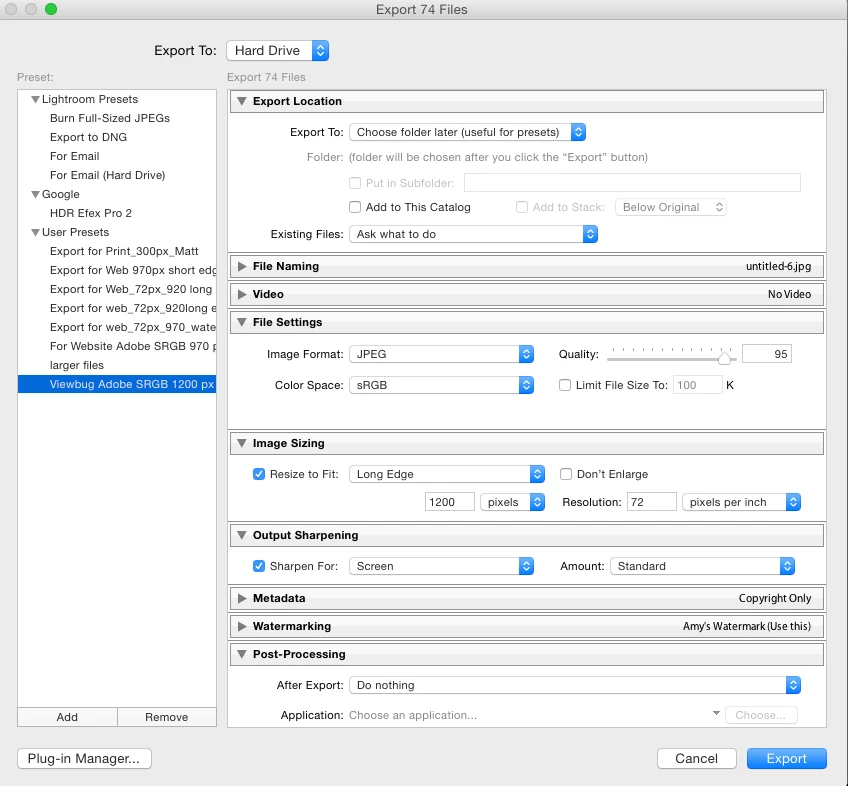
I use Lightroom 5.  and below is an image of my export settings.   The only thing that has change for me is the use of DNG files.  Can you help, or should I just revert to using RAW again?
このトピックへの返信は締め切られました。
解決に役立った回答 dj_paige

Wel, it may be that wordpress causes some loss of sharpness, I don't know. But if we're going to help you, we need to see the "blurry" image zoomed to 1:1, and the "un-blurry" image in Lightroom, also zoomed 1:1, so we can compare. Please provide these screen captures.

返信数 1

Legend
January 6, 2017

Show us a screen capture of the exported photo, zoomed 1:1 so e can see the problem. Show us another screen capture of how the photo appears in Lightroom, also zoomed 1:1.

POB63作成者
Participant
January 6, 2017

Hi DJ_Paige, thanks for the quick response.

Ok so, this is weird, I must be losing my sight or something because it looks fine here.  But on my website, it seems soft around the edges.  Does Wordpress compress images on upload do you know?   This is the exported JPG.   Sorry if I'm wasting your time.

dj_paige解決!
Legend
January 6, 2017

Wel, it may be that wordpress causes some loss of sharpness, I don't know. But if we're going to help you, we need to see the "blurry" image zoomed to 1:1, and the "un-blurry" image in Lightroom, also zoomed 1:1, so we can compare. Please provide these screen captures.
