marjolaineh10237138
Participant
November 27, 2017
Answered

Exportation de photos Lightroom vers Facebook

  • November 27, 2017
  • 1 reply
  • 1274 views

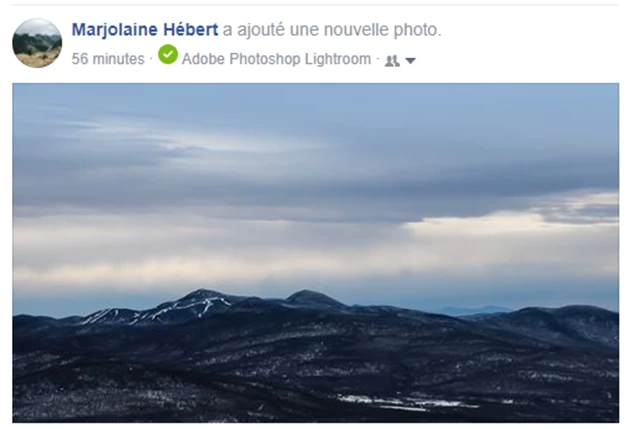
Lorsque j'exporte un photo via Lightroom vers Facebook, un lien "Adobe Photoshop Lightroom" s'affiche en dessous du titre de ma photo. Est-ce qu'il y a une façon d'enlever ce paramètre afin de ne pas voir qu'il s'agit d'une photo provenant de Lightroom ou si ce paramètre ne s'enlève pas?
This topic has been closed for replies.
Correct answer Per Berntsen

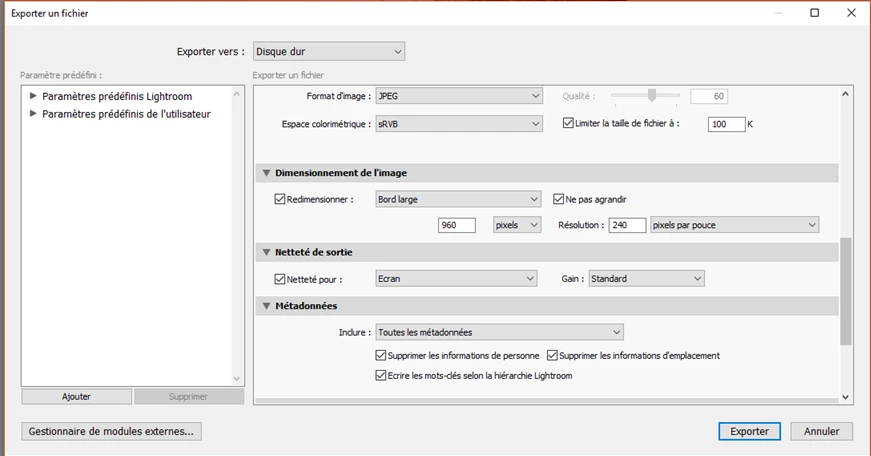
Mes paramètres d'exportation..


Uncheck "Limiter la taille de fichier a"

You have limited the file size to 100 kb, which might affect file quality.

1 reply

Per Berntsen
Community Expert
Community Expert
November 27, 2017

When I export a photo via Lightroom to Facebook, "Adobe Photoshop Lightroom" link appears below the title of my photo. Is there a way to remove this setting to not see that it is a photo from Lightroom or if this parameter won't come off?

I am not on Facebook, so this is only guessing ...

But maybe the Export to Facebook plugin writes a tag to the image which identifies it as coming from Lightroom, and Facebook reads this tag, Try to do a regular export to your hard drive instead, and then post the image om Facebook.

marjolaineh10237138
Participant
November 27, 2017

J'ai essayé et effectivement je n'ai plus ce problème. Par contre, vu l'exportation sur mon disque dur et par la suite sur Facebook, la qualité de mon image n'est totalement plus la même que si je télécharge directement par Lightroom! On dirait que ça fait une double compression. Misère!!! Facebook est renommé pour dégrader la qualité des photos, j'ai tout essayé j'y arrive pas!

dj_paige
Legend
November 27, 2017

I don't have quality problems exporting from Lightroom and then uploading to Facebook.

Show us screen captures of the photo in Lightroom and then the degraded photo in Facebook. Show us a screen capture of your Export dialog box.